ToolsExplainer
Claude skills marketplace: when to use public ones and when to run your own
A Claude skills marketplace is the catalogue your agents install skills from. How public ones work, and how to run a private one with versions, review and one-step rollback.
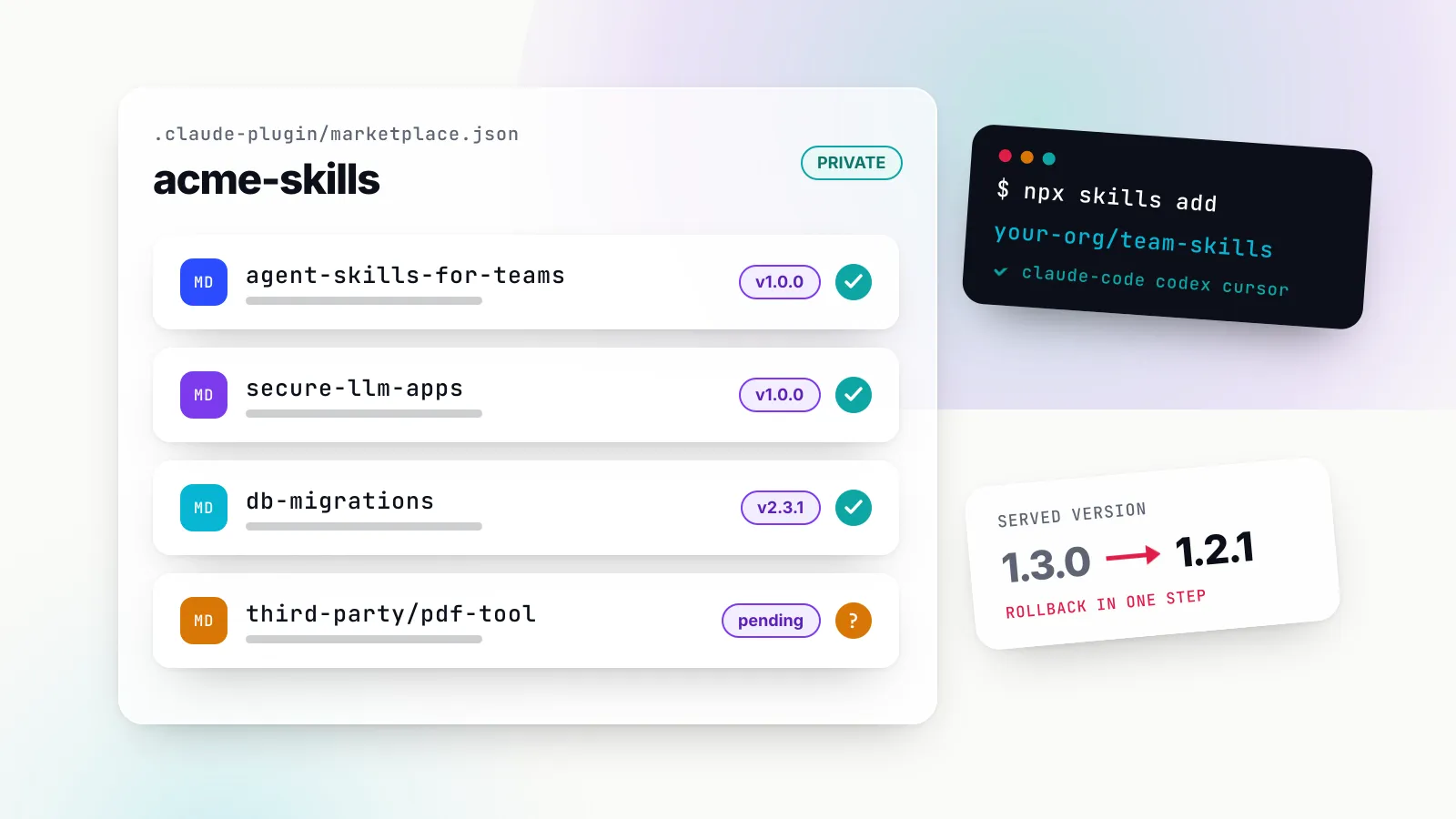
A Claude skills marketplace is the catalogue your coding agent installs skills from. Public ones are easy to find: Anthropic publishes the anthropics/skills repository as a Claude Code plugin marketplace, Anthropic’s official plugin marketplace is registered automatically, and skills.sh indexes skills published in public GitHub repositories. What is less obvious is when a team should stop installing from public catalogues and run its own, and what “its own” involves once you need versions, review and a way to undo a bad change.
This explainer covers both halves. It shows how Claude Code plugin marketplaces actually work (the marketplace.json file, the add and install commands, update behaviour), how the same skills reach Codex, Cursor and other agents through npx skills add, and how to version, review and roll back a SKILL.md the way you would any other dependency. It is for platform and developer-experience engineers who already have a few skills in circulation and have started to notice copies drifting apart.
The practical shortcut we recommend is the open-source agent-skills-for-teams skill from the build-with-ai-hq organisation (skills.sh listing). It teaches your agent the practices below and ships a linter for skill repositories. Install it into the project you use to manage skills:
npx skills add build-with-ai-hq/agent-skills-for-teamsOr target specific agents non-interactively, which is what we tested:
npx skills add build-with-ai-hq/agent-skills-for-teams -a claude-code codex cursor -yIf you are new to the format itself, start with our Claude Skills explainer, which covers progressive disclosure, where skills run and how they differ from MCP servers. This piece assumes you know what a skill is and focuses on distributing them.
What a Claude skills marketplace actually is
“Marketplace” gets used for three different things, and mixing them up is the source of most confusion.
A Claude Code plugin marketplace is a technical object. Anthropic’s documentation defines it as “a directory or repository with a .claude-plugin/marketplace.json file that lists your plugins and where to fetch each one”. A plugin is a folder that can hold skills, slash commands, subagents, hooks and MCP server definitions. Skills reach Claude Code through a marketplace by being bundled into a plugin, and they then appear namespaced as /plugin-name:skill-name.
A skills directory such as skills.sh is a discovery site. It indexes skills that live in public GitHub repositories, shows a leaderboard and links each one to an npx skills add owner/repo command. Nothing is hosted there; the skill’s source of truth is still the publisher’s repository.
A registry is a server that stores skills itself, assigns versions and serves them to agents, often by exposing a marketplace endpoint. It is the heaviest option and the one teams reach for when non-engineers author skills or when rollback has to be a single action.
| Catalogue | What it is | How you install | Who controls updates |
|---|---|---|---|
claude-plugins-official | Anthropic’s official Claude Code plugin marketplace | /plugin install name@claude-plugins-official | Anthropic; auto-update on by default |
anthropics/skills | Anthropic’s example and document skills, packaged as a marketplace | /plugin marketplace add anthropics/skills | Anthropic; you choose when to update |
| skills.sh | Directory of public skill repositories | npx skills add owner/repo | Each publisher |
| Your private marketplace | A git repo with marketplace.json | /plugin marketplace add your-org/repo | You, through versions or refs |
| Your registry | A server that stores and serves versions | Marketplace URL the registry exposes | You, by choosing the served version |
Two details in Anthropic’s own repository are worth reading before you install anything from it. The README says the document skills (docx, pdf, pptx, xlsx) are source-available rather than open source, and it states that the skills are “provided for demonstration and educational purposes only” and should be tested in your own environment before you rely on them. Public catalogues are a starting point, not a supply chain.
How Claude Code plugin marketplaces work
The mechanics are short enough to hold in your head, and knowing them makes every later decision easier.
The marketplace.json file
The file lives at .claude-plugin/marketplace.json at the marketplace root. Anthropic’s walkthrough says it “requires a name, an owner, and a plugins array”, and each plugin entry needs a name and a source. A minimal team marketplace looks like this:
{
  "name": "acme-skills",
  "description": "Reviewed Agent Skills for Acme engineering",
  "owner": { "name": "Acme Platform Team" },
  "plugins": [
    {
      "name": "platform-skills",
      "source": "./plugins/platform-skills",
      "description": "Skill authoring and LLM app security skills"
    }
  ]
}
The plugin folder then holds its own .claude-plugin/plugin.json and a skills/ directory with one subfolder per skill. Relative sources resolve from the marketplace root, not from .claude-plugin/, and a path containing .. fails validation.
A source does not have to be a relative path. The marketplace reference lists github, url, git-subdir, npm, archive and command sources. The git-based ones accept a ref (branch or tag) and a sha (a full 40-character commit), and when both are set Claude Code checks out the sha. That pair is the main lever for versioning and rollback, which we come back to below.
Adding and installing
A user registers a marketplace once and then installs plugins by plugin@marketplace id:
# inside a Claude Code session
/plugin marketplace add your-org/acme-skills
/plugin install platform-skills@acme-skills

# or from the shell, e.g. in a setup script
claude plugin marketplace add your-org/acme-skills
claude plugin install platform-skills@acme-skills --scope project
The add command also takes a full git URL for GitLab, Bitbucket or GitHub Enterprise Server, a local path, or a hosted marketplace.json URL, and you can append #<ref> to pin a branch or tag. Install scope decides which settings file records the plugin: user (~/.claude/settings.json), project (.claude/settings.json, committed) or local (.claude/settings.local.json).
Names that are reserved
Claude Code refuses marketplace names that imitate Anthropic’s. The reserved list includes claude-plugins-official, anthropic-agent-skills, agent-skills and others, and they are only accepted when the source is a repository under github.com/anthropics/. Names that merely look official, such as official-claude-plugins, are rejected too. For a team, the practical rule is to name the marketplace after your organisation.
Updates are off until someone turns them on
This is the behaviour that surprises teams most. Anthropic’s install guide says background auto-update is on by default for the official marketplaces and “off by default” for “every other marketplace, including the community marketplace, third-party marketplaces, and local development marketplaces”. A user turns it on in /plugin under Marketplaces, or an admin sets "autoUpdate": true in managed settings.
Even with auto-update on, a user only gets a new copy when the plugin’s computed version changes. The hosting guide is blunt about the trap: “If you set \"version\": \"1.0.0\" and push new commits without changing it, users don’t receive them.” You either bump version on every release or omit it everywhere so users track commits. Setting it in both plugin.json and the marketplace entry is a mistake; the plugin.json value silently wins.
Agent skills marketplace or your own registry: how to choose
A public agent skills marketplace solves discovery. It does not solve the problems that appear once ten engineers rely on the same skill: which copy is current, who approved the last change, and how to get everyone back to yesterday’s behaviour when an edit makes agents worse. The agent-skills-for-teams skill frames this as four distribution models, each with its own versioning and rollback story.
| Model | Best for | How versions work | Rollback |
|---|---|---|---|
In-repo .claude/skills/ or .agents/skills/ | Knowledge tied to one codebase | Git history of that repo | git revert with the code |
Shared skills repo + npx skills add | Cross-repo skills, several agents | Tags or commits; skills-lock.json records them | Reinstall from the previous commit, or revert and release a patch |
| Private plugin marketplace | Org-wide rollout to Claude Code (and Codex) with install UX | Plugin version, or ref and sha per entry | Point the entry back, bump the version |
| Central registry | Non-git authors, immutable versions, one-click rollback | Registry-assigned SemVer | Shift the served version |
The models stack rather than compete. A common pattern is to author in a shared git repository with CODEOWNERS and CI, publish that repository as a Claude Code marketplace, and let engineers on other agents install the same folders with npx skills add. Repo-specific knowledge, such as a migration tool’s quirks, stays in that repo’s .claude/skills/ and rolls back with the code it describes.
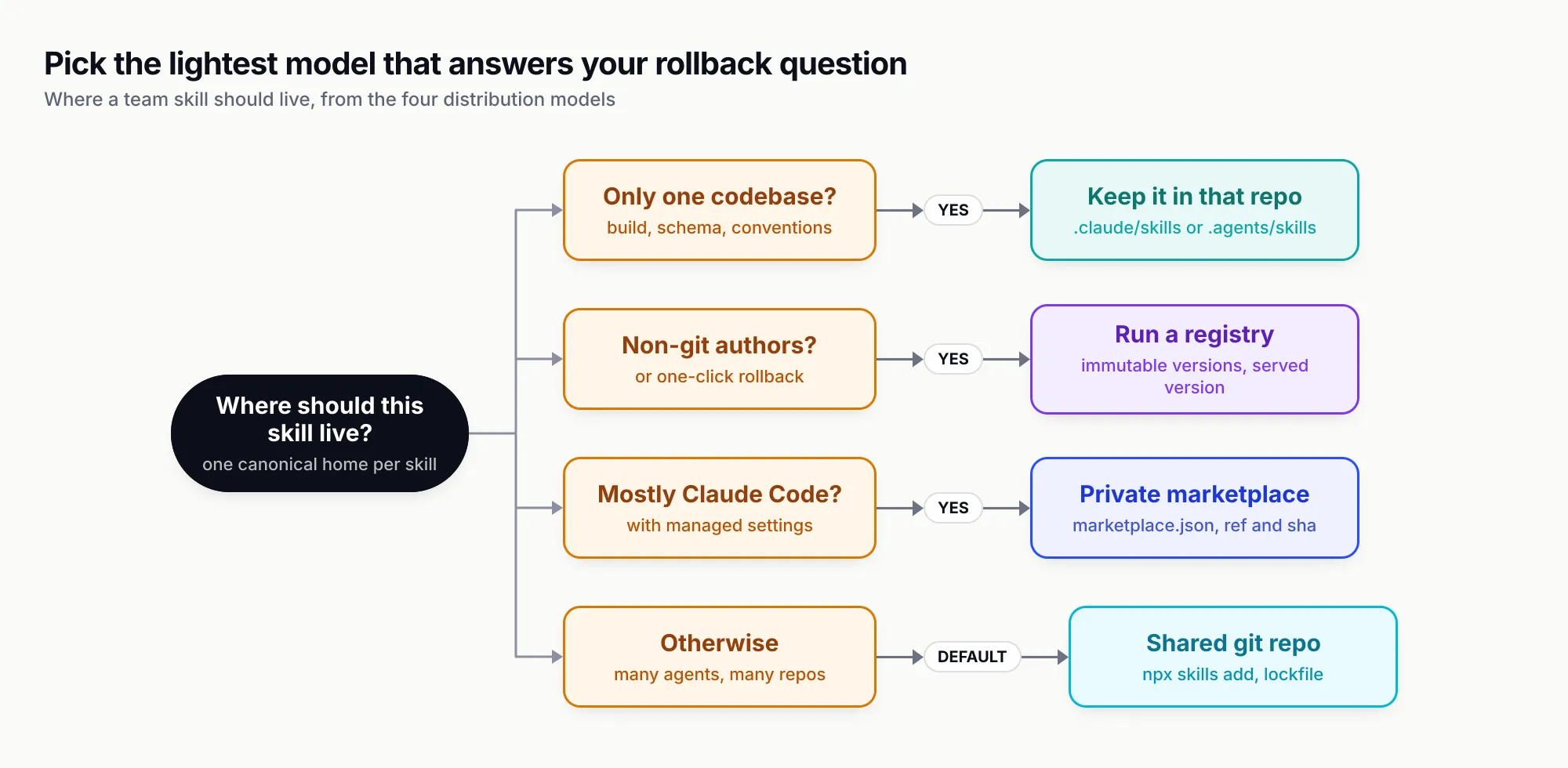
Figure 1: Pick the lightest model that answers your rollback question. Most teams end up with in-repo skills plus one shared source.
The question that decides it is not “public or private” but “what is the rollback?” If the honest answer is “ask everyone to reinstall”, you have not picked a model yet.
Building a private Claude skills marketplace step by step
Here is the shortest path from a folder of skills to something every engineer on Claude Code can install, using only Anthropic’s documented features.
1. Lay out one repository
acme-skills/
  .claude-plugin/marketplace.json
  plugins/
    platform-skills/
      .claude-plugin/plugin.json
      skills/
        agent-skills-for-teams/SKILL.md
        secure-llm-apps/SKILL.md
  .github/CODEOWNERS
  .github/workflows/skills-ci.yml
Group skills into a small number of plugins by audience. Every installed skill puts its name and description into every session, and Claude Code’s skills documentation warns that “every skill in the skill listing adds to your context on every turn, whether or not Claude ever uses it”. A plugin per team or domain lets people install only what they use.
2. Validate locally before anyone else sees it
claude plugin validate ./acme-skills
claude plugin validate ./acme-skills/plugins/platform-skills
Validation checks JSON syntax, required fields, naming rules and relative paths, and warns about unknown keys. It does not fetch remote sources, so a wrong repo in a github entry only shows up at install time. Install from the local path once (claude plugin marketplace add ./acme-skills) before you push.
3. Host it privately and get credentials right
Push the directory to a private repository. Claude Code has no token of its own: the docs on private marketplaces explain that it runs git “with interactive prompts turned off and relies on whatever credentials that machine already holds”. For HTTPS that means a credential helper that already stores a token (on GitHub, gh auth login then gh auth setup-git); for SSH it means a key loaded in ssh-agent. A GITHUB_TOKEN environment variable on its own does not authenticate background updates.
4. Register it for the people who need it
For one repository, run claude plugin marketplace add your-org/acme-skills --scope project once and commit the .claude/settings.json it writes; Claude Code then registers the marketplace for each teammate who trusts the folder. For a whole organisation, an admin sets two keys in managed settings, as the organisation guide shows:
{
  "extraKnownMarketplaces": {
    "acme-skills": {
      "source": { "source": "github", "repo": "your-org/acme-skills" },
      "autoUpdate": true
    }
  },
  "enabledPlugins": {
    "platform-skills@acme-skills": true
  }
}
5. Decide whether public marketplaces stay allowed
The same guide documents an allowlist, strictKnownMarketplaces, and a blocklist, blockedMarketplaces. The common lockdown allows the official marketplace and your own, adds { "source": "skills-dir" } so plugins kept in local skills folders keep loading, and sets disableSideloadFlags so nobody loads a plugin from an arbitrary directory with --plugin-dir. One limit to know: the allowlist matches marketplace sources and does not apply to plain SKILL.md folders without a plugin manifest. Controlling those needs strictPluginOnlyCustomization.
For CI runners and containers that cannot clone at start-up, Claude Code supports a pre-built seed directory via CLAUDE_CODE_PLUGIN_SEED_DIR, which is read-only and never auto-updates.
Distributing the same skills to Codex, Cursor and others
A Claude Code marketplace reaches Claude Code users. Most teams also have engineers on Codex, Cursor, Gemini CLI or GitHub Copilot, and each agent reads skills from a different directory:
| Agent | Project skills | User skills | Source |
|---|---|---|---|
| Claude Code | .claude/skills/ | ~/.claude/skills/ | Anthropic docs |
| Codex | .agents/skills/ (cwd up to repo root) | ~/.agents/skills/ | OpenAI docs |
| Cursor | .agents/skills/, .cursor/skills/, also .claude/skills/ | ~/.cursor/skills/, ~/.agents/skills/ | Cursor docs |
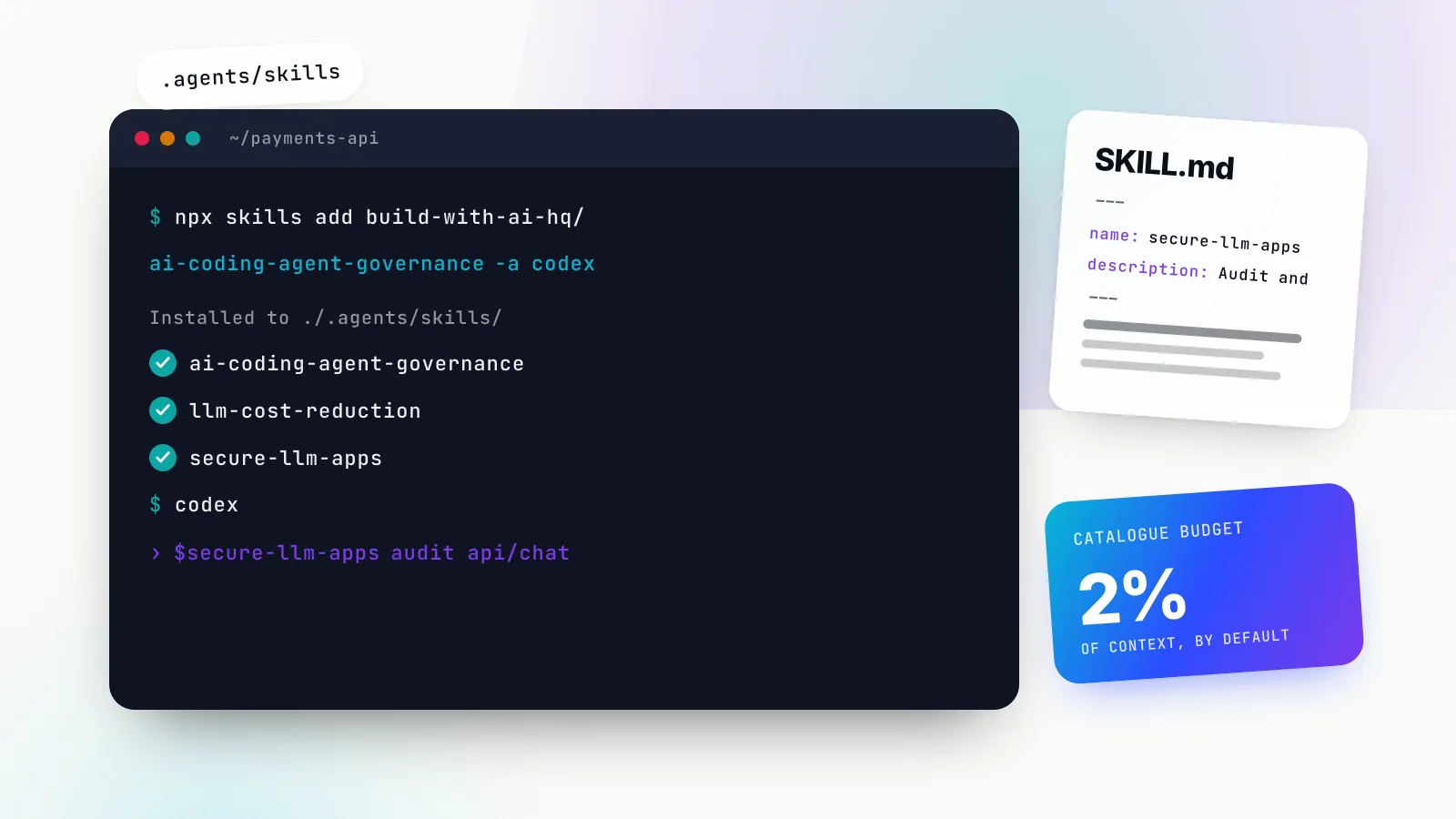
The skills CLI from Vercel (vercel-labs/skills) papers over this. npx skills add clones a repository, finds every SKILL.md in it (in our test, that included skills nested inside a Claude Code marketplace’s plugin folders), and writes one canonical copy into .agents/skills/ with symlinks into agent-specific folders. In our test, installing for claude-code codex cursor produced a real folder at .agents/skills/agent-skills-for-teams and a symlink at .claude/skills/agent-skills-for-teams pointing to it.
The commands a team needs, all verified against the CLI’s own help output for version 1.7.4:
npx skills add your-org/team-skills -l                         # list skills without installing
npx skills add your-org/team-skills -s db-migrations -a claude-code codex cursor -y
npx skills add your-org/team-skills -g -a claude-code -y       # user-wide instead of project
npx skills add your-org/team-skills --copy -y                  # real copies, no symlinks
npx skills list                                                # what is installed, and for which agents
npx skills update                                              # upgrade deliberately
npx skills remove db-migrations
Private repositories work with whatever git, gh or SSH access the machine already has. The CLI writes a skills-lock.json recording each skill’s source, path and a content hash, and when you install from a GitHub tree URL that names a commit, the lockfile also records that commit as ref. That is the cheapest pin available: commit the lockfile and npx skills experimental_install can restore it, though that command is marked experimental in the README.
Two caveats. First, the CLI “collects anonymous usage data”, according to its README; set DISABLE_TELEMETRY=1 or DO_NOT_TRACK=1 to switch that and the security-audit requests off. Second, Cursor and Codex both have their own plugin systems for wider distribution. Cursor’s docs say skills from GitHub are imported through a plugin whose repository has a .cursor-plugin/marketplace.json, and OpenAI says Codex plugins can be shared by “publishing them through a marketplace source”. Harness-specific frontmatter such as Claude Code’s context: fork does not travel, so keep shared skills to the fields in the open spec.
Versioning skills: SemVer and changelogs for SKILL.md
Changing one line of a SKILL.md changes what every agent on the team does in its next session, with no build and no visible diff in the code they are working on. Without versions, “the agent behaves differently this week” cannot be debugged. The fix is to treat the agent as the consumer of an API and apply Semantic Versioning to skills.
The open specification has no version field, but it allows a metadata map of strings, so the convention is a quoted version there:
---
name: db-migrations
description: Write, review and safely apply Postgres schema migrations ...
license: MIT
metadata:
  version: "2.3.1"
---
What counts as a breaking change for a skill is not obvious, so write the rules down. The table below follows the one in agent-skills-for-teams’ references/versioning-and-review.md:
| Bump | Skill changes that qualify |
|---|---|
| Patch | Typo, clearer wording, fixed link; the agent does the same thing |
| Minor | New reference file, new supported case, new optional script, broader description |
| Major | Renamed skill, removed workflow, changed default tool or command, changed script arguments, narrower description |
The non-obvious line is the description. It is the only text the agent sees before deciding whether to load the skill, so editing it changes triggering. A broader description is at least a minor release; one that stops triggering where it used to is major.
Keep a CHANGELOG.md beside each SKILL.md, written in the Keep a Changelog style and aimed at the reviewer of an upgrade: what will the agent do differently? Release from tags, not from main. With several skills in one repository, per-skill tags such as db-migrations/v2.3.1 keep histories separate.
Then connect the skill version to the distribution model. In a Claude Code marketplace, either mirror the skill version into plugin.json or omit version and let commits drive updates. To hold users on one version, set ref and sha on the plugin entry. To run a pilot group, Anthropic’s suggestion is two marketplaces with different names pointing at different refs, as described under release channels; Claude Code itself has no channel concept.
Review and security scanning for third-party skills
A skill is instructions plus, often, scripts that the agent runs with the user’s permissions. Anthropic’s plugin security page opens with the sentence “A Claude Code plugin you install can execute arbitrary code on your machine with your user privileges”, and the trust warning every user sees says Anthropic “cannot verify that they will work as intended or that they won’t change”.
The threat is not hypothetical. OWASP’s Agentic Skills Top 10 rates malicious skills as critical and documents the ClawHavoc campaign, with “1,184 malicious skills across 12 publisher accounts” in January 2026, and cites a February 2026 Snyk finding that three lines of Markdown in a SKILL.md were enough to exfiltrate SSH keys. Its mitigations include signing, behavioural scanning at publish and install time, sandboxing and hash-pinning installed skills. The same concerns apply to the tools skills call, which our guide to MCP security and authentication covers.
A team review gate needs three layers.
Automated lint in CI. The scripts/lint_skills.py script bundled with agent-skills-for-teams uses only the Python standard library (PyYAML if present) and flags spec violations, weak descriptions, oversized bodies, broken relative links, missing metadata.version, copy drift and risky script patterns such as piping curl into a shell, sudo, broad rm -rf and reads of credential files. It exits 1 on any error, so it can gate a pull request.
Human review with CODEOWNERS. Route skills/**/scripts/ to security reviewers. The checklist from the skill is worth adopting nearly verbatim: no secrets or internal hostnames in any file, every network call a script makes documented in SKILL.md, remote resources pinned to versions or commits, destructive steps written as plan, validate, confirm, execute, and no instructions telling the agent to skip confirmations or widen permissions.
Third-party intake. Read every file before install, not just SKILL.md. Install from a pinned commit. Mirror the skill into your own source if the upstream could change or disappear, and re-review on every upgrade.
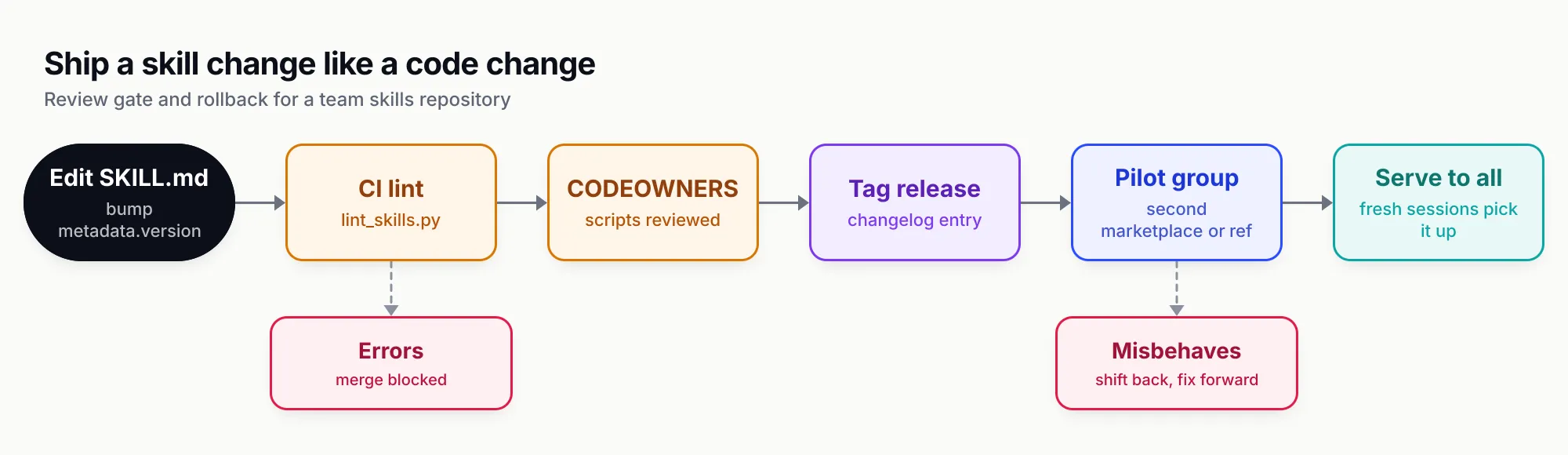
Figure 2: The same gate you use for code, applied to instructions. Rollback is a branch of the pipeline, not an afterthought.
How to create Claude skills that trigger: writing the SKILL.md description
Distribution is wasted on a skill that never loads. The specification caps the description at 1,024 characters and says it “should describe both what the skill does and when to use it”. Claude Code adds its own limit: the description and when_to_use text is “truncated at 1,536 characters” in the skill listing, so the key use case goes first.
The name rules are strict and easy to break when copying skills between repositories: 1 to 64 characters, lowercase letters, digits and single hyphens, and it must match the parent folder. Our linter test below caught exactly that mistake.
A formula that works, from the skill’s writing-skills-that-trigger.md reference:
description: Cut, tag and publish a release of this monorepo's packages with the
  release script, including changelog generation, version bumps and npm publish
  with provenance. Use when the user wants to release, ship, publish or bump a
  package version, asks why a release CI job failed, or says "cut a release" or
  "tag v1.x". Not for deploying the web app; use deploy-web.
Concrete verbs and nouns first, then situations including indirect phrasings, then a boundary when a sibling skill overlaps. Anthropic’s authoring guide makes the same case for specific, third-person descriptions with trigger terms.
Test it rather than guessing. Build about 20 realistic prompts, half that should trigger and half near-misses that share keywords but need something else, run each three times, and count a pass when positives trigger at least half the time and negatives less than half. Split the prompts into a tuning set and a held-out set so you do not overfit the wording. Then run three to five real tasks with and without the skill: if the agent does as well without it, delete the skill. Fewer, sharper skills beat a large catalogue, because every installed description competes for the same decision.
Body size matters too. The spec recommends keeping SKILL.md under 500 lines and roughly 5,000 tokens, moving detail into references/ files that the body tells the agent when to open.
Rollback: one documented step per model
Rollback should be a single, rehearsed step for whichever model you chose. If you cannot write it in one line, fix that before the first incident.
| Model | Rollback | Verify |
|---|---|---|
| In-repo skill | git revert the commit, merge | Fresh session in that repo |
Shared repo + npx skills add | Revert and release a patch; or reinstall from the previous commit’s tree URL | npx skills list, check skills-lock.json |
| Claude Code marketplace | Point the entry’s ref/sha back, bump version, push | claude plugin list shows the version |
| Registry | Shift the served version | Marketplace JSON shows the old version |
Two Claude Code details shape the runbook. Running sessions keep the skill they already loaded, so verify with a new session. And because users only receive a change when the computed version changes, a revert that leaves version untouched reaches nobody; rolling back in a versioned marketplace means publishing a new version string that contains the old content. When you remove or rename a plugin, use the marketplace’s renames map and, if needed, forceRemoveDeletedPlugins, which the docs cover under renaming or removing a plugin.
When a central registry makes sense
Git-based marketplaces assume everyone who writes skills is comfortable with pull requests. When support leads, solutions engineers or analysts author skills, or when the rollback requirement is “one person fixes it for everyone in one click”, a registry is the better fit.
The option agent-skills-for-teams documents is the Skills Repository in Bifrost, the open-source AI gateway from Maxim AI. According to Bifrost’s documentation, it stores skills with immutable SemVer versions, lets you stage a version without serving it, and registers itself as a marketplace for Claude Code and Codex:
claude plugin marketplace add <your-bifrost-url>/api/skills/serve/claude-code/.claude-plugin/marketplace.json
codex plugin marketplace add <your-bifrost-url>/api/skills/serve/codex
Each skill is exposed as a plugin named bifrost-<skill-name>, and a bifrost-all-skills plugin bundles every served skill with automatic version bumps. Rollback is shifting the served version, which deletes nothing; the docs note that “numeric versions cannot go backwards”, so the next fix must be numbered above the highest version ever created. The marketplace needs git on the server’s PATH and an External Client URL every client can reach.
Three operational notes from the docs belong in any review. Marketplace and download URLs are public by design while management is authenticated, so never put secrets in a skill and restrict network reachability if content is internal. Files added “From URL” are fetched when the skill is served, so they are not frozen by version immutability; upload scripts instead. And advanced controls such as RBAC and SSO over who can publish skills come with the enterprise tier.
The reason a gateway is a sensible home for this is that the same agents can route their model traffic through it, so the skill registry and the gateway-level AI governance controls (per-engineer keys, budgets, request logs) sit in one place. If you are designing the wider policy around that, our AI governance framework piece covers the organisational side.
What a team skills registry might carry
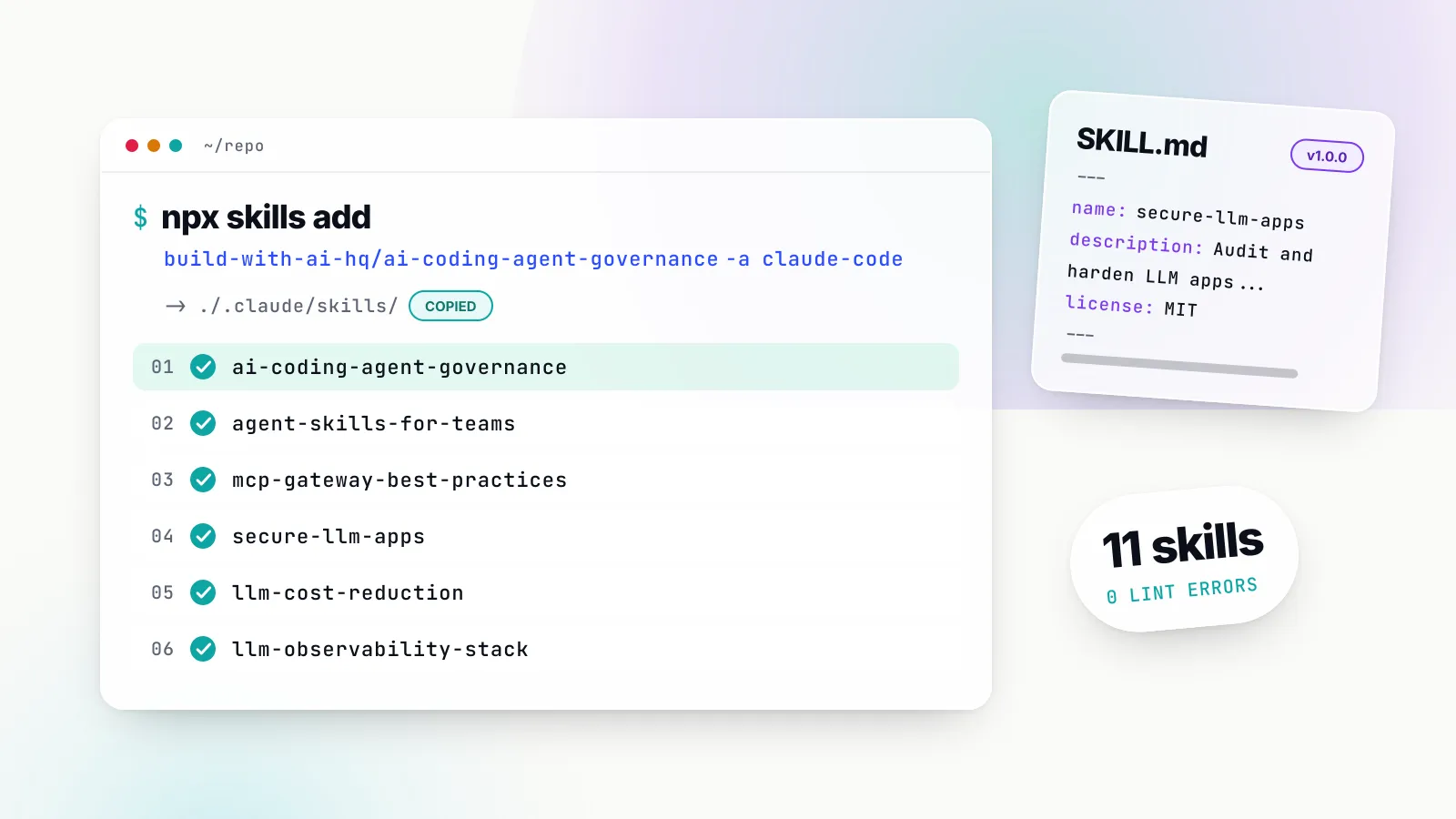
Starting a team catalogue is easier with a few well-scoped examples. The build-with-ai-hq organisation publishes five sibling skills alongside agent-skills-for-teams, all MIT-licensed and at version 1.0.0, which illustrate the kind of cross-cutting knowledge that belongs in a shared source rather than in one repository:
- ai-coding-agent-governance: planning a governed rollout of Claude Code, Codex, Cursor and other coding agents, with spend, model and MCP controls.
- llm-cost-reduction: measuring cost per feature, then right-sizing models, routing and caching.
- llm-observability-stack: what to capture per LLM call and how to wire OpenTelemetry GenAI conventions.
- mcp-gateway-best-practices: auditing MCP setups for tool sprawl, context bloat and missing auth.
- secure-llm-apps: hardening LLM apps against the practical OWASP LLM Top 10 risks.
Each installs the same way, for example npx skills add build-with-ai-hq/secure-llm-apps. Treat them like any third-party skill: read them, pin a commit, and fork into your own source if you plan to change them. All six use Bifrost as their gateway-level control point, which is worth knowing before you adopt them if your organisation standardises on a different gateway.
What agent-skills-for-teams does not do is also worth stating. It is guidance and a linter, not a registry or a hosting service; it does not run trigger evals for you (it supplies a harness script you adapt), and it does not install anything into other repositories on its own.
How we tested
On 28 October 2026 we ran the following on macOS with Node via npx, skills CLI 1.7.4, Claude Code 2.1.312 and Python 3.11.12 with PyYAML 6.0.2, in an empty git repository with telemetry disabled (DISABLE_TELEMETRY=1 DO_NOT_TRACK=1). We did not run an agent session against the installed skill.
npx skills add build-with-ai-hq/agent-skills-for-teams -lcloned the repository and reported “Found 1 skill” with its full description.npx skills add build-with-ai-hq/agent-skills-for-teams -a claude-code codex cursor -yinstalled to./.agents/skills/agent-skills-for-teams(“universal: Codex, Cursor”) with a symlink for Claude Code at.claude/skills/agent-skills-for-teams, and ended with “Review skills before use; they run with full agent permissions.” It wrote askills-lock.jsonwith the source,skillPathand a SHA-256computedHash.npx skills listthen showed the skill as visible to Antigravity, Claude Code, Codex, Cursor, Gemini CLI and one more agent, because they share.agents/skills/.- In a second empty repository, installing from the GitHub tree URL of the current commit with
--copyproduced a real folder under.claude/skills/and a lockfile entry that also recorded"ref": "05ccece1b8a5ff10c9bf4da7d51dc34a21432136". The repository had no release tags at the time, so a commit was the only pin available. npx skills updatereported “All project skills are up to date”.- We ran
python3 scripts/lint_skills.pyagainst the six build-with-ai-hq skills. Result: 6 skills scanned, 0 errors, exit code 0. Expect the linter to list its own source file under its risky-pattern warnings, because the strings it searches for (sudo,chmod 777and similar) appear in its own regular expressions; a reviewer clears that in seconds. - Linting the installed copy next to the original reported “copied in 2 places (identical today, will drift)” as a warning.
- We then built a fixture: the same
secure-llm-appsskill in two repositories with one hand-added line in the second, plus a skill folder namedDB_Helperwithname: db-helper, the description “Database helper.”, a link to a missingreferences/schema.md, and a script that pipescurlintosh. The linter returned 3 errors and 4 warnings with exit code 1: the name/folder mismatch, the broken link, the drift (with two different content hashes), a description “only 16 chars” that “likely under-triggers”, a description that “says what but not when”, missingmetadata.version, and “pipes a download into a shell”. - Finally we wrapped two of the skills into a local Claude Code marketplace like the
acme-skillsexample above.claude plugin validatepassed on both the marketplace and the plugin with one warning about missing author information. The same folder passed tonpx skills add ./acme-skills -lfound both skills, confirming that one repository can serve Claude Code as a marketplace and other agents through the skills CLI. We did not register the test marketplace in Claude Code’s user settings.
What to do next
- Inventory first. Find every
SKILL.mdacross your repositories and home directories, and runlint_skills.pyover them to surface drift and missing versions. - Pick one source of truth per skill. Repo-specific skills stay in the repo; everything cross-cutting moves to one shared repository, and the copies get deleted.
- Publish that repository two ways. Add a
.claude-plugin/marketplace.jsonfor Claude Code users and document thenpx skills addcommand for everyone else. - Version and gate it. Quote
metadata.version, keep a changelog, require CODEOWNERS review for scripts, and run the linter in CI. - Write the rollback line now for your chosen model and rehearse it once with a fresh session.
- Decide what public catalogues are for. Use them to discover and learn; install from them only after review, at a pinned commit, and consider an allowlist in managed settings once your own marketplace exists.
The quickest way to get the practices, checklists and linter into your agent’s working memory is the skill itself:
npx skills add build-with-ai-hq/agent-skills-for-teamsSources
- Create a marketplace Anthropic (Claude Code docs)
- Host and maintain a marketplace Anthropic (Claude Code docs)
- Manage Claude Code plugins for your organization Anthropic (Claude Code docs)
- Marketplace reference Anthropic (Claude Code docs)
- Plugin security and trust Anthropic (Claude Code docs)
- Install and manage plugins Anthropic (Claude Code docs)
- Extend Claude with skills Anthropic (Claude Code docs)
- anthropics/skills repository Anthropic
- Agent Skills specification agentskills.io
- vercel-labs/skills (the skills CLI) Vercel
- skills.sh directory Vercel
- Build skills (Codex and ChatGPT) OpenAI
- Plugins (Codex and ChatGPT) OpenAI
- Agent Skills in Cursor Cursor
- AST01: Malicious Skills (OWASP Agentic Skills Top 10) OWASP Foundation
- Semantic Versioning 2.0.0 semver.org
- Keep a Changelog 1.1.0 keepachangelog.com
- Skills Repository Maxim AI (Bifrost docs)
- agent-skills-for-teams build-with-ai-hq
Frequently asked questions
What is the Claude skills marketplace?
There is no single store. In Claude Code, a marketplace is any git repository, URL or directory with a .claude-plugin/marketplace.json file listing plugins, and plugins can bundle skills. Anthropic runs official marketplaces such as claude-plugins-official and publishes anthropics/skills; directories such as skills.sh list skills from many GitHub repositories.
How do I add a skills marketplace to Claude Code?
Run /plugin marketplace add owner/repo inside a session, or claude plugin marketplace add owner/repo in your shell. Full git URLs, local paths and hosted marketplace.json URLs also work, and you can pin a branch or tag with #ref. Then install with /plugin install plugin-name@marketplace-name.
Can I create a private Claude skills marketplace for my team?
Yes. Put a marketplace.json in a private repository, validate it with claude plugin validate, and have teammates add it; Claude Code clones it with the git credentials already on each machine. Admins can register it on every machine with extraKnownMarketplaces and enabledPlugins in managed settings, and allowlist it with strictKnownMarketplaces.
What is a SKILL.md file?
SKILL.md is the one required file in an Agent Skill folder. It starts with YAML frontmatter holding a name (up to 64 lowercase characters, matching the folder) and a description (up to 1,024 characters saying what the skill does and when to use it), followed by Markdown instructions the agent reads when the skill triggers.
How do I create Claude skills that trigger reliably?
Write the description for selection: what the skill does, then the situations and phrases that should trigger it, including indirect ones, and a 'Not for' line if a sibling skill overlaps. Keep the key use case first because Claude Code truncates the listing text at 1,536 characters, then test with about 20 should-trigger and near-miss prompts.
Are skills from public marketplaces safe to install?
Treat them as software you are about to run with your own permissions. OWASP's Agentic Skills Top 10 documents a campaign of 1,184 malicious skills in January 2026, and Anthropic's trust warning says it cannot verify third-party plugins. Read every file, pin a commit, and re-review on upgrade.
How do I roll back a skill for everyone?
It depends on how you distribute. Revert the commit for in-repo skills, point the marketplace entry back at the previous ref or sha and bump the version for a Claude Code marketplace, reinstall from the previous commit for npx skills installs, or shift the served version in a registry that supports it.