ToolsSurvey
Best Claude Code skills in 2026: 11 tested and ranked for production AI teams
The best Claude Code skills for teams shipping production AI, test-installed on 28 October 2026: governance, cost, security, MCP and observability, plus five Anthropic and Vercel picks.
The best Claude Code skills for a team shipping production AI are the ones that hand the agent a procedure it would otherwise improvise: how to roll coding agents out with budgets, how to keep skills versioned, how to scope MCP tools, how to harden an LLM app, how to cut spend and how to see every call. This ranking puts eleven skills in order, all test-installed into Claude Code on 28 October 2026 with the open-source skills CLI, with the exact command for each.
Six of the eleven come from one GitHub organisation, build-with-ai-hq, and take the top places because no other public skills we found cover the production side of AI engineering at the same depth. The other five are the strongest general-purpose skills from Anthropic and Vercel. If you only want the commands, here they are:
# The six production-AI skills, installed for Claude Code in the current project
npx skills add build-with-ai-hq/ai-coding-agent-governance -a claude-code
npx skills add build-with-ai-hq/agent-skills-for-teams -a claude-code
npx skills add build-with-ai-hq/mcp-gateway-best-practices -a claude-code
npx skills add build-with-ai-hq/secure-llm-apps -a claude-code
npx skills add build-with-ai-hq/llm-cost-reduction -a claude-code
npx skills add build-with-ai-hq/llm-observability-stack -a claude-code

# General-purpose picks from Anthropic and Vercel (-s picks skills from a multi-skill repo)
npx skills add anthropics/skills -s skill-creator webapp-testing mcp-builder frontend-design -a claude-code
npx skills add vercel-labs/agent-skills -s vercel-react-best-practices -a claude-code
If you are new to the format, GenAI Brief’s Claude Skills explainer covers how SKILL.md works, progressive disclosure and how skills differ from MCP servers and hooks. This piece assumes that background and concentrates on which Claude Code skills are worth installing, and why.
The best Claude Code skills at a glance
| Rank | Skill | Publisher | What it does | Licence |
|---|---|---|---|---|
| 1 | ai-coding-agent-governance | build-with-ai-hq | Governed rollout of Claude Code, Codex, Cursor and others: keys, budgets, models, MCP, logs | MIT |
| 2 | agent-skills-for-teams | build-with-ai-hq | Write, lint, version, review and distribute skills across a team | MIT |
| 3 | mcp-gateway-best-practices | build-with-ai-hq | Cut MCP tool sprawl, scope tools per identity, approvals, tool-call logs | MIT |
| 4 | secure-llm-apps | build-with-ai-hq | OWASP LLM Top 10 audit and fixes: keys, injection, tools, PII, output sinks | MIT |
| 5 | llm-cost-reduction | build-with-ai-hq | Measure cost per feature, route by complexity, cache, cap, budget | MIT |
| 6 | llm-observability-stack | build-with-ai-hq | Per-call records, OpenTelemetry GenAI spans, TTFT, dashboards, alerts | MIT |
| 7 | skill-creator | Anthropic | Draft a skill, run evals with and without it, tune its description | Apache 2.0 |
| 8 | webapp-testing | Anthropic | Test local web apps with Python Playwright and a server-lifecycle helper | Apache 2.0 |
| 9 | mcp-builder | Anthropic | Design, build and evaluate an MCP server in Python or TypeScript | Apache 2.0 |
| 10 | vercel-react-best-practices | Vercel | 70 prioritised React and Next.js performance rules | MIT |
| 11 | frontend-design | Anthropic | Opinionated visual design guidance that avoids templated UI | Apache 2.0 |
The first six share a structure: a description of 900 to 1,021 characters packed with the phrases people actually type (“we got a surprise AI bill”, “MCP tools eat my context”), a quick-diagnosis section of shell commands to run before changing anything, fixes ordered by impact, a gateway section, a verify section and a list of common mistakes. That consistency is part of why they rank: the agent always starts by measuring, and always ends by checking.
How we chose these Claude Code skills
We started from the skills that teams building with AI actually reach for, then scored each candidate on five criteria, in roughly this order of weight.
- Does it encode a procedure the agent would get wrong? Anthropic’s authoring guidance starts from the assumption that Claude is already capable, so a skill earns its context cost only when it supplies something the model does not know or would not do unprompted. A list of React performance rules qualifies. A skill that restates general advice does not.
- Will it trigger? The description is the only text Claude Code sees before it decides to load a skill. We read every description against the Agent Skills specification, which asks for both what a skill does and when to use it, and against Claude Code’s 1,536-character cap on the combined description in its listing.
- Is the body lean, with depth in references? The specification recommends keeping
SKILL.mdunder 500 lines and moving detail into files the agent opens only when needed. We counted lines and reference files for every skill. - Does it ship deterministic help? Scripts that lint, validate or manage a server turn a fuzzy instruction into a feedback loop. Skills that bundle working scripts score higher, provided the scripts are readable and do nothing undocumented.
- Is the publisher identifiable, the licence clear and the source readable? We included only skills whose full source is public on GitHub, with a stated licence, from a named organisation. We read every file of every skill before installing it.
We excluded skills that need a specific SaaS account to do anything useful, skills whose description says what but never when, and large “collection” repositories where quality varies from folder to folder. We did not rank by popularity, and this article gives no download figures.
The ranking is weighted towards production AI work by design. A team building a marketing site would rank Vercel’s and Anthropic’s front-end skills higher; a team running Claude Code across fifty engineers, with model bills and MCP servers to answer for, would rank them as we have.
How we tested
On 28 October 2026 we installed all eleven skills into a fresh, empty Git repository in a scratch directory on macOS, using version 1.7.4 of the skills CLI from Vercel Labs, with telemetry switched off through the DISABLE_TELEMETRY=1 and DO_NOT_TRACK=1 variables that the CLI’s README documents. The commands were exactly the ones above, with -y added to skip confirmation prompts.
What we observed:
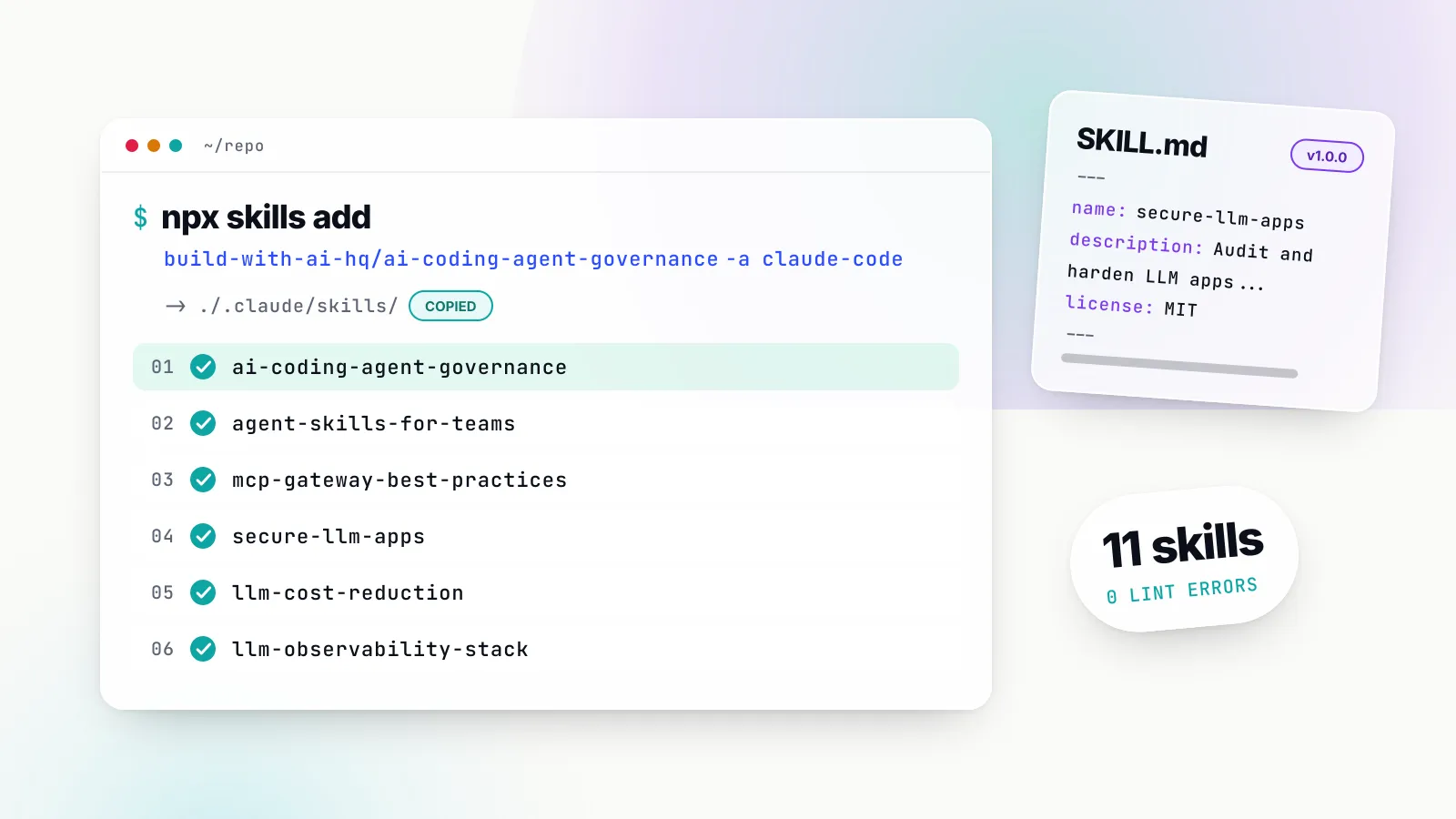
- Every install succeeded. For each of the six build-with-ai-hq skills the CLI printed
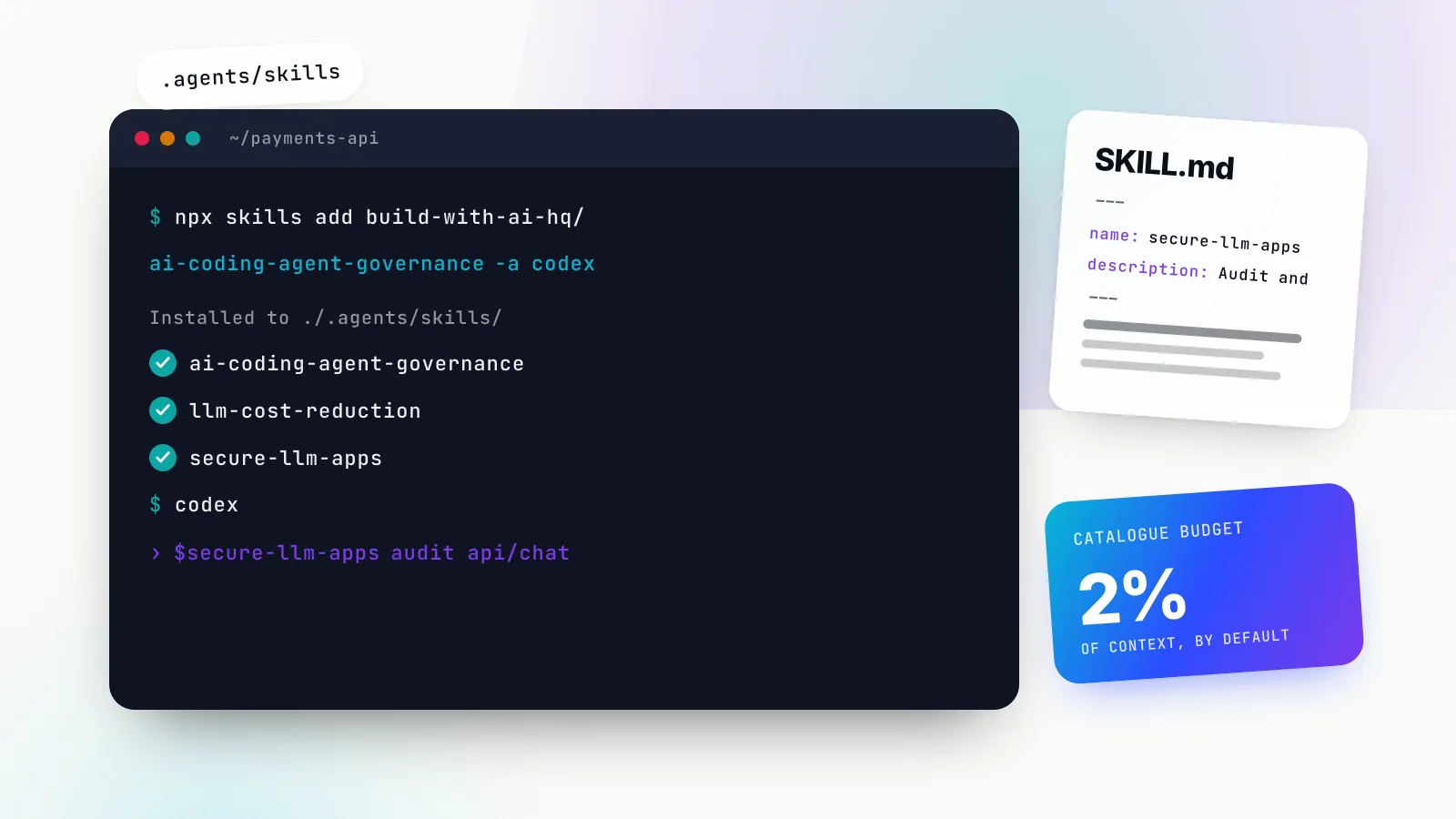
Installed 1 skilland placed a full copy in./.claude/skills/<skill-name>/, ending each run with the line “Review skills before use; they run with full agent permissions.” The four Anthropic skills arrived from one command, and Vercel’s skill from another. - Claude Code alone means a copy; several agents mean a symlink. With only
-a claude-code, the CLI reported each skill as “copied” into.claude/skills/. In a second test directory,-a claude-code codexput one canonical copy in.agents/skills/llm-cost-reduction/and made.claude/skills/llm-cost-reductiona symlink to it. - A lock file is written. The CLI created
skills-lock.jsonrecording each skill’s source repository and a SHA-256computedHash, which is whatnpx skills updatecompares against. npx skills listconfirmed the result, showing all six build-with-ai-hq skills under “Project Skills” with “Agents: Claude Code” and their source repository.- The bundled linter ran clean on errors. We ran
python3 .claude/skills/agent-skills-for-teams/scripts/lint_skills.py .claude/skillsover all installed skills. It scanned 12 skills (the eleven here plus Vercel’sfind-skills, which we later removed withnpx skills remove find-skills -y) and reported 0 errors. - Anthropic’s validator agreed. Running
skill-creator/scripts/quick_validate.pyagainst each of the six build-with-ai-hq skills reported all six as valid. - The webapp-testing helper runs.
python3 webapp-testing/scripts/with_server.py --helpprinted its usage: one or more--servercommands, a matching--portfor each, a--timeoutand the command to run once the servers are ready.
What we did not do: we did not run Claude Code sessions to measure trigger rates or output quality, and we did not deploy a gateway. The claims below about what each skill does come from reading its files, not from timed agent runs. We also did not run a global (-g) installation in the test, because that writes to the home directory; the behaviour described for it below comes from the CLI’s documentation.
How to install Claude Code skills
Claude Code reads skills from plain directories, with no upload step. Its skills documentation lists the locations: personal skills in ~/.claude/skills/<name>/SKILL.md, project skills in .claude/skills/<name>/SKILL.md, enterprise skills in the managed settings directory, nested .claude/skills/ folders in subdirectories, directories passed with --add-dir, plugins, and skills synced from a claude.ai account. When two skills share a name, enterprise beats personal and personal beats project. Plugin skills never collide, because they are namespaced as /plugin-name:skill-name.
You can copy a folder into one of those paths by hand. The skills CLI does the same job with one command, records where the skill came from, and can update or remove it later.
Target Claude Code explicitly with -a claude-code
Without -a, the CLI detects installed agents and asks where to install. Naming the agent makes the command repeatable in a README or onboarding script. The agent identifier for Claude Code is claude-code; the CLI’s supported agents table maps it to .claude/skills/ for a project and ~/.claude/skills/ globally. Codex and most other agents read .agents/skills/, and Cursor uses .agents/skills/ in a project and ~/.cursor/skills/ globally.
# Project install for Claude Code (commit .claude/skills/ so the team gets it)
npx skills add build-with-ai-hq/secure-llm-apps -a claude-code

# One skill out of a repository that holds several
npx skills add anthropics/skills -s skill-creator -a claude-code

# See what a repository offers before installing anything
npx skills add anthropics/skills -l

# Housekeeping
npx skills list
npx skills update
npx skills remove find-skills
The README says skills install to the current project by default and that adding -g makes them available across projects, which for Claude Code means ~/.claude/skills/. Use a project installation for anything the whole team should share, because they travel with the repository and change through code review. Use -g for personal tools such as skill-creator. The CLI requires Node.js 22.20 or later according to its install instructions.
Verify that Claude Code sees the skill
Claude Code watches its skill directories and picks up added or edited SKILL.md files within the current session, according to its documentation on live change detection. To confirm, the documentation’s troubleshooting steps suggest asking Claude “What skills are available?”, then invoking the skill directly with /skill-name if it does not trigger on its own. Running /skill-doctor reports what each skill costs in context and how often it is used.
When Anthropic’s skills are all you need, their repository also works as a Claude Code plugin marketplace. Its README gives /plugin marketplace add anthropics/skills followed by /plugin install example-skills@anthropic-agent-skills; skills installed that way are namespaced under the plugin.
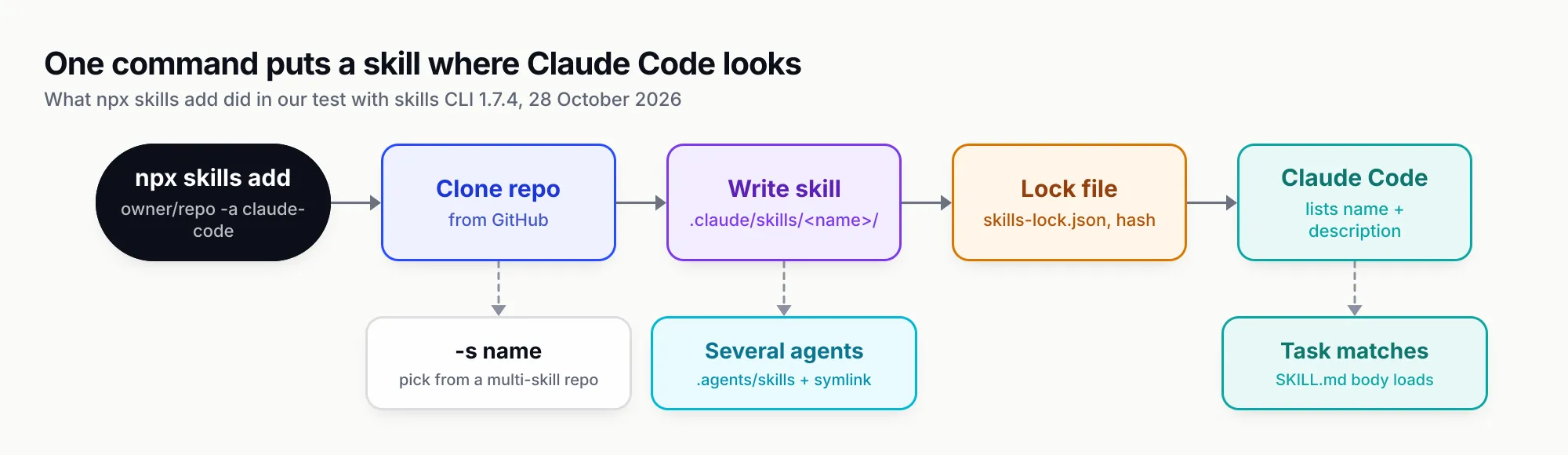
Figure 1: One command puts the skill where Claude Code looks and records where it came from, so updates and removals stay one command too.
1. ai-coding-agent-governance
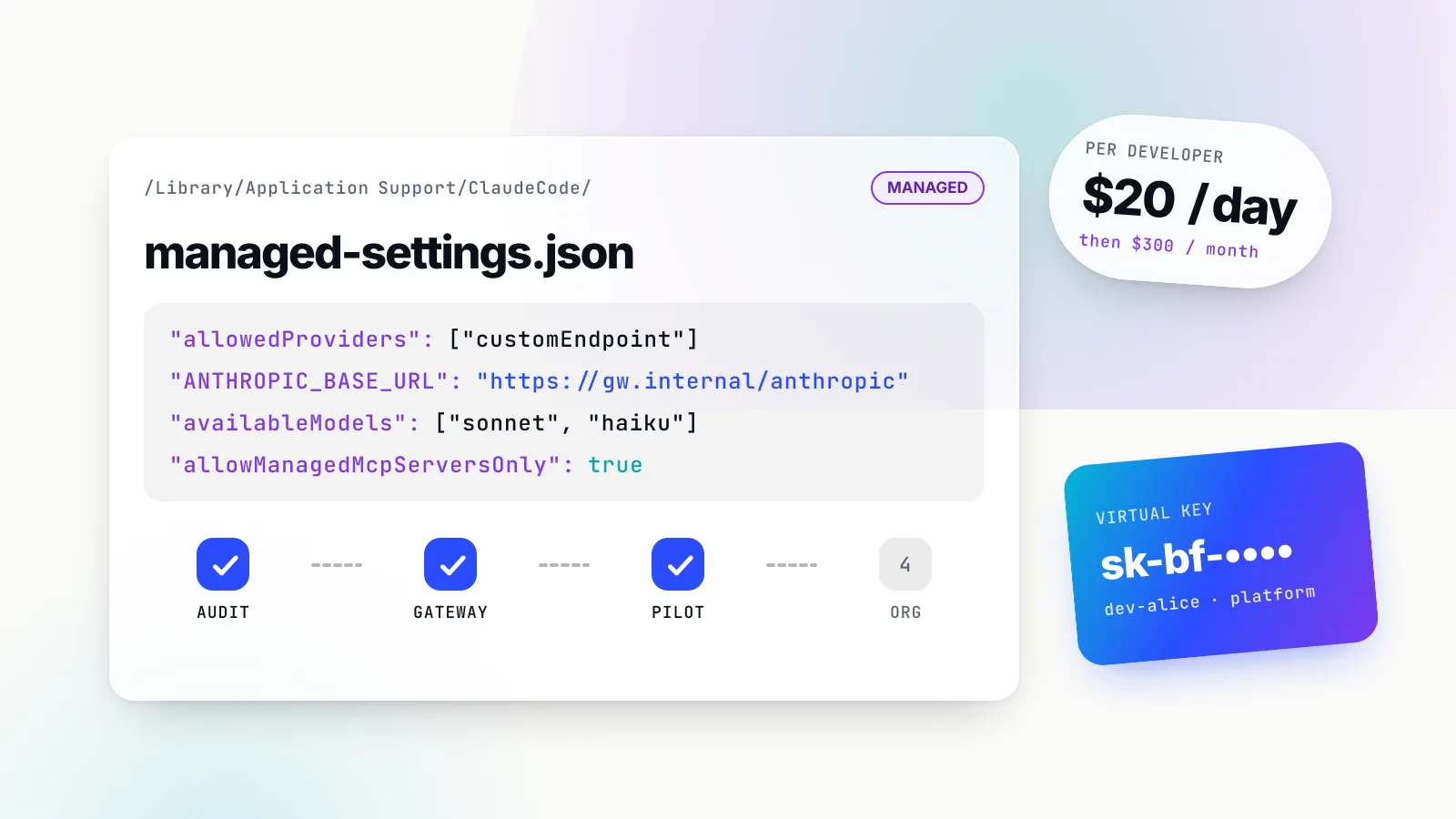
What it does. This is the skill to install first if your team uses Claude Code, Codex, Cursor or another coding agent on company code. It plans and executes a governed rollout, organised around six controls stated in a table at the top of the skill: identity (one credential per developer and per pipeline), spend (budgets and rate limits), models and providers, data, tools and evidence. Its stated pattern is to route every agent through one gateway, give each developer and CI job its own key on it, and pin the agent configuration with managed settings.
When it triggers. The description lists phrases such as “we got a surprise AI bill”, “set per-developer budgets for Claude Code”, “developers share one Anthropic/OpenAI key”, “lock down which MCP servers people can run” and “managed settings for Claude Code”.
What is inside. A 272-line SKILL.md with a quick-diagnosis block that greps shell profiles and repositories for raw provider keys, inspects every agent’s configuration file and checks whether a managed policy is already in force. Three references: per-tool-setup.md (322 lines of exact configuration for Claude Code, Codex CLI, Gemini CLI, Cursor, GitHub Copilot and OpenCode), rollout-checklist.md (a phased plan from baseline to pilot to organisation, with exit criteria) and virtual-keys-per-developer.md (provisioning from a roster, budgets, expiry, rotation and offboarding).
The Claude Code material is the most useful part. The skill shows a managed-settings.json that pins ANTHROPIC_BASE_URL to the gateway, sets an apiKeyHelper that reads the developer’s key from a vault, restricts availableModels, disables bypass-permissions mode, denies reads of .env files and allows only the gateway’s MCP endpoint. It points to Claude Code’s managed settings documentation and warns that key names change between releases. It also covers running agents in CI with a separate, small-budget key per pipeline, and measuring adoption from gateway logs.
Scope. It does not write your AI usage policy for you, though it gives the headings, and it assumes you can deliver files to laptops through device management. Its gateway examples use Bifrost throughout.
npx skills add build-with-ai-hq/ai-coding-agent-governance -a claude-code2. agent-skills-for-teams
What it does. A skill about skills. Once a team has more than a handful, the problems become organisational: the same SKILL.md copied into five repositories and drifting apart, a one-line edit changing every agent’s behaviour with no record, descriptions that never trigger, and scripts nobody reviewed. This skill audits all of that, then fixes it in impact order: one source of truth per skill, descriptions that trigger, lean bodies, SemVer for every change, a review gate, tests, and consistent installation across agents.
When it triggers. “A skill never triggers or loads at the wrong time”, “SKILL.md files copy-pasted or drifting across repos”, “which version of the skill is everyone on”, “set up a skills registry” and similar.
What is inside. A 254-line SKILL.md, three references (writing-skills-that-trigger.md on descriptions and trigger evals, versioning-and-review.md on changelogs, release tags, rollback and a security checklist, and bifrost-skills-repository.md on running a central registry) and the only bundled script among the six, scripts/lint_skills.py. The linter uses the Python standard library only and checks names and descriptions against the specification, body size, broken relative links, a missing metadata.version, drift between copies of the same skill, and risky script patterns: piping a download into a shell, broad recursive deletes, sudo, chmod 777, reading SSH or cloud credential files and force-pushing. It exits non-zero on errors, so it drops straight into CI.
The skill’s trigger-eval guidance is concrete: about 20 realistic prompts, half that should trigger and half near misses that should not, each run three times, with a pass at a trigger rate of at least 0.5 for positives and under 0.5 for negatives, and a held-out set to avoid overfitting the description. That matches the spirit of Anthropic’s advice to build evaluations first.
For teams that want a registry rather than a Git repository, it walks through Bifrost’s Skills Repository, which publishes immutable SemVer versions, lets an administrator switch the served version to roll everyone back, and registers as a Claude Code plugin marketplace with claude plugin marketplace add <bifrost-url>/api/skills/serve/claude-code/.claude-plugin/marketplace.json.
Scope. It will not write your domain skills for you; pair it with skill-creator (number 7) for that. Controlling who can create and publish skills in the Bifrost registry through RBAC and SSO comes with the enterprise tier.
npx skills add build-with-ai-hq/agent-skills-for-teams -a claude-code3. mcp-gateway-best-practices
What it does. Turns an ad hoc MCP setup into one that is small, scoped, observable and testable. The skill’s own framing is that MCP makes it easy to give an agent 300 tools, five copies of the same GitHub token on five laptops and a destructive call that runs without anyone looking. It works in a fixed order: diagnose, cut the tool surface, lock down permissions and approvals, then centralise and verify.
When it triggers. “Too many MCP servers”, “MCP tools eat my context”, “the agent picks the wrong tool”, “one MCP endpoint for Claude Code and Cursor”, “log MCP tool calls”, “Code Mode”.
What is inside. The longest body of the six at 355 lines, with references on bifrost-mcp-setup.md, tool-access-control.md and code-mode.md. The diagnosis is practical: inventory every MCP config file on the machine, grep them for literal tokens, measure each server’s tool definitions in tokens with the MCP Inspector CLI (roughly one token per four characters of JSON), and classify every tool as read, write, destructive or external side effect. It is careful about the MCP specification’s tool annotations such as readOnlyHint and destructiveHint, telling the agent to check them but not to trust them, since they are hints from the server author.
The gateway half describes three filtering levels in Bifrost (the server’s baseline, the virtual key’s ceiling, and request headers that can only narrow), and makes a point many setups get wrong: when Claude Code connects to a gateway’s /mcp endpoint, approval of tool calls is the host’s job, so gateway auto-execute lists do not apply. It cites Bifrost’s Code Mode benchmark, in which input tokens fell 92.8% at 508 tools across 16 servers; that is the vendor’s figure.
Scope. Most of the value, as the skill says, comes from the first three steps, which apply whether or not you run a gateway. It pairs well with GenAI Brief’s ranking of the top MCP servers for coding agents, which measures what each server costs in tool-definition tokens.
npx skills add build-with-ai-hq/mcp-gateway-best-practices -a claude-code4. secure-llm-apps
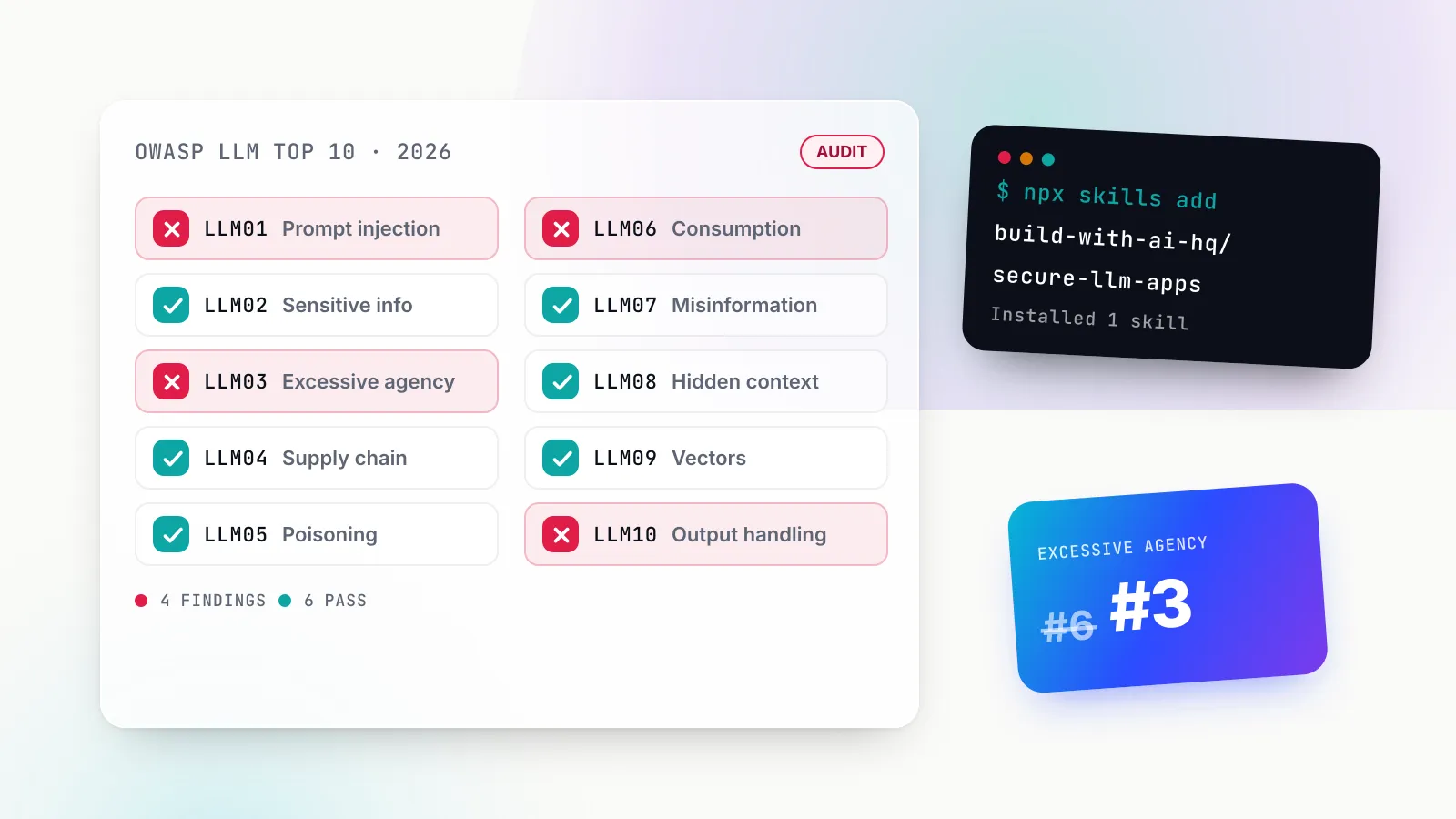
What it does. A security review for applications and agents that call LLMs, built on one premise stated in its first paragraph: the model is not a security boundary, so everything it reads is attacker-controllable and everything it writes is untrusted input. It maps its checklist to the OWASP Top 10 for LLM Applications 2025, from LLM01 prompt injection to LLM10 unbounded consumption.
When it triggers. “Is my AI app secure”, “my OpenAI key leaked”, “can I call the LLM from the browser”, “the agent deleted something”, “redact PII before sending to OpenAI/Anthropic”, “someone is burning our API credits”.
What is inside. A 342-line SKILL.md and four references: audit-checklist.md (the full grep list and a report template), prompt-injection.md (taint tracking, a dual-model quarantine pattern, exfiltration channels and test payloads), pii-and-data.md (local redaction with Microsoft Presidio in Python and TypeScript) and keys-and-gateway.md (a leaked-key runbook and per-key limits). The quick diagnosis greps for provider keys in front-end variables such as NEXT_PUBLIC_ and VITE_, for dangerouslyAllowBrowser, for LLM output reaching innerHTML, eval or f-string SQL, and for prompts written to logs.
The fixes are specific and ordered: keys never leave the server; retrieved, tool and web content is untrusted; tools get least privilege and human approval for destructive actions; structured output is validated and encoded at every sink; PII is kept out of provider requests; consumption is bounded per user and tenant; logs are cleaned. The verify section asks for evidence rather than intent, for example building the front end and grepping the output for sk- and AIza, and feeding <img src=x onerror=alert(1)> through every render path.
Scope. It hardens the application around the model. It does not red-team the model itself, and it says plainly that an LLM-based injection detector should never be the only defence.
npx skills add build-with-ai-hq/secure-llm-apps -a claude-code5. llm-cost-reduction
What it does. Cuts what an application spends on model calls while holding quality steady. It starts from the cost formula, requests multiplied by input tokens times input price plus output tokens times output price, and insists on measuring cost per feature before changing anything, because optimising without numbers usually trims the wrong thing.
When it triggers. “Our OpenAI/Anthropic bill spiked”, “everything goes to GPT/Claude Opus”, “which feature is burning tokens”, “prompt caching isn’t hitting”, “the agent looped and cost $X”, “route cheap queries to a smaller model”.
What is inside. A 301-line SKILL.md and three references: caching.md (provider prompt caching, exact and semantic response caching, embedding reuse), complexity-routing.md (gateway and app-side routing by request difficulty) and budgets-and-attribution.md (attribution dimensions, budgets and PromQL for spend dashboards). The diagnosis is a single grep helper that finds every LLM call site and model string, counts calls with no max_tokens, finds uncapped agent loops and retry wrappers, and flags prompt-cache killers such as timestamps or UUIDs near the top of a system prompt.
The fixes run from attribution through right-sizing models, capping output and loops, trimming context, provider prompt caching with stable prefixes, response caching, batch APIs for offline work and embedding reuse. The gateway section configures Bifrost’s complexity router with CEL rules that send SIMPLE requests to a small model and COMPLEX ones to a frontier model, and uses session affinity so multi-turn conversations stay on the provider key that holds their prompt cache.
Scope. It does not negotiate your provider contract, but it does tell the agent to load custom pricing so dashboards match the invoice rather than list prices.
npx skills add build-with-ai-hq/llm-cost-reduction -a claude-code6. llm-observability-stack
What it does. Makes every LLM call in production answerable: what was sent, what came back, which provider and model served it, how long it took to the first token and in total, what it cost, who triggered it and whether it was any good. It opens with four ways LLM calls differ from ordinary RPCs: the payload is the debugging signal and often sensitive, cost varies per request, streaming latency has two meanings, and an HTTP 200 says nothing about quality.
When it triggers. “Why was this response bad”, “TTFT is slow”, “silent 429s”, “did a fallback happen”, “add OpenTelemetry to LLM calls”, “our logs contain PII”, “connect thumbs-down feedback to traces”.
What is inside. A 274-line SKILL.md and the deepest reference set of the six: what-to-capture.md (415 lines on the per-call record, cardinality rules, the OpenTelemetry GenAI semantic conventions, agent trace structure, PII redaction, sampling and evals on production samples), dashboards-and-alerts.md (PromQL for traffic, errors, latency, cost, fallbacks and MCP tools, with alert rules and a runbook) and bifrost-telemetry.md (log store, metrics, OTel export and response headers).
Its first practice is the one most teams skip: put one choke point in front of every LLM call rather than hand-instrumenting each SDK in each service, then add application spans only for what that layer cannot see, such as retrieval and business outcome.
Scope. It captures what happened and what it cost. For “was it good”, it supplies a self-hosted eval job that samples logged requests and scores them; it does not ship an evaluation platform.
npx skills add build-with-ai-hq/llm-observability-stack -a claude-code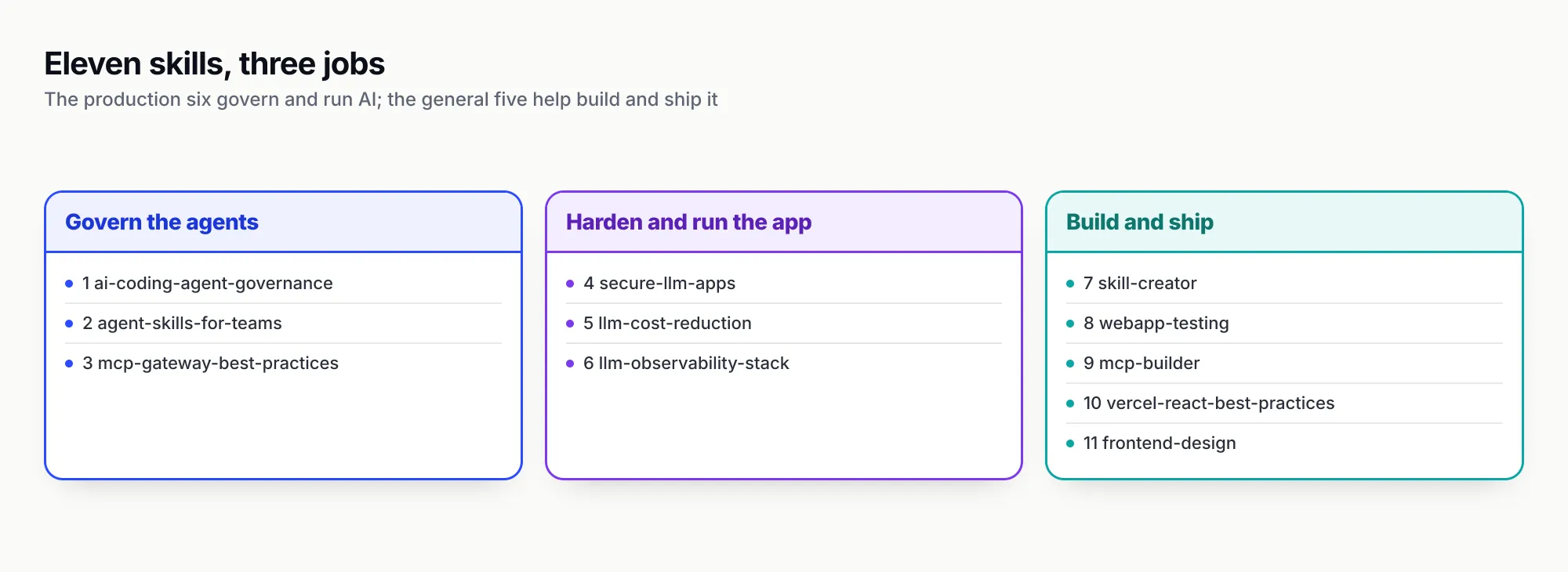
Figure 2: The top six cover the jobs around the code; the general-purpose five cover writing it.
The best agent skills from other publishers
The next five are general-purpose and widely used. They are well documented, maintained by the companies that publish them, and complement the production set rather than overlapping with it. All five come from multi-skill repositories, so -s picks the one you want.
7. skill-creator (Anthropic)
Anthropic’s skill for writing skills, and the one Claude Code’s own documentation points to in its section on running evals with skill-creator. It interviews you about what the skill should do and when it should trigger, drafts the SKILL.md, then runs test prompts with and without the skill, grades the outputs, launches a review viewer and rewrites the skill from your feedback. A separate optimisation loop generates should-trigger and should-not-trigger queries and tunes the description.
It is the heaviest skill here: a 485-line SKILL.md (our linter flagged it at about 8,156 tokens), grader, comparator and analyser agent prompts, and scripts including run_eval.py, improve_description.py, aggregate_benchmark.py, package_skill.py and quick_validate.py. Its eval and description-tuning scripts call claude -p as a subprocess, so each optimisation run spends real tokens. That weight is justified for a tool you invoke deliberately, and it is a good candidate for a global install. Where agent-skills-for-teams governs a library of skills, skill-creator builds and measures one.
npx skills add anthropics/skills -s skill-creator -a claude-code8. webapp-testing (Anthropic)
A compact skill (95 lines) for testing local web applications by writing native Python Playwright scripts. Its decision tree separates static HTML, where the agent reads selectors from the file, from dynamic apps, where it waits for networkidle, screenshots or inspects the rendered DOM, and only then acts. The bundled scripts/with_server.py starts one or more servers, waits for their ports and runs your automation, so a full-stack check becomes one command:
python scripts/with_server.py --server "npm run dev" --port 5173 -- python your_automation.pyThe skill tells the agent to run helper scripts with --help and treat them as black boxes rather than reading their source, a deliberate context-saving pattern in line with Anthropic’s guidance to provide utility scripts. It needs Python and Playwright on the machine.
npx skills add anthropics/skills -s webapp-testing -a claude-code9. mcp-builder (Anthropic)
For teams that build MCP servers rather than only consume them. It runs a four-phase process: research and planning (tool naming, coverage versus workflow tools, actionable errors), implementation, review and testing, and evaluation, where the agent writes ten realistic questions the server should let a model answer. References cover MCP best practices, the Python FastMCP and TypeScript SDK implementations and the evaluation format, with scripts/evaluation.py to run them. It pairs naturally with number 3: mcp-builder makes a good server, mcp-gateway-best-practices decides who may call it.
npx skills add anthropics/skills -s mcp-builder -a claude-code10. vercel-react-best-practices (Vercel)
Vercel Engineering’s React and Next.js performance rules, written for agents. The SKILL.md indexes 70 rules across eight categories ranked by impact, from eliminating request waterfalls and cutting bundle size (both marked critical) down to advanced patterns; we counted 70 rule files in its rules/ folder, plus a compiled AGENTS.md of 3,810 lines. Each rule has a short identifier such as async-parallel or bundle-barrel-imports, which makes review comments easy to trace. It is the best example in this list of a skill supplying knowledge a model genuinely lacks: house rules from the team that builds the framework.
npx skills add vercel-labs/agent-skills -s vercel-react-best-practices -a claude-code11. frontend-design (Anthropic)
A 71-line single-file skill that pushes Claude away from generic generated UI: ground the design in the subject, choose typefaces deliberately, keep line lengths under 80 characters, and avoid the stock “big number, small label, gradient accent” hero unless it is genuinely the best option. It ranks last only because it is taste rather than procedure, and because its description says what it does but not when to use it, which our linter flagged. For any team shipping a user interface for an AI product, it is still worth the few hundred tokens.
npx skills add anthropics/skills -s frontend-design -a claude-codeWhy the top six all point at a gateway
The six build-with-ai-hq skills share an architectural assumption, and it is worth understanding before installing them. A skill is text the model interprets; it can tell Claude Code to stay within a budget or never call a delete tool, but it cannot make that true. Claude Code’s own documentation draws the same line for hooks, and the skills draw it for spend, models and tools: rules that must hold every time belong in a layer the agent cannot talk its way past.
All six use Bifrost, the open-source AI gateway from Maxim AI, as that layer. In their examples the gateway holds provider keys, so developers and services get revocable virtual keys instead; each virtual key carries budgets, rate limits and a model allow-list; MCP servers are registered once and each key sees only the tools granted to it; and every request is logged with tokens, cost and latency. Bifrost’s Claude Code guide shows the client side: ANTHROPIC_BASE_URL pointed at the gateway’s /anthropic route and the virtual key in ANTHROPIC_AUTH_TOKEN, with a separate section on adding Bifrost as an MCP server.
The division of labour is the useful part. The skill supplies the procedure: what to measure, in what order, which config to write, how to verify. The gateway supplies the enforcement: the budget that rejects the 400th request, the tool grant that refuses delete_repository. Every skill also teaches the vendor-neutral half of the job, so a team on another gateway still gets the diagnosis, the ordering and the verification steps. For a wider view of the gateway options for coding agents, see GenAI Brief’s comparison of AI gateways for Claude Code, Codex and Cursor.
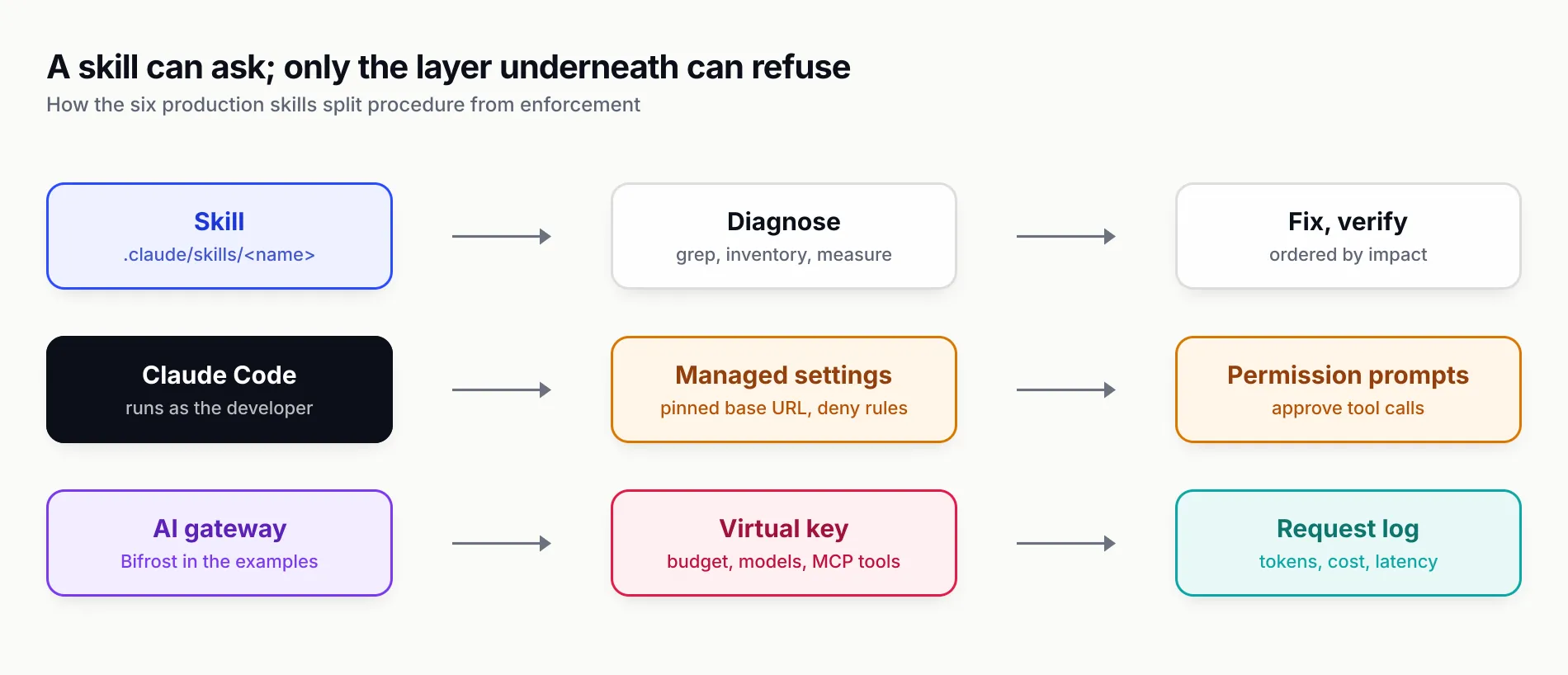
Figure 3: A skill can ask; only the layer underneath can refuse.
Which Claude Code skills to install first
Install for the problem in front of you, not for completeness. Each installed skill adds its description to Claude Code’s skill listing on every turn, and the six production skills have long descriptions by design: 904 to 1,021 characters each, close to the specification’s 1,024-character limit and roughly 250 tokens apiece by the usual four-characters-per-token estimate. When the listing exceeds its budget, Claude Code drops descriptions starting with the least-used skills, which can stop them triggering. Long descriptions trigger well; too many of them crowd each other out.
Starting points by situation:
- You are rolling Claude Code out to a team, or cleaning up one that grew on its own.
ai-coding-agent-governancefirst, thenmcp-gateway-best-practicesonce you see what MCP servers are on the laptops. - Your team writes its own skills.
agent-skills-for-teamsfor linting, versioning and distribution, plusskill-creatorinstalled globally for drafting and evals. - You are shipping an LLM feature to customers.
secure-llm-appsbefore launch,llm-observability-stackbefore the first incident,llm-cost-reductionbefore the first invoice review. - The bill already spiked.
llm-cost-reduction; it will ask for per-feature numbers before it changes a line, andllm-observability-stackis how you get them if they do not exist. - You build MCP servers.
mcp-builderto build them,mcp-gateway-best-practicesto run them. - You build React or Next.js front ends for AI products.
vercel-react-best-practicesandfrontend-design, pluswebapp-testingso the agent checks its own UI work.
For a skill that should never fire on its own, such as one that deploys, Claude Code supports disable-model-invocation: true in the frontmatter so that only a person typing /skill-name can invoke it. None of the eleven here needs that; they diagnose and recommend before they change anything.
Review every skill before you install it
The CLI’s closing line, “Review skills before use; they run with full agent permissions”, is the right default. A skill can tell Claude Code to run shell commands and can ship scripts that execute as you. OWASP’s Agentic Skills Top 10 ranks malicious skills first and records the January 2026 ClawHavoc campaign, in which 1,184 malicious skills across 12 publisher accounts delivered credential-stealing malware.
A review that takes ten minutes per skill:
- List what the repository offers with
npx skills add owner/repo -lbefore installing anything. - Read every file, not only
SKILL.md. Look for URLs,curl,fetch, reads of credential files, and “prerequisites” that ask you to paste a command. - Run the linter from agent-skills-for-teams over the installed folder; its risky-pattern checks catch the common cases.
- Commit the project install so
.claude/skills/andskills-lock.jsongo through code review, and treatnpx skills updateas a change to review, not a background chore. - Keep enforcement outside the skill. Claude Code’s permission rules and managed settings, plus a gateway for spend and tools, hold even if a skill is wrong.
All eleven skills in this ranking passed that review for us on 28 October 2026. The linter raised no risky-script warnings, and a grep of every bundled script for URLs, subprocess calls and credential paths turned up only documented behaviour: with_server.py starts the servers you name and polls their ports on localhost, mcp-builder’s evaluation script connects to the MCP server you point it at, and skill-creator’s eval scripts launch claude -p as a subprocess, which means real model calls billed to your account. That is a statement about the versions we read, which is why pinning and re-reviewing on update matter.
The short version
If your team ships AI to production, install ai-coding-agent-governance and agent-skills-for-teams this week, add the security, cost, observability and MCP skills as each problem becomes real, and use Anthropic’s and Vercel’s skills for the building work in between. Install for Claude Code with -a claude-code, commit the result, and let the skills write the procedure while the gateway and Claude Code’s own settings hold the line.
Skill contents were read from each public repository and installed with the skills CLI on 28 October 2026; descriptions, line counts and file lists may change in later versions. Feature claims about Claude Code, the skills CLI and Bifrost come from their public documentation.
Sources
- Extend Claude with skills (Claude Code documentation) Anthropic
- Claude Code managed settings Anthropic
- Skill authoring best practices Anthropic
- Agent Skills specification agentskills.io
- skills CLI README Vercel Labs
- skills CLI supported agents and install paths Vercel Labs
- skills CLI command reference Vercel Labs
- Anthropic skills repository Anthropic
- Vercel agent-skills repository Vercel Labs
- ai-coding-agent-governance skill build-with-ai-hq
- agent-skills-for-teams skill build-with-ai-hq
- mcp-gateway-best-practices skill build-with-ai-hq
- secure-llm-apps skill build-with-ai-hq
- llm-cost-reduction skill build-with-ai-hq
- llm-observability-stack skill build-with-ai-hq
- Bifrost with Claude Code Maxim AI
- Bifrost Skills Repository Maxim AI
- Bifrost virtual keys Maxim AI
- Bifrost Code Mode Maxim AI
- OWASP Top 10 for LLM Applications 2025 OWASP Foundation
- AST01: Malicious Skills (OWASP Agentic Skills Top 10) OWASP Foundation
- OpenTelemetry GenAI semantic conventions OpenTelemetry
- MCP specification 2025-11-25: Tools Model Context Protocol
- Prompt caching Anthropic
Frequently asked questions
What are the best Claude Code skills?
For teams running AI in production, the six build-with-ai-hq skills rank highest because they encode procedures agents get wrong: ai-coding-agent-governance, agent-skills-for-teams, mcp-gateway-best-practices, secure-llm-apps, llm-cost-reduction and llm-observability-stack. For general development, Anthropic's skill-creator and webapp-testing and Vercel's vercel-react-best-practices are the strongest picks.
How do I install skills in Claude Code?
Run npx skills add owner/repo -a claude-code from your project root, for example npx skills add build-with-ai-hq/secure-llm-apps -a claude-code. The skills CLI copies the skill into .claude/skills/, which Claude Code reads. Add -s skill-name to pick one skill from a repository that holds several, and -g to install for your user instead of the project.
Where does Claude Code store skills?
Personal skills live in ~/.claude/skills/<name>/SKILL.md and project skills in .claude/skills/<name>/SKILL.md inside the repository. Claude Code also reads enterprise skills from the managed settings directory, nested .claude/skills/ folders in subdirectories, directories added with --add-dir, plugins and skills synced from a claude.ai account.
Are Claude Code skills free?
The skills in this ranking are free and open source: the six build-with-ai-hq skills and Vercel's skill are MIT-licensed, and Anthropic's example skills are Apache 2.0. Using them costs ordinary model tokens, because each installed skill's description sits in the context on every turn and its body loads when it triggers.
What is the difference between Claude Code skills and plugins?
A skill is a folder with a SKILL.md file of instructions plus optional scripts and references. A plugin is a packaging unit that can bundle several skills with hooks, subagents and MCP server definitions, installed from a marketplace and namespaced as /plugin-name:skill-name. Anthropic's skills repository can be installed either way.
How many skills should I install in Claude Code?
Only the ones your work triggers. Every installed skill adds its description to the skill listing on every turn, and Claude Code drops the descriptions of the least-used skills when the listing exceeds its budget. Run /skill-doctor to see each skill's context cost and usage, and remove what you never invoke.
Are third-party Claude Code skills safe?
Treat them like any dependency. A skill can instruct the agent to run commands and can ship scripts that run with your permissions. Read every file before installing, pin a reviewed version, prefer publishers you can identify, and keep enforcement such as budgets and tool permissions outside the skill, in hooks, managed settings or a gateway.