ToolsExplainer
LLM observability: what to capture, how to trace agents, and which tools fit
A working guide to LLM observability: the per-call record, OpenTelemetry GenAI conventions, agent traces, PII redaction, Prometheus alerts, production evals and the tools for each job.
LLM observability is the ability to take any bad answer, latency spike, error burst or cost jump in production and trace it to one request, one user, one feature, one prompt version and one model within minutes. It matters because a model call is not an ordinary remote procedure call: the payload is the debugging signal, the cost changes with every request, a streamed response has two latencies, and an HTTP 200 says nothing about whether the answer was any good.
This guide is for engineers who run LLM features or agents in production and want a concrete setup rather than a vendor tour. It covers what to capture on every call, the OpenTelemetry GenAI semantic conventions as they stand on 28 October 2026, how to trace a multi-step agent as one run, sampling and PII redaction, Prometheus and Grafana alerts with starting thresholds, how to tie user feedback and evals to traces, and where SDK instrumentation and gateway-level capture each fit. It ends with a categories-of-tools table and a tested install of an open-source Agent Skill that applies the whole checklist to a codebase.
If you want the checklist inside your coding agent now, the skill is llm-observability-stack from the build-with-ai-hq organisation, listed on skills.sh:
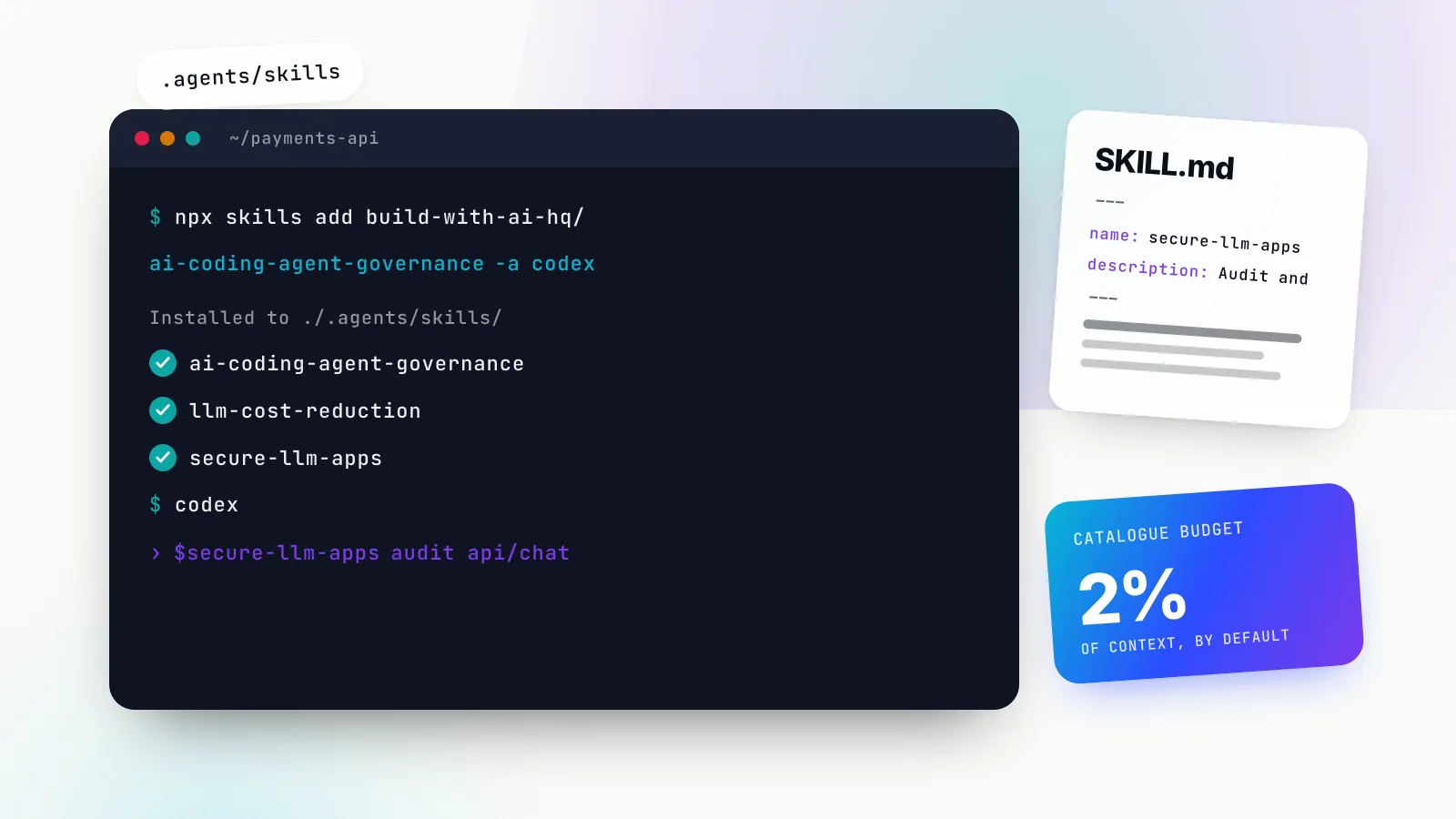
npx skills add build-with-ai-hq/llm-observability-stack
# or target one agent explicitly
npx skills add build-with-ai-hq/llm-observability-stack -a claude-code -y
If Agent Skills are new to you, our Claude Skills explainer covers how a SKILL.md folder loads on demand. The rest of this article stands on its own, skill or no skill.
What LLM observability is, and what ordinary APM misses
Application performance monitoring already gives you request rates, error rates and latency percentiles for every HTTP call, including calls to a model provider. What it does not give you is the content of the call or the economics of it. Four differences drive everything that follows.
The payload is the evidence. When a user reports a wrong answer, the question is what the model was sent and what it returned. A span that says POST api.openai.com 200 3.2s cannot answer that. You need the messages, the system prompt version, the retrieved context and the tool calls, and because those carry personal data, you need them under a policy.
Cost is per request and variable. Two calls to the same endpoint can differ in cost by two orders of magnitude depending on context length, cached tokens, reasoning effort and output length. Cost has to be recorded per call and attributed to a feature, team or customer, or the monthly bill becomes a mystery. Our piece on the real cost of an AI product shows how quickly that compounds.
Latency has two meanings. For a streamed chat response, users feel the time to first token (TTFT). For an agent step or a batch job, the total generation time drives timeouts. A p95 computed over a mix of streaming and non-streaming calls describes neither.
Success is not a status code. A response that stopped at max_tokens, was cut by a content filter, came back empty or returned JSON that does not parse is a failure from the product’s point of view, even though the provider answered 200. Quality needs its own signal, which is where user feedback and evaluations on production samples come in.
LLM monitoring, in the narrow sense, is the alerting layer on top: error rate, p95 latency, TTFT, spend per hour and fallback share, each with a threshold. Observability is the capability underneath that lets you answer questions you did not plan for. You need both, and the monitoring layer is only as good as the records it is built on.
What to capture on every LLM call
The core of LLM observability is a fixed record, emitted once per model call, with the same fields on success and on failure. The llm-observability-stack skill’s what-to-capture reference lays it out field by field; the condensed version is below.
| Group | Fields | Why it matters |
|---|---|---|
| Identity | request_id returned to the client, trace_id, parent span, session_id | Joins feedback, logs and traces to one call |
| Routing | requested model, served provider and model, key used, is_fallback, retry count | Aliases, routing rules and fallbacks change what actually ran |
| Usage | input, output, cached and reasoning tokens, cost_usd | Explains cost changes; cost is computed with the price in effect |
| Timing | total latency, TTFT for streams, provider latency vs your own overhead | Separates “the provider was slow” from “we were slow” |
| Outcome | status, normalised error type, provider error code, finish_reason | length and content_filter are silent failures |
| Attribution | hashed user or tenant ID, feature, environment, prompt name and version, app version | Every cost and quality question is “which feature, which prompt change” |
| Content (gated) | input messages, output, tool calls and results | Redacted, sampled and retained briefly |
Two details in that table cause most of the gaps we see in real systems.
Time to first token and the streaming usage trap
Track TTFT, total latency and inter-token latency (or output tokens per second) as separate series, and never mix streaming and non-streaming calls in one percentile. When comparing models or prompts, normalise total latency by output tokens; a longer answer is slower by construction, not a regression.
The other trap is token usage on streams. With OpenAI-compatible APIs, a streamed response does not include usage unless you ask for it. The chat completions reference says that with include_usage set, “an additional chunk will be streamed before the data: [DONE] message” carrying usage for the whole request, and warns that an interrupted stream may never deliver it. Without the flag, every streamed call records zero tokens and zero cost:
import time

t0 = time.perf_counter()
ttft_ms, usage = None, None
stream = client.chat.completions.create(
    model=MODEL, messages=messages, stream=True,
    stream_options={"include_usage": True},   # otherwise tokens and cost are missing
)
for chunk in stream:
    if ttft_ms is None and chunk.choices and chunk.choices[0].delta.content:
        ttft_ms = (time.perf_counter() - t0) * 1000
    if chunk.usage:
        usage = chunk.usage                     # final chunk carries usage
total_ms = (time.perf_counter() - t0) * 1000
With tool calls or reasoning models the first chunk may be a tool-call delta or reasoning content, so decide whether TTFT means “first visible token” or “first byte” and record it the same way everywhere.
Errors classified by whose fault they are
Alerting on raw HTTP status codes conflates problems that need different responses. A 429 from your own rate limiter means your limits are too tight; a 429 from the provider means you need more capacity or should spread load. A 403 can be your policy refusing a model or the provider rejecting a key. The skill recommends classifying every failure into four fault domains: the caller (bad request, unknown model), your policy (your own budgets and limits), the provider (rate limit, overload, timeout, auth) and your own gateway or app.
Bifrost’s metrics implement exactly this split. Its error type vocabulary prefixes every value with a fault domain (caller_*, policy_*, provider_*, bifrost_*) and adds _OTHER for anything unclassified, which the documentation says “should be flat at zero”. Whether you use a gateway or not, adopt the same idea in your own record. Also record every retry and fallback as data: a fallback that succeeds is still a change in quality, cost and latency, and it should be visible.
Attribution without blowing up cardinality
Attach user or tenant, feature, environment and prompt version to every call, but put them in the right sink. Prometheus’s own naming guidance is blunt: do not use labels to store dimensions with high cardinality, “such as user IDs, email addresses, or other unbounded sets of values”. Metric labels should be provider, model, operation, feature, environment, team and error type. User, session and request IDs belong on spans and log records, where they are searchable without multiplying time series. The skill’s rule of thumb: if a label can take more than a few hundred values, it does not belong on a metric.
OpenTelemetry for LLMs: the GenAI semantic conventions
If you want LLM telemetry that any backend can read, emit it with OpenTelemetry’s GenAI semantic conventions. Two facts about them matter before you write a single query.
First, they moved. The old pages on opentelemetry.io now carry a notice that GenAI semantic conventions have moved to a dedicated semantic-conventions-genai repository, created in May 2026. Second, they are still marked “Development”, and names have changed between versions: gen_ai.system became gen_ai.provider.name, and gen_ai.usage.prompt_tokens became gen_ai.usage.input_tokens. Pin the version your instrumentation emits and look at a real span before building dashboards on it.
The inference span and its attributes
On the new repository’s main branch as of 28 October 2026, a model call is the gen_ai.client.inference span. Its name should be {gen_ai.operation.name} {gen_ai.request.model}, for example chat gpt-4o-mini, with span kind CLIENT for remote calls. The attributes worth knowing:
| Attribute | Requirement | Example |
|---|---|---|
gen_ai.operation.name | Required | chat, generate_content, text_completion |
gen_ai.provider.name | Required | openai, gcp.vertex_ai, aws.bedrock |
gen_ai.request.model / gen_ai.response.model | Conditionally required / recommended | requested vs served model |
gen_ai.conversation.id | Conditionally required | session or thread ID |
gen_ai.prompt.name, gen_ai.prompt.version | When a named template is used | analyze-code, v2 |
gen_ai.request.stream | Conditionally required | true |
gen_ai.response.finish_reasons | Recommended | ["stop"], ["length"] |
gen_ai.usage.input_tokens, gen_ai.usage.output_tokens | Recommended | 100, 180 |
gen_ai.usage.cache_read.input_tokens, gen_ai.usage.reasoning.output_tokens | When available | 50 |
gen_ai.response.time_to_first_chunk | Recommended for streams | seconds, e.g. 0.5 |
error.type | When the call failed | timeout, 500 |
gen_ai.input.messages, gen_ai.output.messages, gen_ai.system_instructions | Opt-in | content |
Prompt name and version are now first-class attributes, which removes one of the most common custom fields. Cost is not in the conventions, so use your own namespace (app.cost_usd, app.feature) for it and for anything else the spec does not cover.
One note in the specification matters for anyone using a gateway: gen_ai.provider.name is set “based on the instrumentation’s best knowledge and may differ from the actual upstream provider”, for example when a client SDK talks to a proxy. If your SDK instrumentation says openai while a gateway routed the call to Anthropic on fallback, only the gateway’s span knows the truth.
Metrics, and a naming drift to check
The conventions define histograms for gen_ai.client.inference.time_to_first_chunk, gen_ai.client.inference.duration and time per output chunk, plus token counters named gen_ai.client.inference.usage.input_tokens, .output_tokens, .cache_read.input_tokens and .reasoning.output_tokens. Older material still uses the earlier gen_ai.client.token.usage histogram and gen_ai.client.operation.duration. Neither is wrong for the version it targets; the point is that your dashboards must match the version your instrumentation actually emits.
The same drift applies to content capture. The current specification says instrumentations “SHOULD NOT capture” prompts and outputs by default, and if an environment variable controls it, it must be named OTEL_INSTRUMENTATION_GENAI_CAPTURE_CONTENT with values NO_CONTENT, SPAN_ONLY, EVENT_ONLY or SPAN_AND_EVENT. OpenTelemetry’s own Python OpenAI instrumentation, now published as opentelemetry-instrumentation-genai-openai (the older -openai-v2 package is deprecated), documents content as not captured by default and switches it on with OTEL_INSTRUMENTATION_GENAI_CAPTURE_MESSAGE_CONTENT=span_only and similar values. Check which variable your library reads before assuming content is off.
Tracing multi-step agents as one run
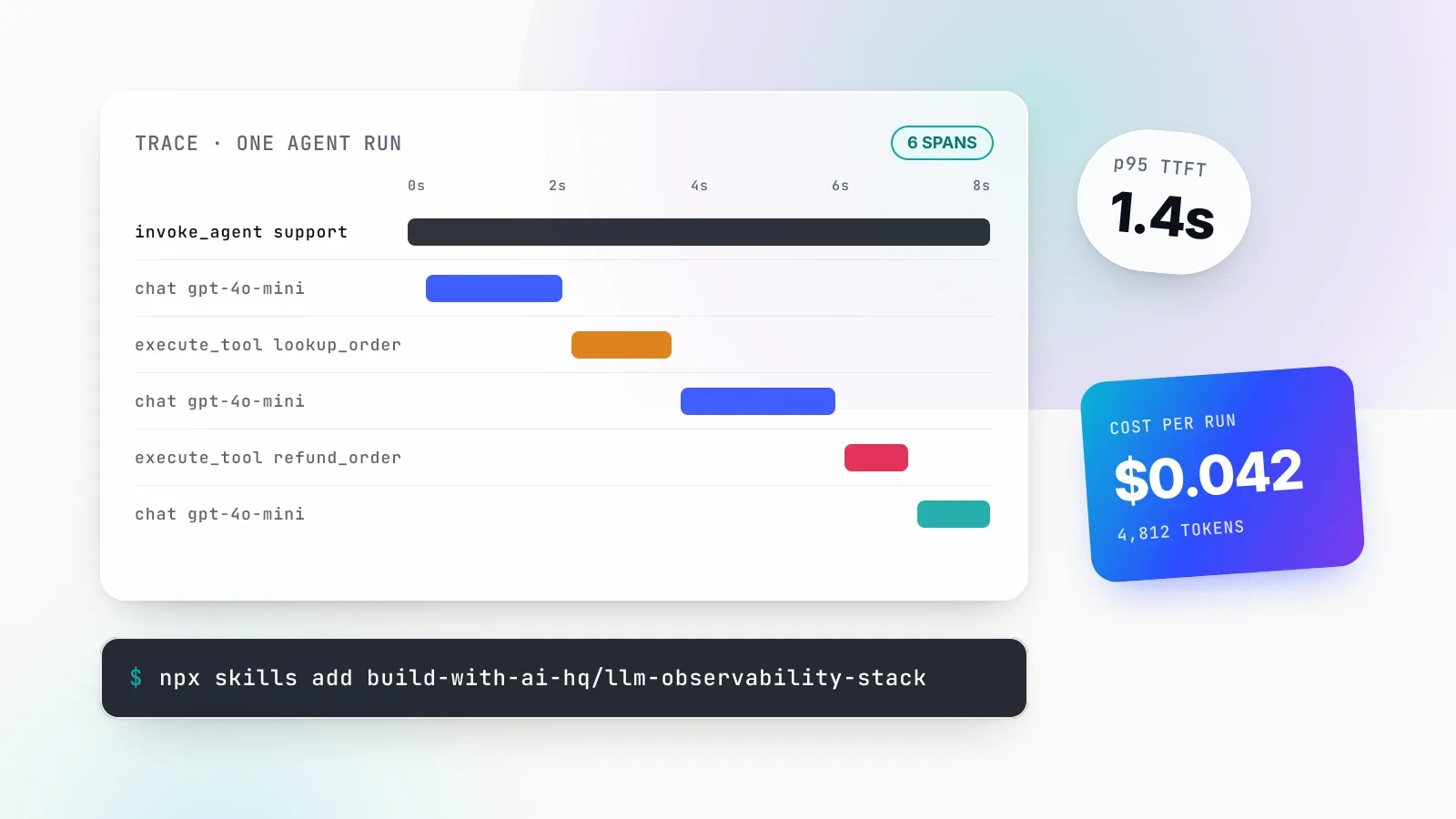
A single chat call is easy to trace. An agent that plans, calls a model, runs three tools, calls a sub-agent and loops eight times is not, unless you decide the shape of the trace up front. The rule from the skill, which matches the OpenTelemetry agent span conventions: one trace per agent run or per user turn, with the run as the root.
trace: one user turn or one agent run
└─ invoke_agent support-agent        (run_id, session.id, user hash, feature, exit reason, step_count)
   ├─ retrieval kb.search             (query hash, top_k, doc IDs, latency)
   ├─ chat gpt-4o-mini                (step=1, tokens, cost, finish_reason=tool_calls)
   ├─ execute_tool lookup_order       (tool.call.id, args [gated], result size, error)
   ├─ chat gpt-4o-mini                (step=2, finish_reason=tool_calls)
   ├─ execute_tool refund_order       (side-effecting: always record the outcome)
   ├─ invoke_agent billing-subagent   (nested run, same trace)
   │  └─ chat claude-sonnet ...
   └─ chat gpt-4o-mini                (step=N, finish_reason=stop)
Span names follow the conventions: invoke_agent {gen_ai.agent.name}, execute_tool {gen_ai.tool.name} and {operation} {model} for model calls. On the root span, record the total tokens and cost (the sum of the children), the step count, the tools called and the loop’s exit reason: final_answer, max_steps, error or user_cancelled. Runaway loops show up as traces with abnormal span counts, so alert on step count above a ceiling and on the share of runs that exit on max_steps.
Two more practices make the tree hold together. Propagate the W3C traceparent header into every outbound model and tool call, so spans recorded by a gateway or provider join the same trace instead of starting new ones. And put a stable gen_ai.conversation.id or session.id on every span of a multi-turn conversation; one trace per turn with a shared session ID is the safer default, because many backends handle very long traces poorly.
The conventions now go further than most tooling. The agent span document includes a load skill span for agents that load an Agent Skill into context, named execute_tool {gen_ai.tool.name} {gen_ai.skill.name}. If your agents use skills, that is the span that tells you which instructions were in play when a run went wrong.
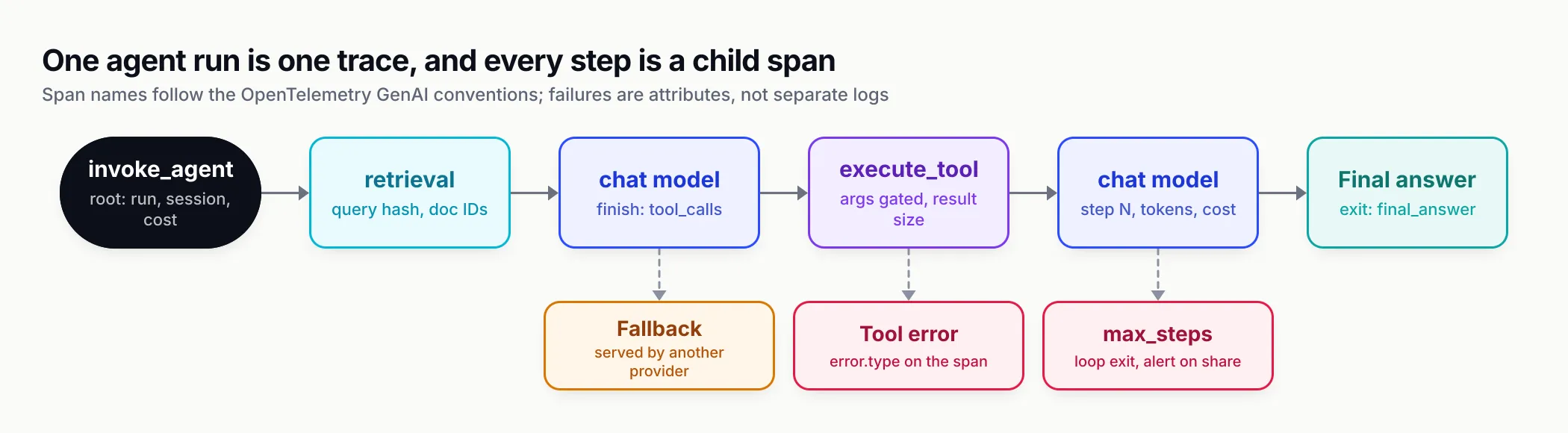
Figure 1: One run, one trace. Each model call and tool execution is a child span, and the failure branches are attributes on those spans, not separate logs.
Sampling and PII redaction
Content is where the value and the risk both sit. OWASP’s LLM02:2025 Sensitive Information Disclosure lists “personal identifiable information (PII), financial details, health records” and credentials among what an LLM application can leak, and telemetry is one of the routes.
Redact before data leaves the process
The order of preference in the skill is sound:
- Do not capture content on regulated routes (health, payments, HR). Metadata is still recorded, which is enough for cost attribution, latency analysis, error analysis and feedback joins.
- Redact at the edge, in-process or at the gateway, before content reaches any sink. Redact both prompt and output, because models echo input, and redact tool arguments and results, which often carry the most PII (order lookups, CRM records).
- Restrict access to content in the backend and keep its retention short: days to weeks for content, longer for metadata and aggregates.
A regex redactor is a floor, not a guarantee. It catches structured identifiers such as emails, phone numbers, card numbers, IP addresses and API keys, and misses names and addresses; the skill suggests a self-hosted NER-based detector such as Microsoft Presidio for free text. Hash user IDs with a salt if your observability backend is not approved for identifiers, and version the redaction function with test fixtures like any other code.
The trap is that each sink has its own switch. Bifrost’s content logging page states it plainly: content is stripped “independently at each destination”, so a log store with content disabled “says nothing about what your BigQuery table or Datadog spans contain”. The same is true of most stacks. Audit every exporter, and remember that header and dimension values (tenant IDs, correlation IDs) are usually exported regardless of content flags. Never put PII in them.
Sample by value, not by volume
| Data | Rate | Notes |
|---|---|---|
| Metrics | 100% | Aggregates only, cheap |
| Metadata record, no content | 100% | Needed for cost attribution and feedback lookup |
| Content and full trace, normal traffic | 1 to 10% | Per feature; raise after a prompt or model change |
| Errors, fallbacks, retries | 100% | Rare and valuable |
| Latency above p95 for its feature | 100% | Where the regressions hide |
| Negative user feedback | 100% | Needs a short raw buffer so content still exists when feedback arrives |
| Regulated routes | 0% content | Metadata only |
Head-based sampling at 1% throws away 99% of your rare failures before you know they are failures. Tail-based sampling decides after the trace completes. The OpenTelemetry Collector’s tail sampling processor supports status_code, latency and probabilistic policies, which map directly onto the table: keep everything with an error status, everything above a latency threshold, and a probabilistic slice of the rest.
LLM monitoring with Prometheus, Grafana and alert thresholds
Once every call produces a record, monitoring is a matter of choosing a handful of series and thresholds. The skill’s dashboards and alerts reference proposes one Grafana dashboard, top to bottom: a health row (request rate, error rate excluding caller errors, p95 latency, p95 TTFT, cost per hour, in-flight requests), then errors by type, latency by model, spend by feature and team, resilience (fallback share, retries, key health) and quality from the eval store.
The PromQL is written against Bifrost’s metric names, which are documented on its telemetry page; if you emit OpenTelemetry metrics from app code instead, map them to the GenAI metric names above. A few of the queries that matter most:
# Error rate the on-call should care about: excludes caller mistakes and your own policy refusals
sum(rate(bifrost_error_requests_total{error_type!~"(caller|policy)_.*"}[5m]))
  / sum(rate(bifrost_upstream_requests_total[5m]))

# p95 time to first token for streams, by model
histogram_quantile(0.95,
  sum by (le, provider, model) (rate(bifrost_stream_first_token_latency_seconds_bucket[5m])))

# Cost per hour by feature (feature declared as a Prometheus label)
sum by (feature) (increase(bifrost_cost_total[1h]))

# Average input tokens per request: catches prompt bloat and runaway agent context
sum by (model) (rate(bifrost_input_tokens_total[15m]))
  / sum by (model) (rate(bifrost_upstream_requests_total[15m]))

# Share of successful requests served by a fallback
sum(rate(bifrost_success_requests_total{fallback_index!="0"}[5m]))
  / sum(rate(bifrost_success_requests_total[5m]))
Starting thresholds
Thresholds depend on your SLOs, but you need somewhere to start. These are the skill’s suggested starting points; treat them as defaults to tune, not benchmarks.
| Signal | Starting threshold | Adjust for |
|---|---|---|
| Error rate (non-caller, non-policy) | 5% for 5 minutes pages; 2% for 15 minutes opens a ticket | Providers have routine noise of roughly 0.1 to 1% |
| Provider 429 share | 2% for 10 minutes | Raise it if retries and fallbacks absorb them without user impact |
| p95 latency | 2x the 7-day baseline per model, or an absolute SLO such as 20 s non-streaming | Separate streaming from non-streaming; reasoning models need their own baseline |
| p95 TTFT | 2x yesterday, or an absolute value such as 3 s for chat UIs | Long prompts raise TTFT; segment by feature |
| Fallback share | 10% for 10 minutes | Any sustained fallback is a quality and cost change |
| Cost per hour | 2x (daily budget / 24) | Compare with the same hour last week (offset 1w) for seasonality |
| Input tokens per request | 2x yesterday | Catches prompt bloat and retrieval returning too much |
| Unclassified errors | Any | Should always be zero |
Use for: durations long enough to ride out single-minute provider blips; LLM error bursts are spiky. And link every panel to the underlying requests. A Grafana data link from a latency panel to the filtered request log (or to your trace backend filtered by provider and model) is what turns a graph into a diagnosis.
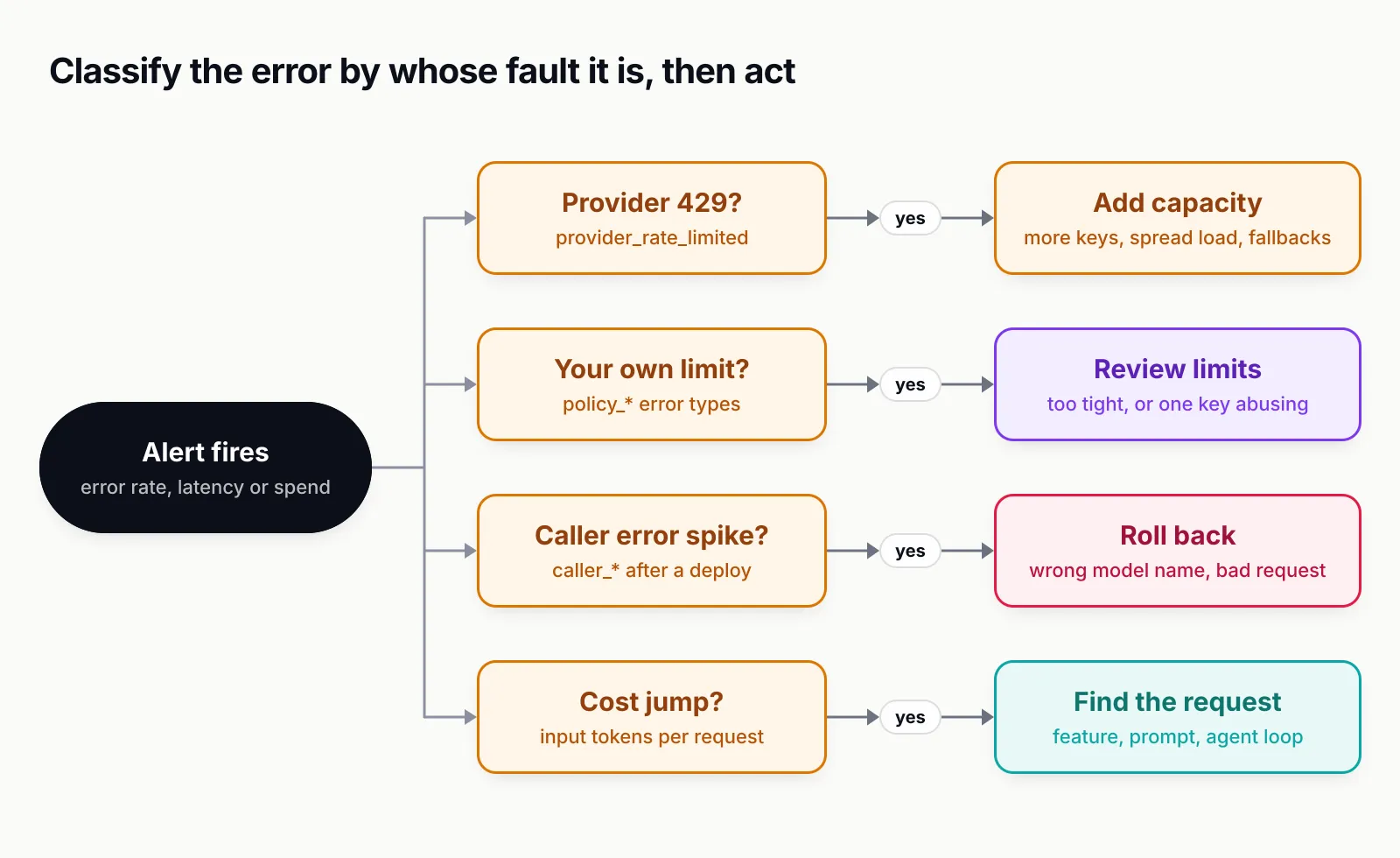
Figure 2: Classifying errors by fault domain turns a page into an action. The same status code can mean “buy capacity” or “your own limit is too tight”.
Linking user feedback to traces, and evals on production samples
Metrics tell you something is wrong. Feedback and evaluations tell you whether answers are good, and they only work if they can be joined to the exact request.
Join feedback by request ID, never by timestamp
The pattern from the skill takes five steps:
- Generate a
request_id(a UUID) in your backend before the model call and send it upstream, for example asx-request-id, so the gateway record and your own record share it. - Return the
request_idto the client with the response and store it with the message in UI state. - Have the feedback endpoint write
{request_id, user_hash, kind, comment, ts}, wherekindis thumbs up or down, edit, regenerate or copy. - Join feedback to records and traces by
request_id, either as a late span event if your backend supports it or in the warehouse. - On negative feedback, force-retain the full trace, add it to a review queue and add it to the eval candidate set.
Implicit signals are usually more plentiful than thumbs: regenerate clicks, copy events, a user rephrasing the same question within 30 seconds, and conversations abandoned right after an answer.
Score production traffic daily
Offline evals before release catch the failures you thought of. Production drifts: prompts change, providers update models, retrieval corpora grow. The skill’s production eval job runs daily (or hourly) in five steps: sample yesterday’s records stratified by feature and model, always including negative-feedback and fallback records; score with cheap deterministic checks first (schema validity, length bounds, required citations, forbidden phrases), then with an LLM judge using a task-specific rubric; store scores keyed by request_id with the judge model and rubric version; track mean score and failure rate per feature and prompt version as time series and alert on drops; and promote reviewed failures into the offline regression dataset so the same failure cannot ship twice.
Judge hygiene matters as much as the judge. Calibrate it against 50 to 100 human-labelled examples before trusting it and report agreement. Version the rubric, because a rubric change resets the baseline. And tag the judge’s own traffic with a dedicated feature dimension so it does not pollute product dashboards or cost reports.
SDK instrumentation or gateway-level capture
There are three ways to make every call produce the same record, and they differ mainly in how much coverage you get per unit of effort.
- Auto-instrumentation libraries per SDK. OpenTelemetry’s GenAI instrumentations and community libraries patch the OpenAI, Anthropic and other SDKs to emit spans. They work, but versions and attribute names drift across languages, and each service must install and configure them.
- A shared client wrapper per language that every service must import, enforced by lint or code review. More control, more code to maintain, and it still drifts when someone calls the SDK directly.
- A gateway in front of every provider. Every service changes a base URL and gets the same record, in every language, with no per-SDK code. This is the approach our explainer on what an AI gateway is describes in general terms.
The skill orders them the other way round, gateway first, and we agree for any team with more than one service calling models. Hand instrumentation drifts: one service forgets include_usage, another swallows errors, a third logs raw prompts with the application logger “temporarily”. A single choke point records every request the same way.
A gateway cannot see everything, though. It sees the model call, not the agent loop around it, the retrieval that built the context, the business logic in a tool, or whether the user got what they needed. So the realistic setup is a gateway for the per-call record plus a small number of app-side spans for the agent run, retrieval and tools, joined by traceparent. If the gateway exports OpenTelemetry spans, do not also create a duplicate span per model call in app code; propagate the trace context instead and let the gateway’s span nest under your step span.
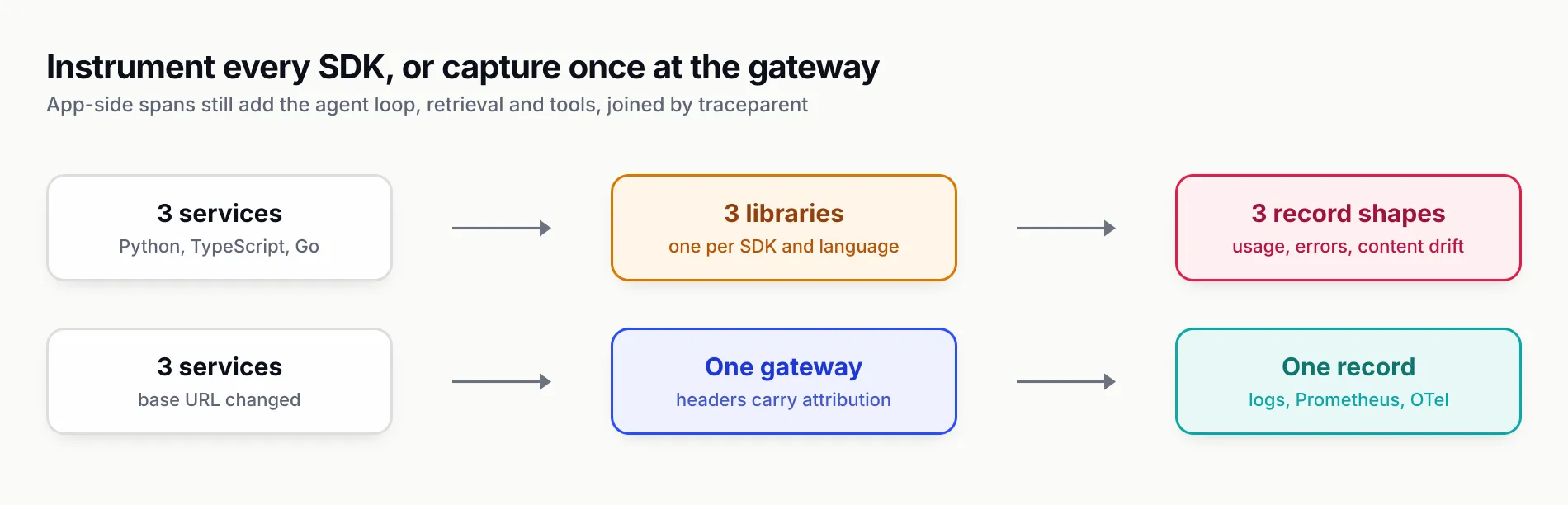
Figure 3: Instrumenting each SDK multiplies the places a record can drift. A gateway gives every service the same record, and app spans add only what the gateway cannot see.
What gateway capture looks like with Bifrost
Bifrost, the open-source gateway from Maxim AI, is the capture point the skill builds on, and its documentation covers each piece. Pointing an existing OpenAI SDK at it is a base URL change; attribution travels as headers:
import uuid
from openai import OpenAI

client = OpenAI(
    base_url="http://localhost:8080/openai",     # Bifrost drop-in route for the OpenAI SDK
    api_key="sk-bf-...",                          # Bifrost virtual key
    default_headers={"x-bf-dim-environment": "production", "x-bf-dim-service": "support-api"},
)

request_id = str(uuid.uuid4())
raw = client.chat.completions.with_raw_response.create(
    model="gpt-4o-mini",
    messages=[{"role": "user", "content": "Summarise this ticket..."}],
    extra_headers={
        "x-request-id": request_id,               # becomes the log ID; join feedback on it
        "x-bf-dim-feature": "ticket-summary",     # logs, OTel spans, Prometheus label if declared
        "x-bf-session-id": "conv-8812",           # groups turns and agent steps
    },
)
print(raw.headers.get("x-bifrost-routing-info-provider"),
      raw.headers.get("x-bifrost-routing-info-is-fallback"))
From there, per the documentation as of 28 October 2026:
- Request logs. The built-in observability plugin records input and output messages, parameters, provider and model, tool calls, tokens, cost, latency, status, errors and the retry and key-selection trail, and exposes them in a logs UI and a filterable
GET /api/logsendpoint. A log’s ID is its request ID, so the request behind a complaint is one lookup away. The vendor reports the logging plugin adds under 0.1 ms of processing overhead in its benchmarks, with writes happening asynchronously. - Prometheus metrics at
/metrics, on by default: request, error, token and cost counters, provider latency, stream TTFT and inter-token histograms, gateway overhead, retries, key health and MCP tool call durations. Custom dimensions sent asx-bf-dim-*become labels only if declared inclient.prometheus_labels, which keeps cardinality under your control. - OpenTelemetry traces via the otel plugin with GenAI-convention spans to any OTLP collector. For streams it exports two TTFT values:
bifrost.response.time_to_first_token_ms, measured from request received (what callers see), andgen_ai.response.time_to_first_chunk, which reflects only the provider. Failures carrybifrost.error.typewith the same vocabulary as the metrics, including requests refused before reaching a provider. Withgroup_traces_by_session, requests sharing a session ID become one trace; an incomingtraceparentalways wins. - Response headers that report who actually served the call. The routing headers include the served provider and model, the requested model, whether a fallback served it and which, the key name used (never the secret), and upstream latency, so app code can log provider time next to its own end-to-end timing.
- Content controls at four layers: global, per virtual key, per request (
x-bf-disable-content-logging, honoured only when the override is enabled) and per exporter.
Together these cover the first five practices in the skill (a single choke point, the fixed record, TTFT, loud failures and attribution) and much of the agent tracing, redaction and sampling work. Maxim AI describes the same capture layer on its AI observability page. Native exporters to Datadog, BigQuery, Kafka and similar sinks, log exports to object storage and built-in alerting come with the enterprise tier; the open-source build covers logs, Prometheus and OpenTelemetry. Our comparison of LLM gateways covers how other gateways approach the same job.
LLM observability tools by category
Most “best LLM observability tools” lists rank products that do different jobs against each other. It is more useful to sort them by where they capture data and what question they answer. The table is a map of categories, not a feature comparison; where we make a specific claim about a product, we link the documentation passage it comes from.
| Category | What it does | Examples (October 2026) | Best for | Watch out for |
|---|---|---|---|---|
| OpenTelemetry-native tracing | Instruments SDKs and frameworks to emit GenAI spans to any OTLP backend | OpenTelemetry GenAI instrumentations, OpenLLMetry, OpenLIT, Arize Phoenix, Langfuse | Teams already on OpenTelemetry who want agent traces in their existing backend | Semconv version drift; one library per SDK and language |
| Gateway-level capture | Records every call at a proxy in front of all providers: logs, metrics, traces | Bifrost, LiteLLM (Prometheus metrics), Cloudflare AI Gateway (logging), Kong AI Gateway | Many services or languages; cost attribution; fallback visibility | Cannot see the agent loop, retrieval or business outcome on its own |
| APM vendors with LLM views | Adds LLM-specific views (tokens, cost, traces) to an existing APM product | Datadog LLM Observability, New Relic, Dynatrace, Elastic, Grafana Cloud | Organisations that want LLM signals next to the rest of their services | Per-span pricing at LLM volumes; content governance in a third-party backend |
| Evaluation platforms | Scores quality offline and on production samples, manages datasets and human review | Maxim AI, LangSmith, DeepEval, Ragas, Arize | Answering “was it good” and catching regressions by prompt version | Need a reliable join key (request ID) back to the capture layer |
These categories stack rather than compete. A common production shape is a gateway as the capture point, Prometheus and Grafana for the monitoring layer, an OpenTelemetry backend for traces that include app-side agent spans, and an evaluation job or platform reading sampled records. Pick the capture point first, because every other tool is only as good as the records it receives.
Setting it up with the llm-observability-stack skill
The llm-observability-stack skill packages everything above as instructions a coding agent can follow inside your repository. It is MIT-licensed, version 1.0.0, and follows the Agent Skills format: a SKILL.md with a name and a description that tells the agent when to load it, plus three reference files the agent opens only when a task needs them.
# See what the package contains without installing
npx skills add build-with-ai-hq/llm-observability-stack -l

# Install into this project for Claude Code
npx skills add build-with-ai-hq/llm-observability-stack -a claude-code -y

# Or for Codex (lands in .agents/skills, which several agents read)
npx skills add build-with-ai-hq/llm-observability-stack -a codex -y

# Check what is installed, and update later
npx skills list
npx skills update -p -y
The -a flag appears in the skills CLI README; -l, -y, list and update -p are listed in the CLI’s own --help output, which is where we checked them.
What the skill does when loaded
The description lists the phrases that trigger it: “why was this response bad”, “we have no visibility into our LLM calls”, “TTFT is slow”, “silent 429s”, “token costs blew up and we don’t know who”, “trace my agent run”, “add OpenTelemetry to LLM calls”, “our logs contain PII”, “alert on LLM errors” and “evaluate production traffic”. When one of them comes up, the agent:
- Runs a six-part diagnosis with grep: where LLM calls happen across Python, TypeScript, JavaScript and Go; what instrumentation already exists; prompts or completions written to plain logs; streams without
include_usage; swallowed exceptions around model calls; and whether user, session or feature identity is passed with each call. - Applies ten practices in order of impact: one choke point, the fixed per-call record, TTFT versus total latency, loud failures and fallbacks, cost attribution with safe cardinality, agent traces with GenAI conventions, content treated as sensitive by default, deliberate sampling, feedback joined by request ID, and scoring production traffic.
- Sets up gateway-level capture with Bifrost where it removes per-SDK work, with config blocks for the log store (SQLite for development, Postgres at volume), content controls, Prometheus labels, the otel plugin and the response headers.
- Builds the dashboard and alert rules from its PromQL reference, with a runbook mapping each symptom to a first query, a likely cause and an action.
- Verifies end to end with curl checks and a checklist: a forced provider failure appears as an error record and an alert, a streamed call has non-zero tokens and cost, a request ID in the UI resolves to exactly one record with feedback attached, a request with content logging disabled has no messages in the log store or in any exporter, and one agent run renders as one trace.
The reference files are where the depth is: what-to-capture holds the record schema, cardinality rules, Python and TypeScript span code, redaction patterns, the sampling table and the production eval job; bifrost-telemetry holds gateway configuration and its pitfalls; and the dashboards file holds PromQL, alert rules and thresholds.
What it does not do
The skill is a set of instructions, not a running service. It does not host a tracing backend, store your logs, or run the eval job for you; it writes code and configuration you then deploy. It does not choose a tracing vendor or an evaluation platform. And like any third-party skill, it runs with your agent’s permissions; the CLI says as much after every install.
How we tested
On 28 October 2026 we installed the skill with the skills CLI version 1.7.4 in a fresh, empty git directory with telemetry disabled (DISABLE_TELEMETRY=1 DO_NOT_TRACK=1). What happened:
npx skills add build-with-ai-hq/llm-observability-stack -lcloned the repository and reported one skill,llm-observability-stack, with its full description.npx skills add build-with-ai-hq/llm-observability-stack -a claude-code -ycopied the skill to./.claude/skills/llm-observability-stack/:SKILL.md(274 lines, about 2,600 words),references/what-to-capture.md(415 lines),references/bifrost-telemetry.md(341 lines),references/dashboards-and-alerts.md(298 lines), a README, the MIT licence and three image assets. There is noscripts/folder; the checks are grep and curl commands insideSKILL.md. It also wrote askills-lock.jsonrecording the source repository and a content hash, and ended with “Review skills before use; they run with full agent permissions.”npx skills add ... -a codex -ycopied a second copy to./.agents/skills/llm-observability-stack/.npx skills listthen reported that copy as available to Antigravity, Claude Code, Codex, Cursor, Gemini CLI and one more agent.npx skills update -p -ychecked the project skill and reported it up to date.
We then ran the skill’s six diagnosis commands, unchanged, against a two-file sample app: a Python function that logged the prompt, streamed a completion without stream_options and wrapped it in except Exception: pass, and a TypeScript function that logged the completion with console.log. The greps found both call sites, found no existing instrumentation, flagged both content-logging lines, flagged the stream and found no include_usage, flagged the swallowed exception, and found no user, session or request identity on either call. That is every problem we planted.
We did not run an agent session with the skill loaded, and we did not run the Bifrost gateway for this article; the gateway behaviour described above comes from its documentation as read on 28 October 2026. We also read the OpenTelemetry GenAI conventions on the new repository’s main branch on the same date, which is where the naming differences noted above come from.
What to do this week
If you run LLM features in production and cannot answer “what exactly did the model see for this complaint”, start with the record, not the dashboard.
- Pick one capture point. Put a gateway in front of every provider or mandate one shared client wrapper. Everything else depends on every call producing the same record.
- Fix the silent gaps first. Add
include_usageto every stream, removeexcept: passaround model calls, treatfinish_reasonoflengthorcontent_filteras an error, and record fallbacks. - Return a request ID to the client and join feedback on it. This one change makes every later investigation faster.
- Turn content into a policy. Decide which routes capture content, redact at the edge, set short retention, and audit every exporter’s content setting separately.
- Alert on whose fault it is. Error rate excluding caller and policy errors, provider 429 share, p95 TTFT, fallback share, cost per hour against budget, and unclassified errors at zero.
- Score a daily sample of production traffic and track it by prompt version. Quality regressions should reach you before users do.
The llm-observability-stack skill will walk a coding agent through all six in your own repository, starting with the grep that tells you where you stand:
npx skills add build-with-ai-hq/llm-observability-stackSources
- Semantic conventions for generative AI client inference (span gen_ai.client.inference and metrics) OpenTelemetry
- Semantic conventions for generative client AI spans: capturing instructions, inputs and outputs OpenTelemetry
- Semantic conventions for GenAI agent and framework spans OpenTelemetry
- Semantic conventions for generative AI inference token metrics OpenTelemetry
- Moved: Generative AI semantic conventions OpenTelemetry
- OpenTelemetry OpenAI instrumentation (opentelemetry-instrumentation-genai-openai) OpenTelemetry
- Tail sampling processor OpenTelemetry
- Metric and label naming Prometheus
- Chat completions API reference: stream_options OpenAI
- LLM02:2025 Sensitive Information Disclosure OWASP GenAI Security Project
- Bifrost built-in observability Maxim AI
- Bifrost content logging Maxim AI
- Bifrost Prometheus metrics and error types Maxim AI
- Bifrost OpenTelemetry plugin Maxim AI
- Bifrost response headers Maxim AI
- Bifrost request options Maxim AI
- Cloudflare AI Gateway logging Cloudflare
- LiteLLM Prometheus metrics LiteLLM
- Agent Skills specification agentskills.io
- skills CLI repository and README Vercel Labs
- llm-observability-stack skill repository build-with-ai-hq
Frequently asked questions
What is LLM observability?
LLM observability is the practice of recording every model call with enough detail to explain it later: the prompt and output (redacted where needed), the provider and model that served it, tokens, cost, time to first token, total latency, errors, tool calls and who triggered it. It extends ordinary tracing and metrics with the signals that matter for language models, including quality scores on production traffic.
What is the difference between LLM monitoring and LLM observability?
LLM monitoring watches known signals such as error rate, p95 latency and hourly spend, and alerts when they cross a threshold. LLM observability is the wider capability behind it: per-request records and traces detailed enough to answer questions you did not plan for, such as why one user got a bad answer from one prompt version.
What should I log for every LLM call?
At minimum a request ID returned to the client, trace and session IDs, requested and served model, provider, fallback and retry count, input, output and cached tokens, cost computed at capture time, TTFT for streams and total latency, a normalised error type, finish_reason, and attribution fields such as feature, environment and prompt version. Prompts and outputs should be captured only under a redaction and retention policy.
Does OpenTelemetry support LLM tracing?
Yes. OpenTelemetry publishes GenAI semantic conventions for inference spans, agent and tool spans, token metrics and time to first chunk. They are still marked as in development and moved to a dedicated repository in 2026, so pin the version your instrumentation emits and check attribute names on a real span before writing dashboards.
Should I instrument the SDK or capture LLM calls at a gateway?
Capture at a gateway when several services or languages call models, because one configuration covers all of them and the record is identical everywhere. Keep app-side spans for what the gateway cannot see: the agent loop, retrieval, tool logic and business outcome. Propagate traceparent so both appear in one trace.
What are the best LLM observability tools?
It depends on which job you need done. OpenTelemetry-native tracers record spans, gateways such as Bifrost, LiteLLM or Cloudflare AI Gateway capture every call centrally, APM vendors add LLM views to existing dashboards, and evaluation platforms score quality. Most production teams combine a capture point, a tracing backend, Prometheus and Grafana for alerts, and an eval job.
How do I keep PII out of LLM logs and traces?
Redact before content leaves the process or gateway, disable content capture for regulated routes, hash user IDs, and set short retention for content. Check every sink separately: in many stacks, turning content off in the log store does not turn it off in the trace exporter, and header or dimension values are exported regardless of content settings.