ToolsExplainer
Claude Code enterprise rollout: a phased plan with budgets, managed settings and logs
How to roll Claude Code, Codex, Cursor and Copilot out to an engineering organisation: managed-settings.json, per-developer budgets, Bedrock residency, MCP allowlists, CI keys.
A Claude Code enterprise rollout is mostly not about Claude Code. Installing the agent takes a minute. The work is deciding, once, who may use which models through which provider, how much each person and pipeline may spend, which MCP servers may run, what gets logged, and then making those decisions stick on every laptop and CI runner. Do it badly and you get the familiar pattern: one Anthropic key pasted into a Slack thread, a surprise invoice with no per-person breakdown, and a dozen unreviewed MCP servers launched with npx -y.
This guide is a phased rollout plan for engineering organisations that want Claude Code for teams, usually alongside Codex CLI, Cursor and GitHub Copilot. It covers Claude Code’s managed-settings.json, per-developer budgets through a gateway, model and provider control including Bedrock and Vertex for data residency, MCP server allowlists, CI usage with budgets, and the logs and metrics that prove the rollout is working. Every setting below was checked against Anthropic’s, OpenAI’s, Cursor’s and GitHub’s documentation in October 2026.
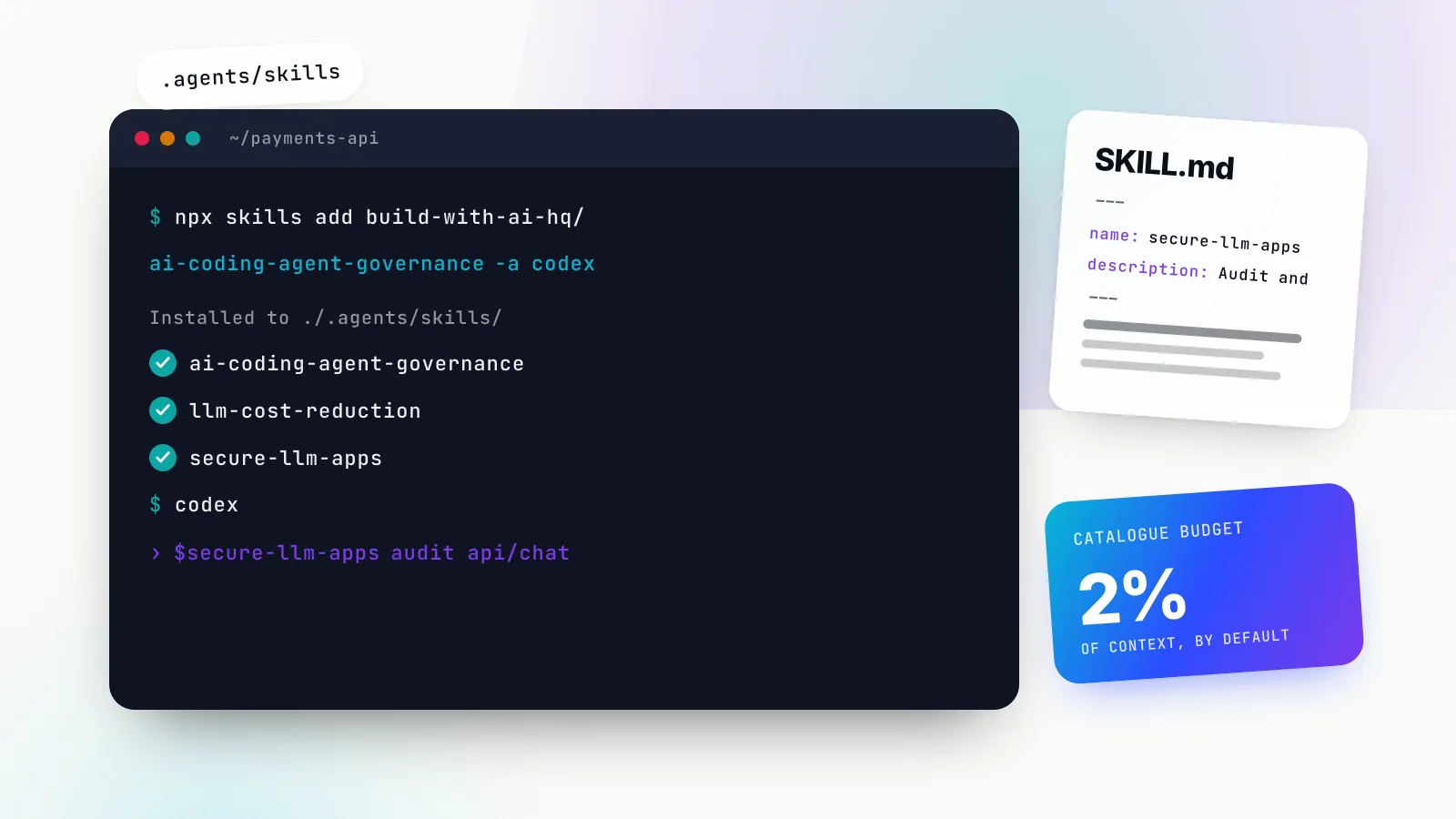
The plan follows the structure of ai-coding-agent-governance, an MIT-licensed Agent Skill from build-with-ai-hq (skills.sh listing) that packages the audit commands, rollout checklist, per-tool configuration and key provisioning scripts so your own coding agent can work through them with you. Installing it takes one command:
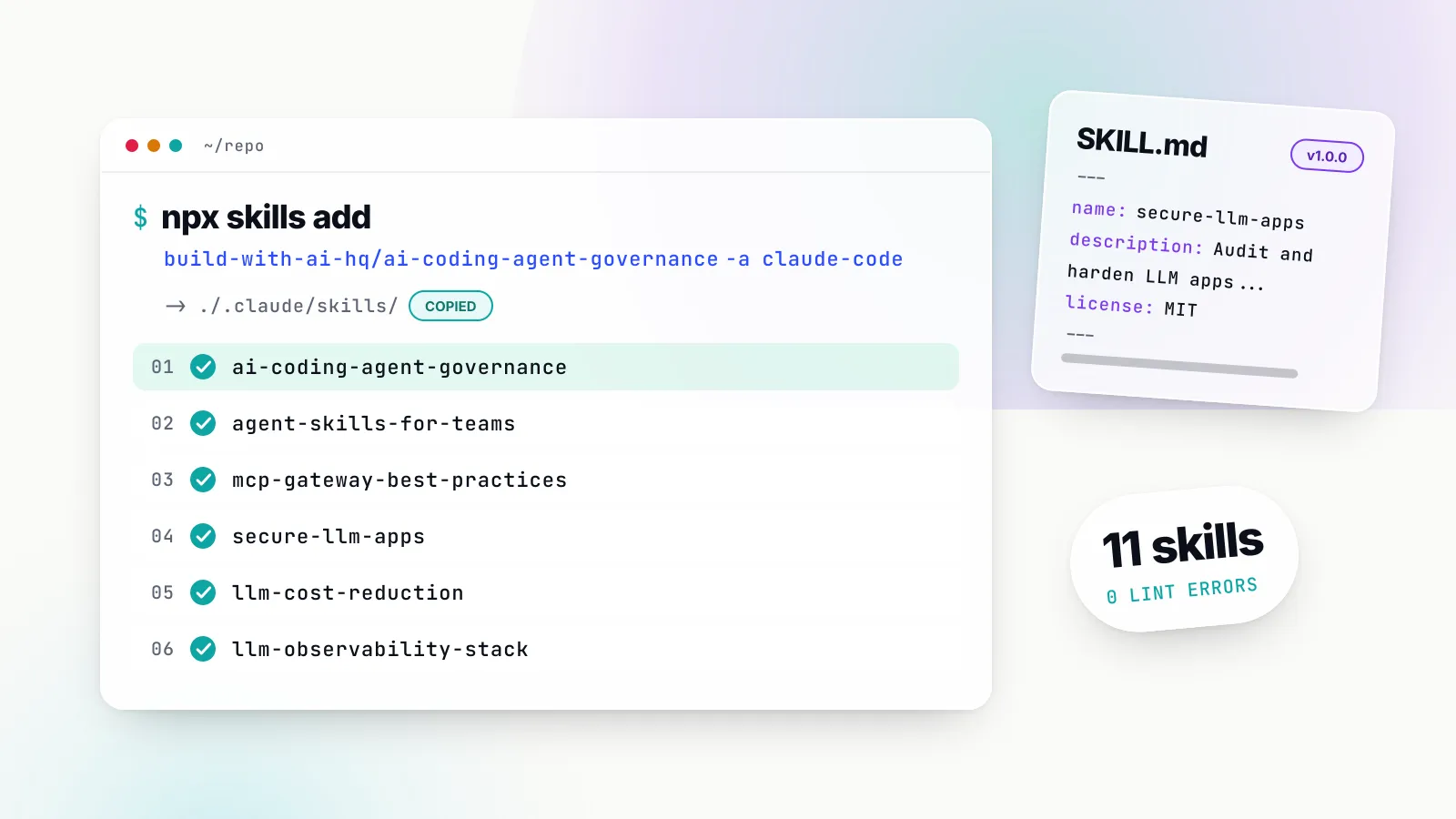
npx skills add build-with-ai-hq/ai-coding-agent-governanceIf you also need to distribute your team’s own skills to every developer, the companion agent-skills-for-teams skill (skills.sh listing) covers versioning and rollout of those:
npx skills add build-with-ai-hq/agent-skills-for-teamsIf skills are new to you, our Claude Skills explainer covers how SKILL.md folders load. This piece assumes you know what Claude Code is and want to put it in front of a hundred engineers without losing control.
What a Claude Code enterprise rollout has to control
Coding agents are the highest-volume model consumers in most companies. One agentic session can make hundreds of model calls, read most of a repository, run shell commands and start MCP servers on the developer’s machine. The governance skill frames the job as six controls, each answering one question:
| Control | Question it answers | Enforced by |
|---|---|---|
| Identity | Which person or pipeline made this call? | One credential per developer and per pipeline, never shared |
| Spend | How much can each person or team spend per day and month? | Budgets and rate limits on that credential |
| Models and providers | Which models, through which provider and region? | Gateway model allowlist plus agent model settings |
| Data | Which code may leave, to whom, and is it retained? | Provider contracts, egress pinning, content logging, file deny rules |
| Tools | Which MCP servers and shell actions can the agent use? | Central MCP endpoint plus client-side allowlists |
| Evidence | Who sent what, when, at what cost? | Gateway request logs with retention |
The pattern the skill recommends is simple to state: route every agent through one gateway, give each developer and each CI job its own key on that gateway, and pin the agent configuration with managed settings so it cannot be bypassed. Anthropic’s own LLM gateway guide describes almost the same sequence: deploy the gateway with the provider credential, issue each developer a gateway credential, distribute the configuration through a managed settings file, then have each developer verify it.
The rest of this article is the detail behind each of those steps, in the order you would do them.
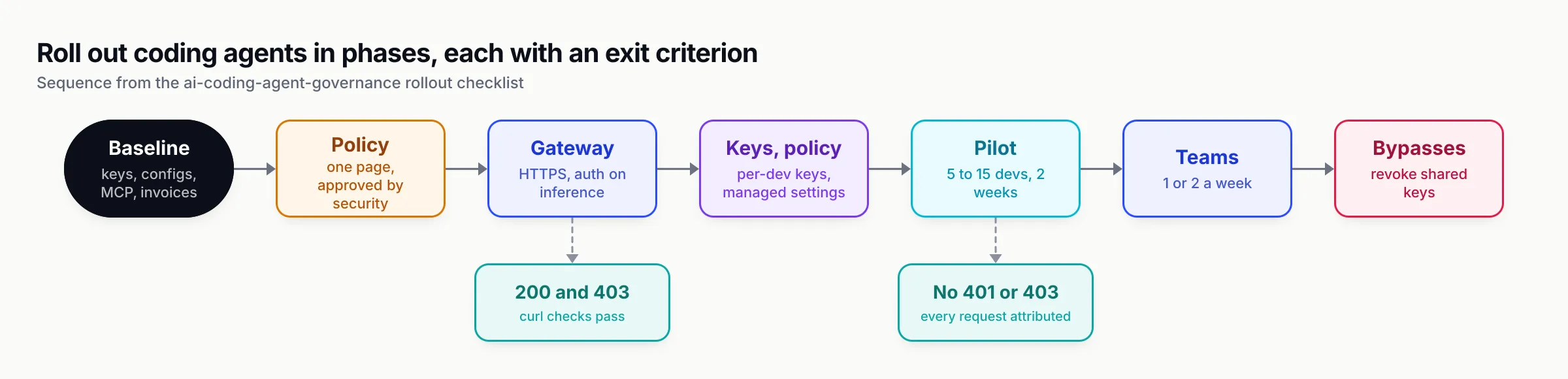
Figure 1: Each phase has an exit criterion. Widening the rollout before the previous one is met is how shared keys and unmanaged MCP servers survive into production.
Claude Code enterprise options: seats, API, cloud or gateway
Before any configuration, decide how Claude Code reaches Claude, because it decides billing, which controls you get for free and which features work. Anthropic’s organisation setup guide lists five providers: Claude for Teams or Enterprise seats (its default recommendation), the Claude Console with pay-as-you-go API billing, Amazon Bedrock, Google Cloud’s Agent Platform (formerly Vertex AI) and Microsoft Foundry.
Plan prices, seat tiers and per-token rates are covered in our Claude Code pricing explainer, so this guide does not repeat them. What matters here is what each route gives an administrator:
| Route | See spend | Cap spend | Per-user reporting |
|---|---|---|---|
| Teams or Enterprise seats | Spend report in org analytics | Seat allowance, then spend limits on usage credits | Spend report CSV; Enterprise Analytics API on Enterprise |
| Claude Console (API) | Console usage page | Workspace spend limits | Console dashboard, Claude Code Analytics API |
| Bedrock, Agent Platform, Foundry | Cloud billing console | Cloud budget controls | OpenTelemetry or an LLM gateway |
That table is condensed from Anthropic’s cost management page. Two details in it shape every later decision.
First, seat plans and the cloud routes cover different halves of the problem. Seats give you server-managed settings from the claude.ai admin console, an analytics dashboard and spend limits at organisation, group or member level, but only for usage-credit spend beyond the seat allowance. Cloud routes give you regional data handling and your existing cloud contract, but no per-developer budget at all: the cloud console sees one account.
Second, some Claude Code features need a claude.ai account. Anthropic lists cloud sessions, cloud scheduled tasks, Code Review, Remote Control and the Chrome extension as unavailable through Console API keys or cloud credentials alone. If you deploy through Bedrock, plan whether developers also need seats.
Where a gateway fits
A gateway sits between Claude Code and whichever provider you chose. Anthropic’s gateway page lists what it adds: provider keys stay server-side, usage is attributed per developer or team regardless of provider, budgets and rate limits are enforced in one place, every request is logged, and the provider can be switched without touching developer machines.
There is one billing subtlety the gateway page is explicit about, under subscriptions and gateways. When a gateway credential (ANTHROPIC_AUTH_TOKEN, ANTHROPIC_API_KEY or apiKeyHelper) is active, requests carry that credential instead of the developer’s claude.ai login, the seat’s usage limits do not apply, and the traffic is billed per token to whoever owns the key the gateway forwards. If you set only ANTHROPIC_BASE_URL and leave the developer signed in, the subscription stays the active credential.
So you can run two shapes of rollout:
- Per-token through the gateway. Developers hold only a gateway key. Billing goes to your Console, Bedrock or Vertex account. The gateway is the budget authority.
- Seats plus gateway governance. Developers sign in with their Teams or Enterprise seat, and the gateway key travels in a header for logging and attribution. Bifrost’s Claude Code page documents this as subscription mode: set
ANTHROPIC_CUSTOM_HEADERStox-bf-vk: <key>and do not set any of the three credential variables.
Mixed estates are common: seats for interactive developers, per-token keys for CI and for teams whose code must stay on a regional cloud deployment. Our Claude platform admin guide covers the Console side of that split: workspaces, roles and the Admin API.
Phase 0 and 1: baseline audit and a one-page policy
The skill’s rollout checklist starts with a week of measurement, run in parallel with writing the policy. You cannot set sensible budgets or allowlists without knowing what is already happening.
Audit what is already there
Run the skill’s quick-diagnosis commands on a sample of developer machines and in your main repositories. They look for raw provider keys in the environment, shell profiles and git history, agent configuration files that point somewhere unexpected, any managed policy already in force, and MCP servers each agent will start:
# Raw provider keys in env and shell profiles (values redacted)
env | grep -Ei 'ANTHROPIC|OPENAI|GEMINI|AZURE_OPENAI|COPILOT_PROVIDER' | sed 's/=.*/=<redacted>/'
git grep -nE 'sk-ant-|sk-proj-|ANTHROPIC_(API_KEY|AUTH_TOKEN)' -- ':!*.lock' | cut -c1-120

# Managed policy already in force?
ls -l "/Library/Application Support/ClaudeCode/" /etc/claude-code/ 2>/dev/null

# MCP servers Claude Code will start
claude mcp list
How to read the results: any provider key in a profile, .env or committed settings file is the shared-key problem, so plan to revoke it once the gateway is live. Credentials in a project .claude/settings.json or .vscode/mcp.json are visible to everyone with clone access. No managed settings means every developer can point the agent anywhere and add any MCP server. A stdio MCP server launched with npx -y <package> is arbitrary npm code running with the developer’s credentials.
Also collect the last three provider invoices and any per-key usage export. If spend cannot be split by person today, attribution is the first thing to fix. And record baseline delivery metrics per team (PR cycle time, review rework, change-failure rate) so you can compare later.
Write the policy on one page
The checklist includes a policy template. The point is to make every decision the configuration will encode, in language developers will read:
# AI coding agent policy
Approved agents: Claude Code, Codex CLI, Cursor (versions >= ...)
Approved providers and regions: Anthropic via Bedrock (eu-central-1), OpenAI direct
How to connect: all agents use the company gateway with your personal key.
Repositories: allowed everywhere except <regulated repos>; for those, only <provider/region>, no content logging.
Never send: production data, customer PII, secrets, private keys.
Budgets: default <$X/day, $Y/month> per developer; raise via <process>.
MCP servers: only those exposed through the gateway's /mcp endpoint.
Agent permissions: bypass mode is disabled on company machines.
Logging: requests logged with identity, model, tokens and cost; prompt content <stored N days | not stored>.
CI usage: one key per pipeline, owned by the repo's team, with a budget and expiry.
Two decisions in that template deserve real thought. The content-logging decision (store prompts and completions, and for how long, or metadata only) has legal and security consequences in both directions. And check each approved provider’s data retention and training terms before the provider goes on the list; the gateway can enforce the list but cannot fix a contract.
Phase 2: one gateway in front of Claude Code, Codex, Cursor and Copilot
Every major coding agent can target a custom base URL. Pointing them all at one gateway means spend, models, logs and tools are controlled in one place, and provider keys live only on the gateway. That is the job an LLM gateway does for a coding fleet. Our ranking of gateways for Claude Code, Codex and Cursor compares five options; the skill defaults to Bifrost, Maxim AI’s open-source gateway, because it speaks the Anthropic, OpenAI and Gemini wire formats these agents use and has per-key budgets, model allowlists, MCP aggregation and request logs built in. The commands in the rest of this guide use Bifrost’s API, but the shape of the plan does not depend on it.
For a trial, the gateway runs locally with npx -y @maximhq/bifrost or the maximhq/bifrost Docker image. For a team, the checklist’s production items are: deploy once on an internal HTTPS host rather than on each laptop, pin a version, persist the data directory, use Postgres for the shared log store, enable dashboard authentication, and set enforce_auth_on_inference so every inference call needs a key. Add provider keys only for approved providers and regions.
The most common rollout failure is the wrong URL shape per agent: a 404, or a silent fallback to the vendor’s own login. The skill’s per-tool reference gives the shapes:
| Agent | Base URL | Credential |
|---|---|---|
| Claude Code | https://<gw>/anthropic in ANTHROPIC_BASE_URL | Key in ANTHROPIC_AUTH_TOKEN or apiKeyHelper |
| Codex CLI | https://<gw>/openai/v1 in a named [model_providers.bifrost] | Key in the variable named by env_key |
| Cursor | https://<gw>/cursor via Override OpenAI Base URL | Key in the OpenAI API Key field |
| Copilot CLI | https://<gw>/openai/v1 in COPILOT_PROVIDER_BASE_URL | Key in COPILOT_PROVIDER_API_KEY |
| Gemini CLI | https://<gw>/genai in GOOGLE_GEMINI_BASE_URL | Key in GEMINI_API_KEY |
Three agent-specific traps account for most first-week tickets:
- Codex needs a named provider. OpenAI’s custom model providers mechanism is a
[model_providers.<id>]table in~/.codex/config.toml. Setting onlyOPENAI_BASE_URLcan leave Codex on its built-in provider, and an existing ChatGPT sign-in takes precedence over custom credentials, so run/logoutfirst. The trailing/v1on the base URL is required because Codex appends/responses. - Cursor calls from its own backend. Cursor’s API key documentation says the key “is sent to our backend with every request because all requests are routed through Cursor’s servers for final prompt building”. A gateway on
localhostor a private network therefore does not work for Cursor; it needs a public HTTPS URL protected by per-developer keys. Requests to Cursor’s own hosted models under a Cursor plan are routed and billed by Cursor, not your gateway, so decide in policy whether those are allowed. - Copilot CLI uses environment variables. GitHub’s bring-your-own-model page lists OpenAI-compatible, Azure OpenAI and Anthropic provider types, configured through
COPILOT_PROVIDER_TYPE,COPILOT_PROVIDER_BASE_URL,COPILOT_PROVIDER_API_KEYandCOPILOT_MODEL.
Before touching any agent, the skill has you curl the gateway directly with a test key: 200 means URL, key and model are fine, 401 means the key was rejected, and 403 means the key does not allow that provider or model. That one check separates gateway problems from agent configuration problems.
Phase 3: per-developer keys and budgets for Claude Code for teams
Never distribute provider keys. Give each developer a gateway key attached to their team, with a budget, a rate limit and a model allowlist. In Bifrost these are virtual keys with the sk-bf- prefix. A key with no provider configuration denies every provider, so allowlisting is the default rather than an afterthought.
The skill’s virtual-keys reference creates one like this (model IDs are examples; use the ones your policy approves):
curl -s -u "$BF_ADMIN:$BF_PASS" -X POST https://bifrost.internal.example.com/api/governance/virtual-keys \
  -H "Content-Type: application/json" \
  -d '{
    "name": "dev-alice",
    "team_id": "<platform-team-id>",
    "metadata": {"owner": "alice@example.com", "team": "platform", "cost_center": "cc-1234"},
    "provider_configs": [
      {"provider": "anthropic", "allowed_models": ["claude-sonnet-5", "claude-haiku-4-5"], "key_ids": ["*"], "weight": 1.0}
    ],
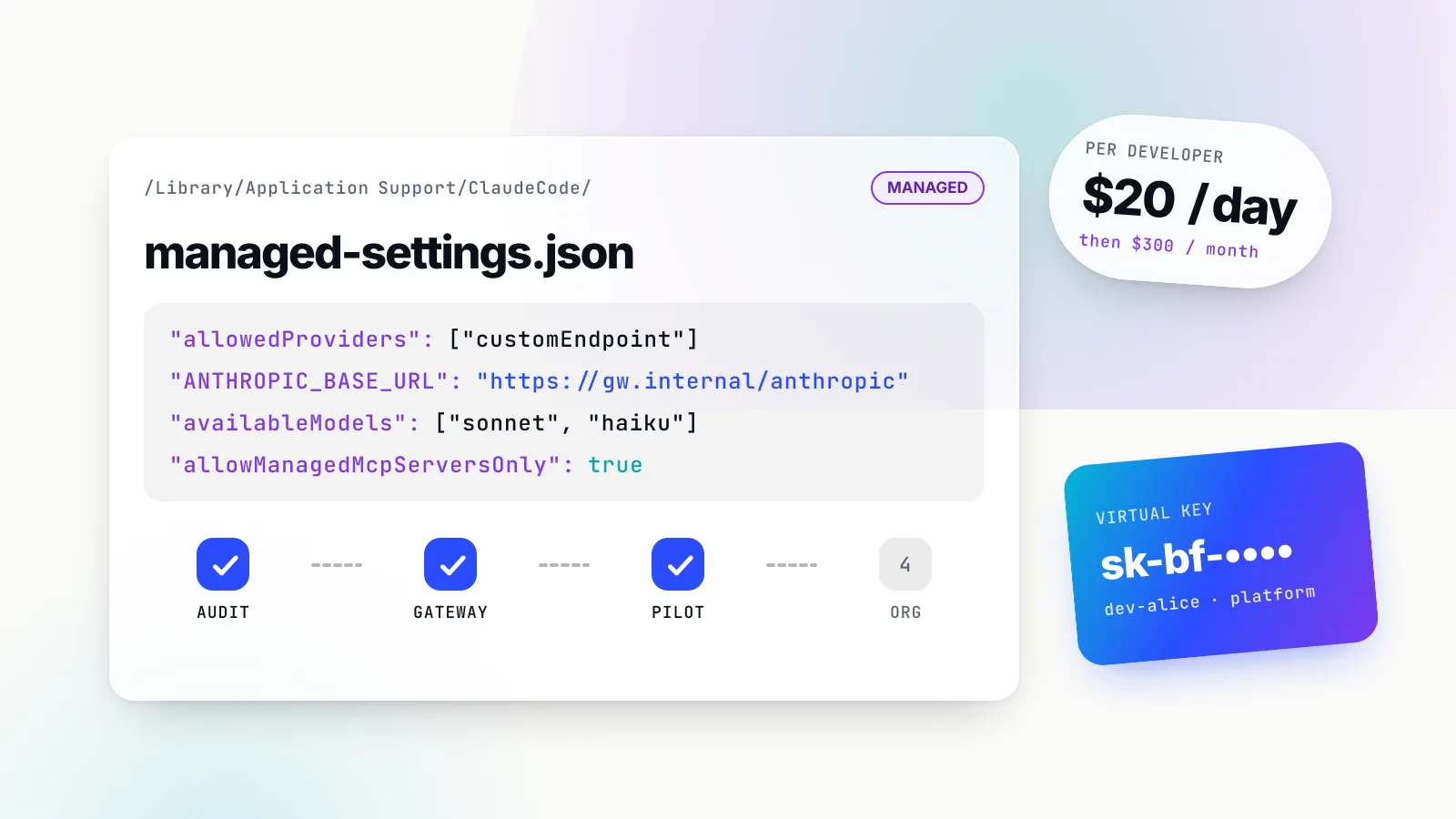
    "budgets": [{"max_limit": 20.00, "reset_duration": "1d"}, {"max_limit": 300.00, "reset_duration": "1M"}],
    "rate_limit": {"request_max_limit": 120, "request_reset_duration": "1m"},
    "is_active": true
  }' | jq -r '.virtual_key.value'
Why two budgets and a rate limit
A monthly budget on its own is the most common mistake the skill calls out: a runaway agent loop can spend the whole month in an afternoon. The pattern is a daily cap that stops loops, a monthly cap for the plan, and a requests-per-minute limit that catches tight loops before they cost much. Reset durations in Bifrost run from 1m (a minute) through 1d, 1w, 1M (a month) and 1Q, and keys can be set to reset on UTC calendar boundaries instead of rolling windows.
Budgets stack. Bifrost’s budget checking flow checks the provider-config budget, the virtual key’s budget, the team’s budget and the customer’s budget independently; any single failure blocks the request, and the cost is deducted from every level. That is how “$20 a day per developer, $3,000 a month for the platform team, a company cap above that” becomes configuration rather than a spreadsheet. Together with per-key logs, this is the AI governance layer that per-token Claude Code billing otherwise lacks.
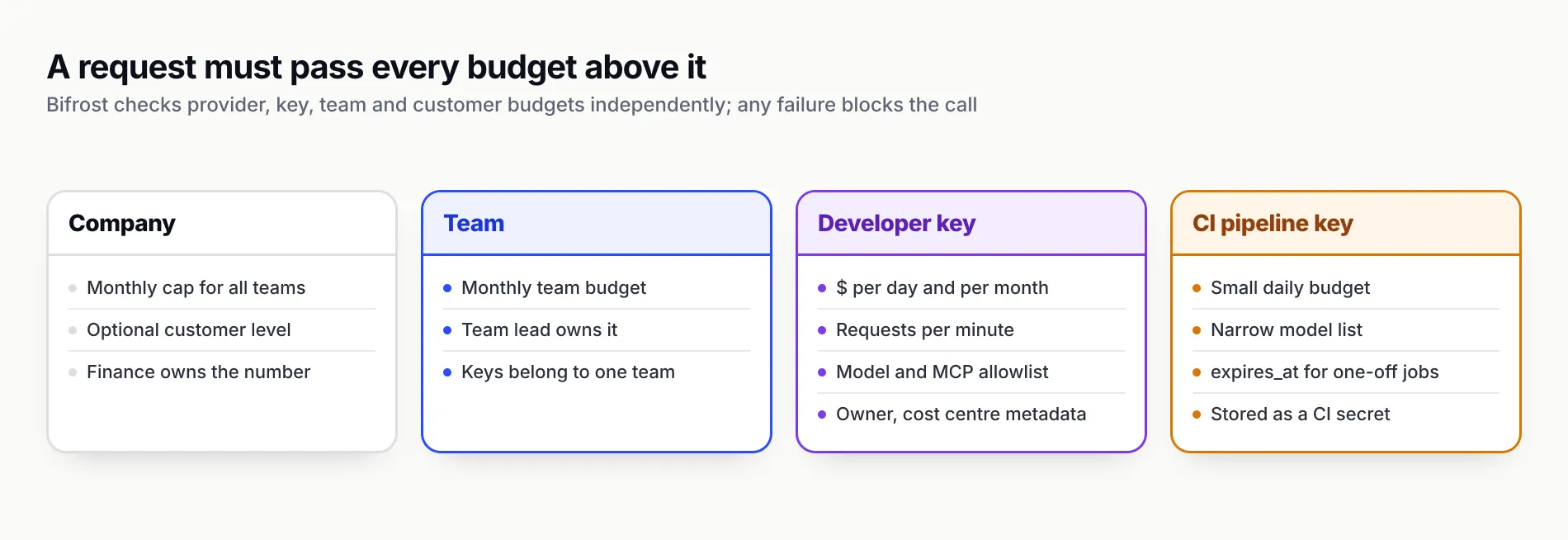
Figure 2: A request must pass every budget above it. One key per human and per pipeline is what makes both attribution and revocation possible.
Metadata is the attribution layer
Put owner, team and cost centre in the key’s metadata. Bifrost copies a key’s metadata onto every log entry made with it, so spend can be filtered by cost centre without developers sending any headers, and a caller cannot override it. The documented limits are 50 entries per key, string values up to 512 characters.
Provisioning from a roster
Do not create keys by hand. The skill’s reference includes a bash script, plus Python and TypeScript equivalents, that reads a roster.csv (email, team, daily and monthly budget), creates a key per row and writes each key straight into your secret manager rather than printing it. The same structure can be declared in the gateway’s config.json if you manage it as code.
The lifecycle table in the same reference is the part teams usually forget:
| Event | Action |
|---|---|
| Joiner | Run provisioning for the new roster row; deliver the key through the secret manager |
| Team change | Update team_id and metadata; old log entries keep the old attribution |
| Suspected leak | Set is_active to false immediately, issue a new key, review the old key’s recent logs |
| Rotation | Create the new key, update the vault entry, then deactivate the old key |
| Leaver | Deactivate on the last day; delete after the log-retention window |
Contractor and CI keys get an expires_at. An expired key is rejected for inference and MCP calls but stays visible for audit.
Deliver the key without a settings file
On Claude Code, prefer an apiKeyHelper: a script that prints the developer’s key from your vault or keychain. Claude Code re-runs it when its cache expires, on a 401 and after /login, so rotation needs no laptop changes. It must print only the key on stdout, and ANTHROPIC_AUTH_TOKEN and ANTHROPIC_API_KEY must be absent, because both outrank the helper. Bifrost also ships a CLI that stores the key in the OS keyring and launches Claude Code, Codex, Gemini CLI or OpenCode already pointed at the gateway, which suits developers who switch agents often.
Phase 3 continued: pin it with Claude Code managed settings
User settings are advisory: developers can edit ~/.claude/settings.json. Managed settings are not. Anthropic’s settings precedence puts managed settings at the top, above the command line, project local, shared project and user files: “Nothing in your own settings files or --settings overrides a managed key.”
Where the policy lives
Claude Code reads managed policy from four kinds of source, per Anthropic’s managed settings page:
| Mechanism | Location | Notes |
|---|---|---|
| Server-managed | claude.ai admin console | Teams or Enterprise plans; fetched at startup and refreshed hourly |
| macOS profile / Windows registry | com.anthropic.claudecode domain; HKLM\SOFTWARE\Policies\ClaudeCode | Via Jamf, Intune, Group Policy; checked every 30 minutes |
| File | managed-settings.json in /Library/Application Support/ClaudeCode/, /etc/claude-code/ or C:\Program Files\ClaudeCode\ | Optional managed-settings.d/ drop-ins for policy split across teams |
| Windows user registry | HKCU\SOFTWARE\Policies\ClaudeCode | Writable without elevation; a convenience, not enforcement |
By default Claude Code uses the highest-ranked source that delivers any policy and ignores the rest. If your organisation mixes seat users and Bedrock users, Anthropic suggests server-managed settings for the seat users plus a file or MDM fallback for everyone else. Anthropic publishes starter MDM templates for Jamf, Intune and Group Policy in the anthropics/claude-code repository.
The policy file
This is the skill’s managed policy, adjusted to model aliases. Every key was checked against the current settings reference:
{
  "allowedProviders": ["customEndpoint"],
  "env": {
    "ANTHROPIC_BASE_URL": "https://bifrost.internal.example.com/anthropic",
    "CLAUDE_CODE_API_KEY_HELPER_TTL_MS": "900000"
  },
  "apiKeyHelper": "/usr/local/bin/bifrost-credential",
  "availableModels": ["sonnet", "haiku"],
  "permissions": {
    "disableBypassPermissionsMode": "disable",
    "deny": ["Read(./.env)", "Read(./.env.*)", "Read(./secrets/**)"]
  },
  "allowedMcpServers": [
    { "serverUrl": "https://bifrost.internal.example.com/mcp" }
  ],
  "allowManagedMcpServersOnly": true,
  "cleanupPeriodDays": 30
}
What each key does:
allowedProviders: ["customEndpoint"]with a managedANTHROPIC_BASE_URLis the lock. Anthropic’s reference sayscustomEndpointis admitted “only for the exact value a managedenvblock pins”, and a session on an unlisted provider is refused at startup, at login and on its next API call. It requires Claude Code v2.1.285 or later, and the setting is only honoured from managed sources. A malformed value fails closed: Claude Code treats it as an empty allowlist and will not start.apiKeyHelperdelivers the per-developer key from your vault, as above.availableModelsrestricts what developers can pick with/model,--modelor themodelkey. A managed list is not merged with developers’ own entries. AddenforceAvailableModelsif you also want the auto-selected default constrained.permissions.disableBypassPermissionsModerejects--dangerously-skip-permissionsand ignores subagent definitions that ask for bypass mode.permissions.denykeeps the agent out of secret files. Deny rules from managed settings merge with lower scopes, so developers can add rules but not remove yours.cleanupPeriodDayscontrols how long session transcripts stay on disk (default 30). Include local transcripts in your retention policy.
Two incompatibilities matter. Do not combine this with forceLoginMethod or forceLoginOrgUUID: Anthropic’s admin guide notes that when either is set, sessions authenticated by ANTHROPIC_AUTH_TOKEN, ANTHROPIC_API_KEY or apiKeyHelper are blocked at startup. And on networks that only allow egress to the gateway, CLAUDE_CODE_DISABLE_NONESSENTIAL_TRAFFIC=1 blocks other traffic but also disables auto-update, so ship updates through MDM and consider requiredMinimumVersion to refuse old clients.
Verify on one machine first
Run /status in Claude Code. The Setting sources line should show Enterprise managed settings with the source in parentheses, and the status view should show your gateway as the Anthropic base URL with apiKeyHelper as the credential, not a claude.ai login. claude doctor lists any entries Claude Code dropped. Then try to break it: point ANTHROPIC_BASE_URL elsewhere in user settings and confirm Claude Code refuses to start.
For the other agents there is no equivalent policy tier with the same reach, so the skill’s advice is to ship their config files (~/.codex/config.toml, opencode.json, a managed shell profile) through the same MDM channel and treat any edit as drift that the monthly audit will catch.
Models, providers and data residency through Bedrock and Vertex
Claude Code’s opus, sonnet and haiku aliases map through environment variables, which makes the gateway the natural place to decide where each alias actually runs. Bifrost’s Claude Code page documents provider prefixes: no prefix for Anthropic direct, bedrock/ for Bedrock deployments or inference profiles, vertex/ and azure/ for those providers, and the provider’s own prefix for non-Claude models.
{
  "env": {
    "ANTHROPIC_DEFAULT_SONNET_MODEL": "bedrock/<eu-inference-profile-for-sonnet>",
    "ANTHROPIC_DEFAULT_HAIKU_MODEL": "vertex/<haiku-model-id>"
  }
}
For strict residency, the governance skill’s advice is to list only the regional provider on the key (Bedrock in the approved region, say) and not add the direct provider to the gateway at all. A key can also be pinned to specific provider credentials, such as the EU Bedrock account, through key_ids. If a provider is not configured on the gateway, no agent can reach it through the gateway; once the rollout is complete, block direct egress to api.anthropic.com and api.openai.com from developer networks to close the other path.
An alternative that avoids touching laptops at all: set the aliases to labels and let a gateway routing rule rewrite them to the target model. Changing the model behind sonnet for the whole company is then a gateway edit.
The setting that silently bypasses everything
If CLAUDE_CODE_USE_BEDROCK or CLAUDE_CODE_USE_VERTEX is left set in a shell profile, Claude Code goes straight to the cloud provider and ignores ANTHROPIC_BASE_URL. Bifrost’s documentation puts these cloud-provider variables at the top of its credential precedence for exactly that reason. Remove them from managed shell profiles as part of Phase 3, and do residency at the gateway instead. Anthropic’s Bedrock page is still the right reference for pinning model versions and inference profiles if you deliberately run Claude Code on Bedrock without a gateway.
Mixing models across agents
Before adding any model to an allowlist, test it with a real agent task. A model that answers chat can still fail mid-task if it lacks solid tool calling and streaming. Non-Claude models routed into Claude Code may not implement Claude-specific server tools, and a 400 mentioning context_management from a non-Anthropic upstream usually needs CLAUDE_CODE_DISABLE_EXPERIMENTAL_BETAS=1. Bifrost uses the x-claude-code-session-id header Claude Code sends to keep a session on the same provider and key, which preserves prompt-cache hits without extra configuration; caching is a large part of Claude Code cost on per-token billing.
MCP server allowlists
By default, anyone running Claude Code can connect any MCP server they choose. Anthropic’s managed MCP page offers a range of patterns, from disabling MCP entirely to an approved catalogue:
| Pattern | Configure |
|---|---|
| Disable MCP | managed-mcp.json with an empty server map |
| Fixed deployment, no additions | managed-mcp.json with the servers you want |
| Provided servers, users keep their own | managedMcpServers in managed settings |
| Approved catalogue, everything else blocked | allowedMcpServers plus allowManagedMcpServersOnly: true |
| Denylist only | deniedMcpServers |
Three rules from that page decide whether your allowlist actually works:
- Match by URL or command, never by name. Anthropic is blunt: a
serverNameentry “is not a security control” because a user can call any servergithub. UseserverUrl(wildcards allowed) for remote servers andserverCommand(exact command and arguments) for stdio servers. - Lock the allowlist to managed sources. Without
allowManagedMcpServersOnly, allowlists from every scope merge, including a developer’s own settings, so users can broaden yours. Note thatallowManagedPermissionRulesOnlyis a separate flag and does not enforce the MCP allowlist. - Denylists always win and always merge. A denylist match blocks a server regardless of any allowlist entry.
The governance skill pairs this client-side lock with a gateway-side one. Register approved MCP servers once on the gateway and give agents a single MCP endpoint, https://<gw>/mcp. Then the managed allowlist only has to contain that one URL. On the gateway, Bifrost’s MCP tool filtering is deny-by-default per key: a virtual key with no MCP configuration sees no tools, except from clients explicitly marked Allow by Default, and each key lists the tools it may execute per MCP client, enforced both when tools are listed and when they run.
curl -s -u "$BF_ADMIN:$BF_PASS" -X PUT https://bifrost.internal.example.com/api/governance/virtual-keys/<vk_id> \
  -H "Content-Type: application/json" \
  -d '{"mcp_configs": [
        {"mcp_client_name": "github", "tools_to_execute": ["get_issue", "list_pull_requests"]},
        {"mcp_client_name": "docs-search", "tools_to_execute": ["*"]}
      ]}'
The result is two locks: Claude Code will only load the gateway’s MCP endpoint, and the gateway only exposes the tools that developer’s key allows. When you tighten either, tell users which servers are blocked. Anthropic notes that a server blocked by policy simply disappears from /mcp, with no message saying why.
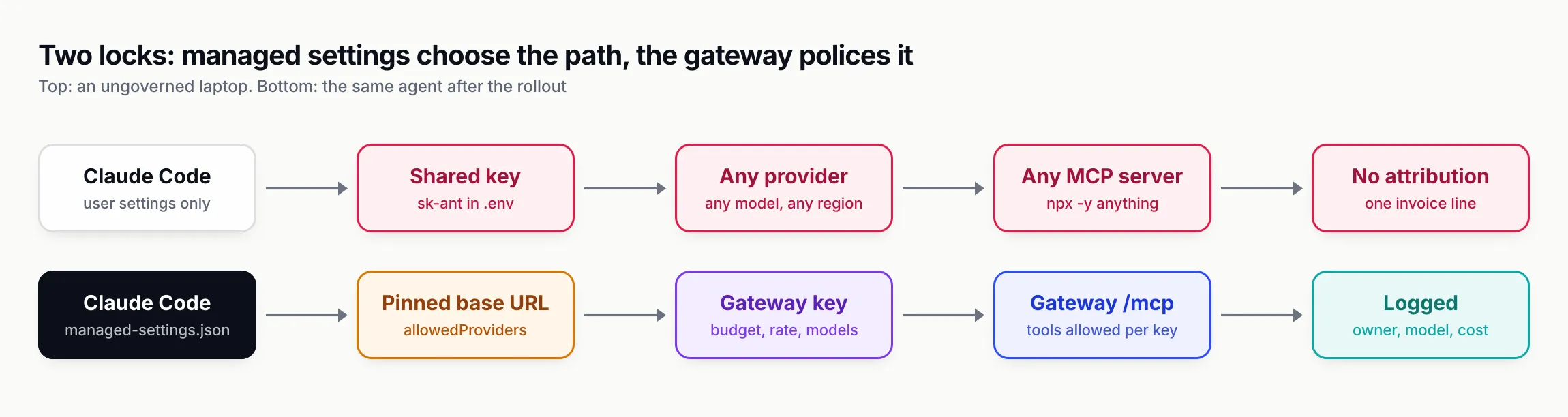
Figure 3: Managed settings decide where the agent may connect; the gateway decides what each developer may do once connected. Either alone leaves a gap.
Phase 4 and 5: pilot, team-by-team rollout and CI with budgets
The pilot
The checklist’s pilot is one team for two weeks: 5 to 15 developers across at least two agents. Each pilot user runs the verification steps (/status, a request visible in the gateway logs under their key, a disallowed model rejected). Review the logs daily for the four failure signatures: 401 (key delivery is broken), 403 (allowlist too narrow), budget rejections, and provider errors on non-native models.
The exit criterion is specific: no unresolved 401 or 403 issues, every pilot request attributed to a person, spend within forecast, and pilot users who would not want to go back. At the end of the pilot, set per-developer budgets around the 90th percentile of observed daily spend rather than a guess.
Team-by-team
Onboard one or two teams a week, with each team lead owning their team budget. Publish a short onboarding page: install the agent, receive the MDM config or run one command, verify with /status, where to ask. Send a weekly spend and adoption report to team leads.
CI usage with budgets
Agents in CI (review bots, test fixers, migration runs) need the same controls with tighter limits. The skill’s rules:
- One key per pipeline or repository, separate from any human key, with a small daily budget, a request rate limit and an
expires_atfor one-off migrations. - Store the key as a CI secret and inject
ANTHROPIC_BASE_URLandANTHROPIC_AUTH_TOKENfor Claude Code’s print mode. - Restrict tools explicitly and never use bypass mode on shared runners.
- Fail the job on a budget rejection rather than retrying in a loop.
# GitHub Actions step (sketch)
- name: Agent review
  env:
    ANTHROPIC_BASE_URL: https://bifrost.internal.example.com/anthropic
    ANTHROPIC_AUTH_TOKEN: ${{ secrets.BIFROST_VK_CI_REVIEW }}
  run: claude -p "Review the diff in this PR for correctness issues" --allowedTools "Read" --max-turns 20 --max-budget-usd 2.00
Anthropic’s print-mode documentation covers --allowedTools, which auto-approves the tools you list. The CLI reference adds two useful caps: --max-turns, which exits with an error at the limit, and --max-budget-usd, which stops the run when estimated spend reaches the amount. Anthropic warns that this is a client-side estimate and that spend can pass it, so treat it as a soft brake and the gateway key’s budget as the hard one. For Codex, the equivalent is codex exec with the same provider config and the key from a CI secret.
Close the bypasses
Phase 6 is the one that gets skipped. Revoke every previously shared provider key at the provider the week the gateway goes live; “temporary” keys never get revoked otherwise. Block direct egress to provider APIs where feasible. Run the audit commands monthly on a sample of machines and treat any raw key or unmanaged MCP server as an incident. Wire key deactivation into your HR or identity-provider offboarding flow.
Logs, adoption metrics and Claude Code cost reporting
You need three data sources, and each answers a different question.
Gateway logs answer “who sent what, when, at what cost”. Bifrost logs every request with virtual key, provider, model, tokens, cost and latency, with the key’s metadata attached, and exposes Prometheus counters such as bifrost_cost_total at /metrics. Content logging can be dropped globally or per key while usage metadata is kept, which suits teams working on regulated code. For dimensions that change per session, Claude Code can send extra headers through ANTHROPIC_CUSTOM_HEADERS, such as x-bf-dim-agent: claude-code, which Bifrost turns into log fields and metric labels.
Claude Code’s own telemetry answers “what are developers doing with it”. With CLAUDE_CODE_ENABLE_TELEMETRY=1 and an OTLP exporter, Claude Code emits metrics including claude_code.session.count, claude_code.cost.usage, claude_code.token.usage (split into input, output, cache read and cache creation), claude_code.lines_of_code.count, claude_code.pull_request.count, claude_code.commit.count and claude_code.active_time.total. Admins can set the exporter variables in managed settings, and Claude Code ignores those variables in a repository’s settings files, so a repo cannot redirect your telemetry. Anthropic’s cost page calls OpenTelemetry the only option that streams per-user token and cost metrics into your own stack in near real time on every setup.
Anthropic’s analytics answer the adoption question for seat customers. The Team and Enterprise dashboard shows lines of code accepted, suggestion accept rate, daily active users and sessions, and, once the Claude GitHub app is connected, PRs and lines shipped with Claude Code assistance. Those contribution figures cover only users in your claude.ai organisation, not Console or cloud-provider traffic, and are not available with Zero Data Retention enabled.
The weekly numbers
The governance skill suggests a small weekly set per team, joined from gateway logs and your version control system:
| Measure | What to track | What it tells you |
|---|---|---|
| Adoption | Distinct active keys per week; sessions per developer | Whether the rollout is used |
| Spend | Cost per active developer; top 10 spenders | Top spenders are usually a misconfigured loop or the wrong default model |
| Model mix | Share of requests per model | Whether routine work runs on cheaper models |
| Quality | PR cycle time, rework and revert rate for agent-assisted PRs versus the Phase 0 baseline | Whether it pays off |
| Friction | Budget-exceeded and model-not-allowed counts | Rising numbers mean limits need adjusting |
Tag agent-assisted PRs with a commit trailer or label so the quality comparison is a join rather than a guess. Report value alongside cost; a cost report on its own invites the wrong conclusion.
Distributing team skills alongside the rollout
Once every developer runs a governed agent, the next request is usually “make the agent follow our conventions”. That is what Agent Skills are for, and it brings its own distribution problem: the same SKILL.md copied into five repos becomes five diverging skills.
The agent-skills-for-teams skill covers that side. Its core rules: one canonical source per skill, a metadata.version in SemVer with a changelog, releases from tags rather than main, a review gate (CODEOWNERS on the skills directory, no curl | sh, no secrets), and installation through the skills CLI rather than hand-copying into each agent’s directory. It bundles a linter, scripts/lint_skills.py, that checks the Agent Skills specification rules, weak descriptions, oversized bodies, missing versions and drift between copies, and exits non-zero on errors so it can gate CI.
The skills CLI puts one canonical copy and links it into each agent:
npx skills add your-org/team-skills --list
npx skills add your-org/team-skills --skill db-migrations -a claude-code codex cursor -y
npx skills update db-migrations
For organisations that want a central registry with immutable versions and one-step rollback, the same skill documents Bifrost’s Skills Repository, which can serve skills to Claude Code and Codex as a plugin marketplace from the gateway you already run. On the managed-settings side, Claude Code’s strictKnownMarketplaces restricts which marketplaces developers can install plugins from, which is how you keep the governed rollout governed once plugins arrive.
How we tested
On 28 October 2026 we installed both skills into an empty git repository in a scratch directory with skills CLI 1.7.4, telemetry disabled (DISABLE_TELEMETRY=1 DO_NOT_TRACK=1), on macOS with Claude Code 2.1.312 present on the machine.
npx -y skills add build-with-ai-hq/ai-coding-agent-governance -a claude-code -ycloned the repository, found one skill and copied it into.claude/skills/ai-coding-agent-governance/:SKILL.md,README.md,LICENSE,assets/and areferences/folder holdingrollout-checklist.md,per-tool-setup.mdandvirtual-keys-per-developer.md. The CLI closed with “Review skills before use; they run with full agent permissions.”npx -y skills add build-with-ai-hq/agent-skills-for-teams -a claude-code codex cursor -yplaced the canonical copy in.agents/skills/agent-skills-for-teams/, reported Codex and Cursor as reading that universal directory, and created.claude/skills/agent-skills-for-teamsas a symlink to it for Claude Code. Both were recorded in askills-lock.jsonwith source and content hash, andnpx skills listshowed both under Project Skills.- We ran the bundled linter over the installed set:
python3 .agents/skills/agent-skills-for-teams/scripts/lint_skills.py .claude/skills .agents/skills. It scanned both skills, reported zero errors and exited 0. - We ran the governance skill’s managed-policy check on the test machine. Neither
/Library/Application Support/ClaudeCode/nor/etc/claude-code/existed, which is the “no managed settings” baseline the skill tells you to record.
We did not stand up a production gateway, provision real keys, or run a Claude Code session with the skill loaded for this article. The gateway, managed-settings and MCP behaviour described above comes from the vendors’ documentation, cited inline.
What the skills do and do not cover
The governance skill is a planning and configuration aid. It gives your agent the audit commands, the phased checklist with owners and exit criteria, exact per-agent configuration and key-provisioning scripts. It does not deploy anything by itself, it does not sign provider contracts or decide your content-logging policy, and it cannot reach agents you have not routed through the gateway. Its examples use Bifrost’s API; the managed-settings and MCP allowlist guidance applies to any gateway.
At company scale, identity integration matters. The skill notes that Bifrost’s enterprise tier adds SSO and SCIM user provisioning, role-based access control, audit logs and Bifrost Edge for rolling governance out to every machine through MDM; the open-source gateway covers virtual keys, budgets, model and MCP allowlists and request logs.
The teams skill covers authoring, versioning, review and distribution of skills. It does not write your team’s skills for you, and its trigger-rate testing is a method you run, not a hosted service.
Claude Code best practices for a governed rollout
If you are starting this week, do these in order:
- Install the skill and run the audit.
npx skills add build-with-ai-hq/ai-coding-agent-governance, then ask your agent to run the quick diagnosis on a few machines and summarise shared keys, agent configs and MCP servers. - Decide the billing shape. Seats, per-token through a gateway, or seats plus gateway headers. Write it into the one-page policy with providers, regions, budgets and logging.
- Stand up the gateway and test it with
curlbefore configuring a single agent:200for an allowed model,403for a disallowed one. - Provision keys from a roster with a daily budget, a monthly budget and a rate limit, metadata for owner and cost centre, delivered through
apiKeyHelper. - Ship
managed-settings.jsonwithallowedProviders, a pinned base URL,availableModels, bypass mode disabled, secret-file deny rules and a URL-based MCP allowlist. Verify with/statusand by trying to break it. - Pilot for two weeks, then tune budgets to the 90th percentile of real daily spend.
- Revoke the shared keys. The rollout is not finished until the old path is closed.
The organisations that struggle with coding agents are rarely the ones that chose the wrong model. They are the ones that never decided who may spend what, through which path, and so ended up with dozens of uncontrolled paths. The controls above are not exotic; they are documented, versioned settings. The work is applying them in order and refusing to widen the rollout until each phase’s exit criterion is met.
Sources
- Set up Claude Code for your organization Anthropic
- Deploy managed settings Anthropic
- Settings files and precedence Anthropic
- Settings reference: allowedProviders Anthropic
- Control MCP server access for your organization Anthropic
- Other LLM gateways (Claude Code) Anthropic
- Manage costs effectively Anthropic
- Monitoring usage with OpenTelemetry Anthropic
- Track team usage with analytics Anthropic
- Run Claude Code programmatically Anthropic
- Claude Code on Amazon Bedrock Anthropic
- Advanced configuration, custom model providers (Codex) OpenAI
- API keys (Cursor) Cursor
- Using your own LLM models in GitHub Copilot CLI GitHub
- Bifrost with Claude Code Maxim AI
- Bifrost virtual keys Maxim AI
- Bifrost budget and limits Maxim AI
- Bifrost MCP tool filtering Maxim AI
- ai-coding-agent-governance (Agent Skill) build-with-ai-hq
- agent-skills-for-teams (Agent Skill) build-with-ai-hq
- skills CLI README Vercel Labs
- Agent Skills specification agentskills.io
Frequently asked questions
Does Claude Enterprise include Claude Code?
Yes. Anthropic's admin guide lists Claude for Teams and Enterprise as the default way to give an organisation Claude Code, with usage drawn from each member's seat allowance. Plan prices and seat tiers are covered in our Claude Code pricing explainer; this guide covers the controls around the rollout.
What is managed-settings.json in Claude Code?
It is the organisation policy file Claude Code reads from /Library/Application Support/ClaudeCode/ on macOS, /etc/claude-code/ on Linux and WSL, and C:\Program Files\ClaudeCode\ on Windows. Keys in it override user, project, local and --settings values. The same policy can also arrive as a macOS plist, a Windows HKLM registry value or server-managed settings from the claude.ai admin console.
How do I set per-developer budgets for Claude Code?
Seat plans let admins set spend limits for usage credits at organisation, group or member level. For per-token billing, put a gateway in front of Claude Code and issue each developer their own key with a daily and a monthly budget plus a request rate limit, so a runaway loop stops at the daily cap rather than eating the month.
Can Claude Code use Amazon Bedrock or Vertex for data residency?
Yes. Claude Code supports Bedrock and Google Cloud's Agent Platform (formerly Vertex AI) natively, and a gateway can map its sonnet, opus and haiku aliases to regional Bedrock or Vertex deployments. If you route through a gateway, do not also set CLAUDE_CODE_USE_BEDROCK or CLAUDE_CODE_USE_VERTEX, because those send traffic straight to the cloud provider.
How do I restrict which MCP servers developers can use in Claude Code?
Set allowedMcpServers with serverUrl or serverCommand entries and allowManagedMcpServersOnly true in managed settings, or deploy a managed-mcp.json for a fixed set. Do not rely on serverName entries: Anthropic's documentation says the name is a user-chosen label and not a security control.
How do teams measure Claude Code adoption and cost?
Team and Enterprise plans include an analytics dashboard with daily active users, sessions and contribution metrics. Claude Code can also export OpenTelemetry metrics such as claude_code.cost.usage and claude_code.token.usage, and a gateway logs every request with the developer's key, model, tokens and cost.
What is the best way to roll out Claude Code to a team?
Baseline first, then policy, gateway, per-developer keys, managed settings, a two-week pilot with 5 to 15 developers, team-by-team onboarding, and finally revoking shared provider keys. The ai-coding-agent-governance skill packages that sequence with exit criteria for each phase.