Bifrost's Warp puts a plain-language analyst inside the AI gateway
Bifrost v2.3.0 adds Warp, a dashboard assistant that answers questions about gateway logs, spend and latency, plus semantic log search, both scoped to what the person asking may see.
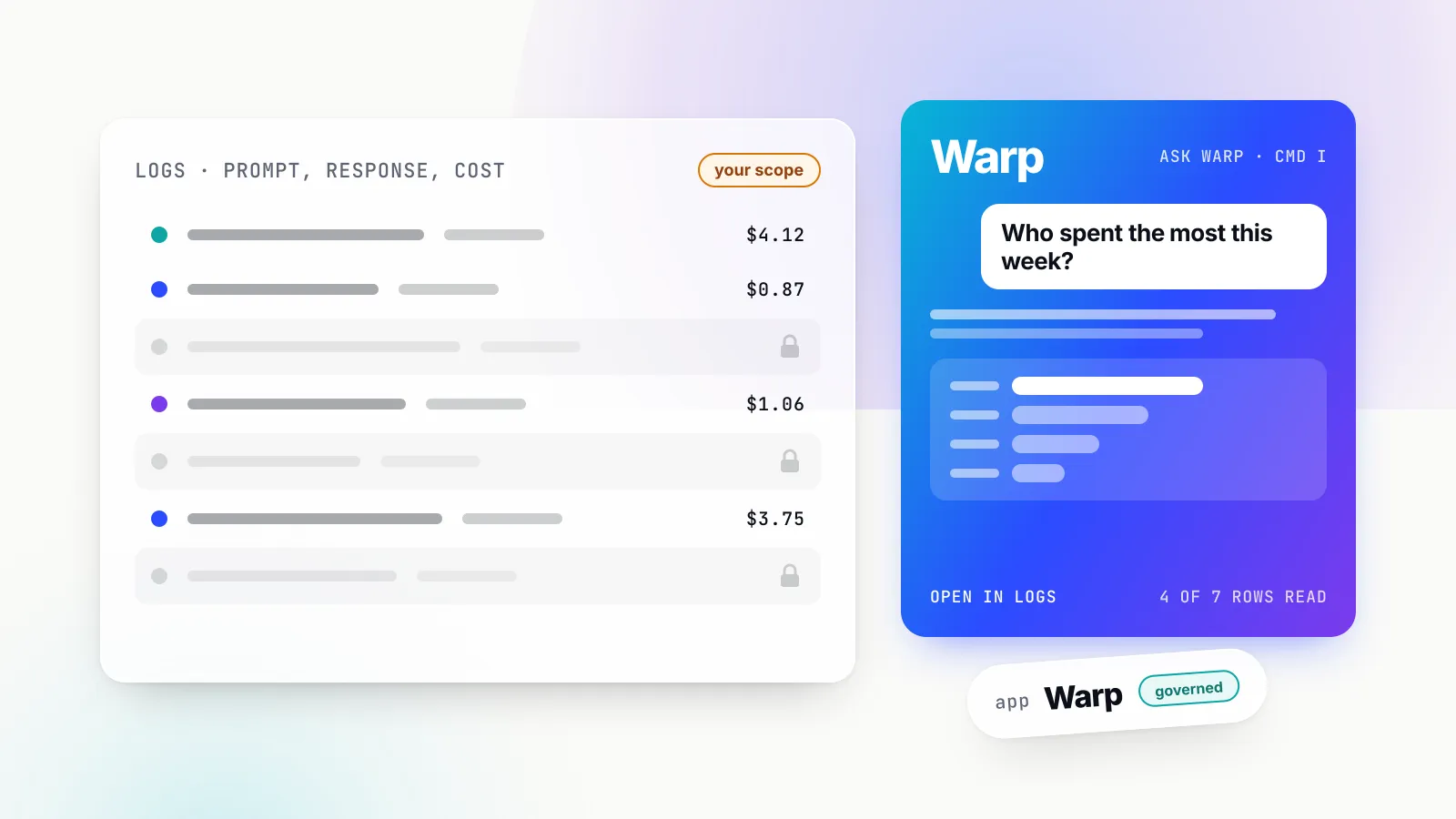
Maxim AI’s open-source gateway Bifrost has added Warp, an AI assistant that sits inside the gateway’s own dashboard and answers questions about the traffic passing through it. Warp shipped in Bifrost v2.3.0 on 13 October 2026, alongside Warp Semantic Log Search, which lets the assistant find past conversations by what they were about rather than by exact field values. The release notes describe Warp as “a new in-dashboard agent that answers questions about the deployment’s logs, spend, latency and governance in plain language.”
The pitch is simple and the timing is not accidental. An AI gateway already records every prompt, response, token count, cost and latency figure for the models an organisation uses. Until now, getting an answer out of that record meant filtering a logs table or exporting it to something else. Warp lets an operator, a finance lead or a team manager type “Who are my top 5 users by cost this week?” and get a number, a chart and a link to the rows behind it.
The design choice that matters most is the one least visible in a demo. Warp only reads what the person asking is allowed to see, and its own model calls are logged, priced and governed like any other application’s. For platform teams who have spent the last year putting budgets and access rules around AI traffic, that is the difference between a useful assistant and a new way to leak data.
What shipped in v2.3.0
The v2.3.0 changelog lists two Warp entries, plus supporting changes to the dashboard, the database schema and background job handling.
Warp AI Assistant. Warp (the changelog notes it was formerly called Odin) is opened from an Ask Warp button in the dashboard’s top bar or with Cmd I (Ctrl I on Windows and Linux). On wide screens it opens as a resizable panel docked on the right; on narrow screens it takes the full width. The usage section of the docs suggests starting questions such as “What did I spend on each provider in the last 7 days?” and “Which model had the worst p99 latency yesterday?”.
While it works, the panel shows each tool Warp calls and how long that call took. It asks multiple-choice clarifying questions when a request is ambiguous, draws inline line or bar charts, and builds links that open the Logs page with matching filters applied. The docs say Warp “only shows links built from queries it actually ran”, which is a small but deliberate guard against an assistant inventing a plausible-looking filter. Relative dates such as “today” and “yesterday” are resolved in the asker’s time zone, and questions can filter by agent name and by the x-bf-agent-correlation-id header Bifrost uses to stitch agent traffic together.
Warp Semantic Log Search. The second entry says completed LLM logs “can be embedded into a vector store so Warp’s semantic_search_logs finds conversations by meaning.” New logs are indexed as they are written; older logs are added by a resumable, concurrent background backfill exposed at /api/warp/log-index/backfill.
Around those two features, v2.3.0 also adds a Background Jobs panel that lists long-running work such as “Warp log indexing” with progress and a cancel button, makes Warp follow the dashboard’s role-based access control, and serves Warp to signed-in users who have no access profile. Warp is gated by a warp feature flag that is on by default in the open-source build and off by default in Enterprise.
The follow-up releases, v2.3.1 on 19 October and v2.3.2 on 20 October, carry no Warp-specific entries. One v2.3.1 change does widen what the logs hold: with content logging on, passthrough calls to provider-native routes “are parsed into the same fields as typed requests”, so they render as conversations in the log view rather than raw bodies.
Why the gateway is the natural place to ask
A gateway’s log is unusually complete. Bifrost’s built-in observability records input messages, model parameters, provider and model, output messages, tool calls, token usage, latency and cost for each request, with retries, fallbacks and key selection attached. Other gateways keep a similar record: Cloudflare’s AI Gateway documentation says “each log can include the prompt, response, provider, timestamp, status, token usage, cost, duration, and user agent.”
That record answers most of the questions that keep coming up once AI usage spreads across an organisation. Which team blew through its budget? Which model got slower after a provider change? Why did one customer’s requests start failing at 3am? Which conversations touched a particular product or complaint? The data to answer each of these already exists in the gateway. The friction has been in getting it out.
The cost of forensics by hand
Anyone who has run an incident review or a month-end cost reconciliation on LLM traffic knows the routine. Open the logs table. Filter by time window. Filter by virtual key. Realise the question is really about a team, not a key. Export to a spreadsheet. Pivot by model. Cross-check against provider invoices. Then someone asks a follow-up and the exercise starts again.
Structured filters are good at questions their designers anticipated. They are poor at “show me the conversations where users were confused about refunds”, because no column says “refund confusion”. That kind of question has historically meant either reading samples by hand or building a separate pipeline that copies logs into an analytics or search system, with its own access rules and its own cost.
Two things make the manual route more expensive with AI traffic than with ordinary application logs. The rows are large, because each one carries a full prompt and response. And the people asking are not only engineers: finance wants spend by department, security wants to know who sent what to which model, and product teams want to know what users are asking about. Each audience has a different permission boundary.
The industry has already moved to conversational querying
Warp arrives as the major observability vendors converge on the same interface. Grafana Labs documents Grafana Assistant as a way to “ask questions in plain English and get visualizations and insights without learning query syntax”, generating PromQL, LogQL and TraceQL behind the scenes; it is a paid feature with usage limits based on active users and message volume. Datadog’s Bits Chat, per its documentation, “helps you search and act across Datadog using natural language”, including generating DDSQL queries.
Microsoft has gone furthest in Azure Monitor. Its Observability Agent lets users “ask natural-language questions about logs, metrics, and related telemetry”, runs Kusto queries on their behalf, and can be escalated into a deeper investigation saved as an issue. The page also notes current limits: conversations cannot continue beyond 24 hours and the agent supports English only.
What these products have in common is that the assistant lives next to the data, not in a separate chat tool, and that each vendor has had to answer the same question about permissions. Datadog’s answer is explicit: Bits Chat “uses your Datadog role to fetch data, so it can only access the resources you have permission to view or modify.” Microsoft’s Copilot documentation makes the same promise for Microsoft 365 data, saying Copilot “only surfaces organizational data to which individual users have at least view permissions.”
Warp applies that pattern to the AI gateway, a data source the general observability platforms see only if logs are exported to them.
How Warp answers a question
The mechanism is a tool-calling agent loop with three constraints that shape everything else: a fixed, read-only toolset; a model chosen by an administrator and governed by the gateway; and a scope tied to the asker’s identity.
A fixed set of read-only tools
The docs list thirteen tools Warp can call, and nothing else:
| Tool | What it returns |
|---|---|
query_logs | Matching log rows: provider, model, status, latency, tokens, cost, virtual key, user, error |
count_logs | Counts and summaries without fetching rows |
get_log_detail | One log with a longer content preview |
get_request_trace | One request’s path: retries, fallbacks, guardrail and cache decisions, latency breakdown |
query_metrics | Totals and time series for requests, cost, tokens, latency percentiles, throughput |
query_usage_by | A dimension ranked by cost, requests or tokens, with trend against the previous period |
query_model_performance | Models ranked by usage and spend, latency and throughput across providers |
semantic_search_logs | Conversations found by meaning, when the log index is set up |
render_chart | A line or bar chart from a server-side query, up to 6 per answer |
describe_filter_space | Who is asking and real values for each filter |
describe_virtual_key | A virtual key’s budget, rate limit, allowed providers and models |
describe_user_limits | A person’s budgets and rate limits with current usage (Enterprise) |
ask_user | A multiple-choice clarifying question |
The documentation is direct about the boundary: “Warp has no tool that changes configuration, sends requests to providers on your behalf, or reads data outside the logs store and governance settings.” In practical terms, a prompt injection buried in a logged conversation cannot get Warp to rotate a key or raise a budget, because no tool exists that would do it.
The tool design also explains why Warp’s answers should be checkable. Charts are drawn from queries that run on the server rather than from numbers the model writes out, and every chart has an Open in Logs link to the underlying rows. When Warp runs out of tool-call rounds before it finishes, it answers with what it found and marks the answer as partial, rather than guessing to fill the gap.
A model the administrator picks, governed like any other app
Warp does not ship with a model. An administrator configures one in Settings > Warp or with PUT /api/warp/config. The settings reference covers:
- Default model: a provider, model and optionally a pinned API key. The docs suggest pinning a key “to keep Warp’s spend separate from tenant traffic”; leaving it on “Any key” load-balances across the provider’s keys. Warp stores a reference to the key, never the secret.
- Additional models: up to 20 more that users can switch between in the chat panel. Users can switch among them but cannot add to the list.
- Behaviour:
max_iterations(2 to 20 tool-call rounds, default 8),request_timeout_seconds(default 120),temperature(0 to 2),reasoning_effort(fromnonetomax) andsystem_prompt_suffix, extra instructions such as naming conventions or an internal cost model that are appended to Warp’s built-in prompt but cannot replace it. - Retention: chat history kept for 30 days after the last turn by default.
The more interesting part is what happens when Warp calls that model. According to the cost and governance section, Warp’s calls “go through the full Bifrost pipeline, so they appear on the Logs page with the app name Warp and the user agent bifrost-warp/1.” Calls in one conversation share a session ID equal to the conversation ID. MCP tools are never attached to them.
Because the calls go through governance, the asker’s own limits apply. If a budget, rate limit or model restriction covers the person asking, Warp reports that its call was refused and why. Those refusals got their own error codes shortly before release: pull request #8176 split them into budget_exceeded, rate_limited and model_blocked because, as its description puts it, “a user who had access but had spent their budget was told they had no access to Warp’s model.” The dashboard now headlines each case in plain words, such as “You’ve used up your budget.”
This is the governance property that is easy to miss. An assistant that queries spend data while itself spending money off the books would be an awkward thing to put in front of a finance team. Warp’s spend lands in the same ledger it reads from, under its own app name, so “what did Warp cost us this month?” is itself a question Warp can answer.
Scoped to the person asking
The access section states the rule in one line: “Every tool call runs as the person asking.” With Bifrost Enterprise’s row-level access control, “Warp sees exactly the logs that person could see on the Logs page, and semantic search results are filtered the same way.”
That row-level control is Bifrost’s Data Access Control, which sets a scope on each role: own data, team data, business unit data, customer data, or everything. A team lead with permission to view logs sees their team’s requests; an account manager sees everything under their customer. Warp inherits whatever scope the asker’s role carries.
When a question does not say whose traffic it means, Warp picks a default. A signed-in user with restricted access gets their own traffic. An unrestricted caller such as an administrator gets the whole deployment. A caller with no user identity and several teams, customers or business units to choose from gets asked which one. Naming a scope in the question (“for the payments team”) overrides the default, within what the asker may see.
Who can use Warp at all is controlled through two RBAC resources. Warp covers the configuration: View to see the settings page (also required to use the chat), Update to change settings, choose which models are offered and run backfills. WarpSession covers the chat: View to use the panel and see one’s own history, Delete to remove one’s own conversations. Without dashboard authentication, anyone who can open the dashboard can use Warp and every caller counts as the local admin, which is reasonable for a single developer and a clear signal that shared deployments should turn authentication on.
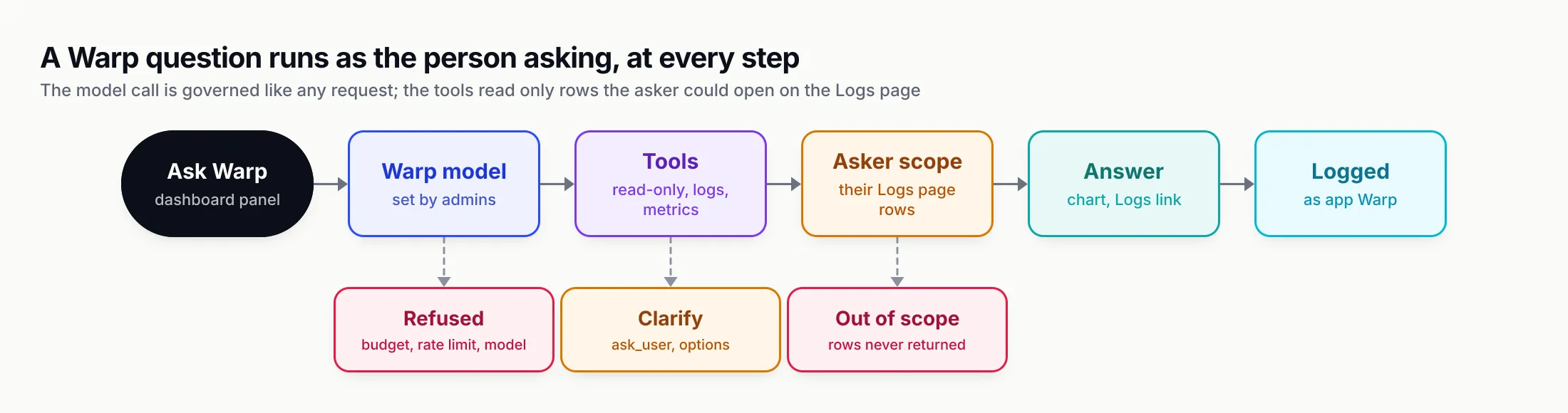
Figure 1: Each step of a Warp answer is bounded by the asker’s identity, from the governed model call to the rows the tools may return.
Semantic log search, and what it costs to build
Structured tools answer “how much” and “how slow”. Semantic search answers “what about”. The indexing section of the docs sets out precisely which logs qualify. A log is embedded when it is a chat completion or Responses API request (streaming or not), it has finished with a success, error or cancelled status, its content was logged, and it is not Warp’s own traffic.
For each qualifying log, Warp embeds the user input and the assistant output, up to 16 KB of text, and stores the vector with filterable metadata: provider, model, status, latency, cost, token counts, app, virtual key, user, team, customer and business unit. That metadata is what lets results be filtered to the asker before the model sees them, and what lets a semantic hit be tied back to cost and ownership.
Live indexing and backfill
Live indexing embeds each new log in the background as it is written. If logs arrive faster than they can be embedded, the queue fills and further logs are dropped from the index with a warning in the server log. They remain in the logs store; they are simply not searchable by meaning until a backfill picks them up.
The backfill covers that gap and everything written before Warp was configured. From the settings page, an administrator picks a date range (the default is the last 7 days) and starts the job. Progress shows indexed, skipped and failed counts and the embedding spend so far, and the job also appears as “Indexing logs for Warp” in the dashboard’s Background jobs tab. A cancelled or interrupted backfill can be resumed or discarded. Only one runs at a time; starting a second returns HTTP 409 with the running job’s status, and a backfill stops itself after 100 consecutive embedding failures.
The same operations are available over the API: POST /api/warp/log-index/backfill with a start and end time, GET .../backfill/status, POST .../backfill/cancel, and GET /api/warp/log-index/status for the index as a whole.
The settings that matter
Four embedding settings are required when Warp is enabled: provider, model, API key (or any key) and dimension, which must match what the model returns, for example 1,536 for text-embedding-3-small. The index lives in a vector store namespace, BifrostWarpLogs by default. Search uses a similarity threshold (default 0.5, on a single 0 to 1 scale across every supported vector store) and returns at most 10 matches by default, configurable from 1 to 25.
Changing the embedding model is handled conservatively. Vectors from different models cannot be compared, so the docs say a change of embedding provider, model or dimension requires a new namespace; Bifrost rejects the save otherwise, and the new namespace starts empty until a backfill fills it. The changelog adds that a finished backfill is hidden once the embedding space changes, so the dashboard does not report progress against an index that no longer applies.
Bifrost’s vector store layer supports Weaviate, Redis and Valkey-compatible stores, Qdrant and Pinecone. Teams already running one for Bifrost’s semantic cache can point Warp at the same infrastructure under a separate namespace. (For background on how that cache works, see our explainer on semantic caching for LLMs.)
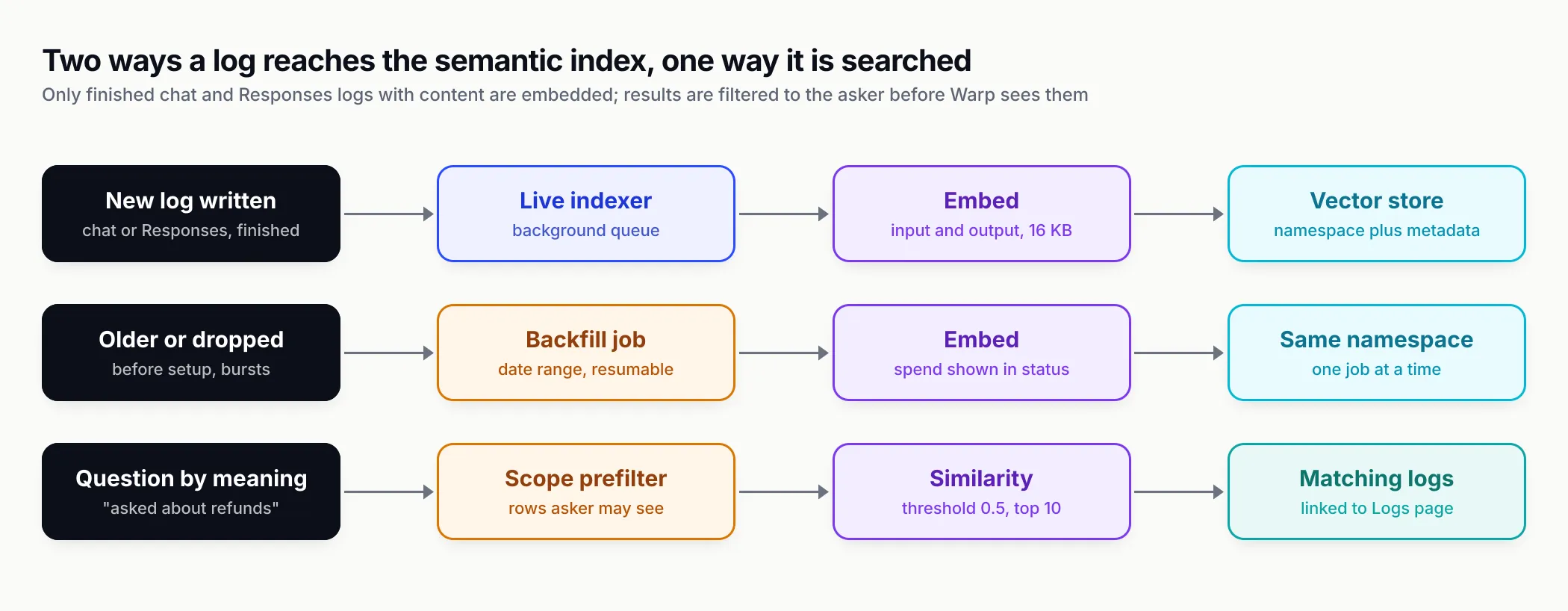
Figure 2: The index has two inputs and one guarded output; permission filtering happens before similarity ranking, not after.
Permission-aware retrieval is the hard part
Semantic search over logs is retrieval-augmented generation pointed at an organisation’s most sensitive AI data: everything employees and customers typed into models. The security community has a name for what goes wrong here. OWASP’s LLM08:2025 entry on vector and embedding weaknesses warns that “inadequate or misaligned access controls can lead to unauthorized access to embeddings containing sensitive information”, flags cross-context leaks in multi-tenant vector stores, and recommends “fine-grained access controls and permission-aware vector and embedding stores.”
Warp’s design lines up with that guidance in three ways. Restricted callers get results prefiltered to rows they can see, so the model never receives an out-of-scope conversation to summarise. Warp’s own requests are never added to the index, so asking about Warp does not pollute search and Warp’s summaries of sensitive conversations do not become new searchable records. And logs with content logging turned off are skipped entirely: Bifrost’s content logging controls can be set globally, per virtual key, per request header and per connector, so a team that never logs content for a sensitive workload never has that workload embedded.
How Warp compares with the observability assistants
Warp is not trying to replace a general observability platform. It answers questions about one data source, the gateway, from inside the product that owns it. The comparison below uses each vendor’s public documentation as of 28 October 2026.
| Bifrost Warp | Grafana Assistant | Datadog Bits Chat | Azure Observability Agent | |
|---|---|---|---|---|
| Data it reads | Gateway logs, metrics, governance settings | Telemetry in connected Grafana data sources | Data across Datadog | Logs, metrics and related telemetry for a resource |
| How it queries | Fixed read-only tools | Generates PromQL, LogQL, TraceQL | Natural language, DDSQL | Runs KQL on the user’s behalf |
| Permission model | Runs as the asker; row-level scope in Enterprise | Not described on the explore page | Uses the user’s Datadog role | Scoped to the launching resource; requires Azure Copilot access |
| Model choice | Admin picks default plus up to 20 others | Vendor-managed | Vendor-managed | Vendor-managed |
| Where it runs | Self-hosted with the gateway | Grafana Cloud | Datadog SaaS | Azure |
| Semantic search over prompts | Yes, vector index of logged conversations | Not documented | Not documented | Not documented |
Two rows stand out. The first is model choice. The general-purpose assistants run on models their vendors select. Warp runs on whatever model the operator has configured in the gateway, which means a team with data-residency rules can point it at a self-hosted or in-region model, and a team watching cost can pick a small model as default with a stronger one available for hard questions.
The second is where the data stays. Because Warp is part of a self-hosted gateway, the logs it reads, the conversations it stores and the vector index it searches all live in the operator’s own stores. The only data that leaves is what goes to the configured agent and embedding models, and those calls themselves pass through the gateway’s governance.
The obvious counterpoint is breadth. A Datadog or Azure assistant can correlate an LLM latency spike with a Kubernetes node failure; Warp only sees the gateway. Teams that already export gateway telemetry into a full observability stack, or into Maxim AI’s AI observability platform for evaluation and tracing of agent behaviour, will still want those tools for cross-system work. Warp’s case is that a large share of day-to-day questions about AI usage never need to leave the gateway. For a wider view of how gateways differ on logging and governance, see our comparison of LLM gateways.
What it looks like in practice
Three scenarios show where Warp’s design choices bite.
A budget alarm on a Friday afternoon
A team’s virtual key hits its monthly budget with a week to go. The team lead, whose role carries team-level data access, opens Warp and asks why. Warp can call describe_virtual_key for the budget and limits, query_usage_by to rank the team’s users or models by cost against the previous period, and query_logs to pull the expensive requests. The answer might show that one internal tool switched to a larger model mid-month. The lead clicks through to the Logs page with filters applied and sees the same rows.
The lead never sees another team’s spend, because the tools run with the lead’s scope. And if the lead’s own Warp usage were blocked by the same exhausted budget, Warp would say so with budget_exceeded rather than a vague access error, which is the case pull request #8176 was written to fix.
A latency regression after a provider change
A platform engineer asks which model had the worst p99 latency yesterday. query_model_performance and query_metrics answer with numbers and a chart. A follow-up about a single slow request uses get_request_trace, which shows retries, fallbacks, guardrail and cache decisions and a latency breakdown for that one call. The engineer can tell whether the time went to the provider, to a fallback chain, or to a guardrail check, without writing a query.
A product question nobody built a column for
A product manager wants to know what customers asked about refunds last month. No field captures that. With the semantic index running, semantic_search_logs finds conversations by meaning, filtered to the customers the manager’s role may see, and returns them with their cost and model metadata. If last month predates Warp’s setup, an administrator runs a backfill over that window first. If the workload has content logging disabled for privacy reasons, there is nothing to search, by design.
Turning it on
The requirements table lists five prerequisites: the warp feature flag, a logs store, a vector store, and providers configured for the agent model and the embedding model (which can be the same provider). Without a logs store the Warp launcher is hidden; without a vector store the Enable Warp switch stays disabled.
The order of operations is:
- Turn on the
warpfeature flag under Settings > Feature Flags, viaPUT /api/feature-flags/warp, or inconfig.jsonunderfeature_flags.flags.warp.enabled. In v2.3.0 the flag is the only Warp setting thatconfig.jsonaccepts; a flag set there is locked in the UI. - In Settings > Warp, choose the default model, optional additional models, behaviour limits and embedding settings, or send them in one
PUT /api/warp/config. The response includes aconfiguredfield that says whether Warp can answer. - Switch on Enable Warp and save.
- Run a backfill over the window you want searchable.
- In Enterprise, grant Warp and WarpSession permissions to the roles that should use it, and check that their data access scopes are what you expect.
For programmatic use, the chat API at POST /api/warp/chat accepts the conversation so far, an optional conversation ID, an optional model override and a time zone, and streams server-sent events: start, delta, tool_call_start, tool_call_end, question, error and done. The done event carries the finish reason (partial when Warp ran out of iterations), the iteration count, token usage and the model used. Chat history is stored in the logs store, belongs to the user who started it, is swept hourly after the retention period, and is capped at 100 conversations per owner.
Enterprise is where the access story is complete. Row-level data access control, the RBAC resources that decide who may chat and who may configure, and the describe_user_limits tool are Enterprise features. The open-source build has Warp on by default and serves everyone who can open the dashboard, which suits a single team; organisations that need per-team visibility will want the Enterprise controls.
The limits of asking logs questions in English
The broader category has limits that no single product removes.
Language models still make mistakes about numbers. Microsoft’s own Copilot documentation warns that generative responses “aren’t guaranteed to be 100% factual”. Warp’s design narrows the gap, since charts come from server-side queries and links come only from queries that actually ran, but a summary sentence is still model output. The habit to build is clicking through to the rows before a number goes into a board deck.
Semantic search is only as good as what was logged. Content-free logs cannot be embedded, logs dropped during a traffic burst need a backfill, and a similarity threshold is a dial, not a guarantee. A threshold set too high misses paraphrases; too low returns noise. The default of 0.5 is a starting point that teams will tune against their own traffic.
Embedding is a data flow in its own right. Indexing sends logged prompts and responses to an embedding model. For most teams that model will be the same provider they already send traffic to, but compliance reviews should treat the log index as a copy of sensitive data, with its own retention and residency questions, as OWASP’s guidance implies.
Permissions are only as good as the org chart behind them. Warp inherits scope from roles, teams, business units and customers. If those are stale, Warp’s answers will faithfully reflect stale permissions. Bifrost’s data access control is built to follow team membership, including membership synced from an identity provider, which helps; it does not replace reviewing who sits where.
What to watch next
Several Warp changes have merged to Bifrost’s main branch since v2.3.2 and are not yet in a tagged release as of 28 October 2026.
Topics and themes. Pull request #8096, merged on 23 October, adds tables that assign each request to a discovered topic, with the log’s ownership columns copied across “so the existing access-scope predicate applies to them unchanged.” Its stated aim is to answer “what was asked this week”, “by which team” and “what did that topic cost”. Pull request #8395, merged the same day, rolls topics up into themes because “a deployment with a hundred topics answers ‘what do people ask about’ with a hundred rows that nobody reads.” That turns semantic search from a lookup into a standing map of what an organisation uses AI for, which is exactly the question governance and product teams keep asking.
Configuration as code. A pull request titled “add config.json support” for Warp merged on 23 October, which would let Warp’s settings be declared in the same file as the rest of a deployment rather than only through the dashboard or API. Helm chart updates for Warp also merged.
The bigger question is whether the gateway becomes the default place organisations ask questions about their AI usage. For teams that route all model traffic through one gateway, as we argued in our explainer on what an AI gateway is, the record is already there. Warp’s bet is that putting a scoped, governed assistant on top of that record answers most of the everyday questions faster than exporting it somewhere else, and does so without widening who can see what. The access model is the part to test first.
Sources
- Warp (feature documentation) Bifrost (Maxim AI)
- Bifrost v2.3.0 changelog, Warp AI Assistant Bifrost (Maxim AI)
- Bifrost v2.3.0 changelog, Warp Semantic Log Search Bifrost (Maxim AI)
- Bifrost v2.3.1 changelog, passthrough logs as conversations Bifrost (Maxim AI)
- Built-in observability Bifrost (Maxim AI)
- Content logging Bifrost (Maxim AI)
- Vector store Bifrost (Maxim AI)
- Role-based access control Bifrost (Maxim AI)
- Data Access Control Bifrost (Maxim AI)
- Pull request #8416: add Warp docs GitHub, maximhq/bifrost
- Pull request #8176: improved Warp error codes GitHub, maximhq/bifrost
- Pull request #8395: group Warp topics into themes GitHub, maximhq/bifrost
- Pull request #8096: Warp topic clustering tables GitHub, maximhq/bifrost
- Use Grafana Assistant to explore telemetry Grafana Labs
- Bits Chat Datadog
- Azure Copilot Observability Agent Microsoft Learn
- Data, privacy and security for Microsoft Copilot Microsoft Learn
- LLM08:2025 Vector and Embedding Weaknesses OWASP Gen AI Security Project
- AI Gateway logging Cloudflare
Frequently asked questions
What is Warp in Bifrost?
Warp is an AI assistant built into the Bifrost gateway dashboard, introduced in Bifrost v2.3.0 on 13 October 2026. It answers questions about a deployment's logs, spend, latency and governance in plain language, using read-only tools such as query_logs, query_metrics and get_request_trace, and can draw charts and link to the matching rows on the Logs page.
Which model does Warp use?
Whichever model an administrator configures. Admins set a default provider and model, optionally pin a specific API key, and can expose up to 20 additional models that users switch between in the chat panel. Temperature, reasoning effort, request timeout and the number of tool-call rounds (2 to 20, default 8) are also set by the admin.
Can Warp see logs a user is not allowed to see?
No, according to Bifrost's documentation. Every tool call runs as the person asking. With Enterprise row-level access control, Warp sees exactly the logs that person could see on the Logs page, and semantic search results are prefiltered the same way. Without authentication, anyone who can open the dashboard can use Warp.
How does Warp semantic log search work?
Finished chat completion and Responses API logs with content logging on are embedded, input and output up to 16 KB of text, into a vector store namespace (BifrostWarpLogs by default) along with metadata such as model, cost, user and team. New logs are indexed live, older ones through a resumable backfill. Searches use a similarity threshold (default 0.5) and return up to 10 matches by default.
Does Warp cost money to run?
Yes, it spends tokens on whichever model it is configured to use, plus embedding calls for semantic search. Warp's chat calls are logged and priced under the app name Warp, so they appear on the Logs page and count against budgets. Embedding calls made while indexing skip the plugin pipeline and their tokens and cost are reported in the backfill status instead.
Can Warp change gateway configuration?
Not in v2.3.0. Bifrost's documentation says Warp has no tool that changes configuration, sends requests to providers on a user's behalf, or reads data outside the logs store and governance settings.
How do I turn Warp on?
Warp needs the warp feature flag (on by default in open source, off by default in Enterprise), a logs store, a vector store and configured providers for the agent and embedding models. Then an administrator fills in Settings, Warp in the dashboard, or calls PUT /api/warp/config, and switches on Enable Warp.